Version 2025-07 is the last API version to support React-based UI components. Later versions use Polaris web components, native UI elements with built-in accessibility, better performance, and consistent styling with Shopify's design system. Check out the upgrade guide to upgrade your extension and avoid being blocked from updating your extension after October 1st 2026.
Order summary
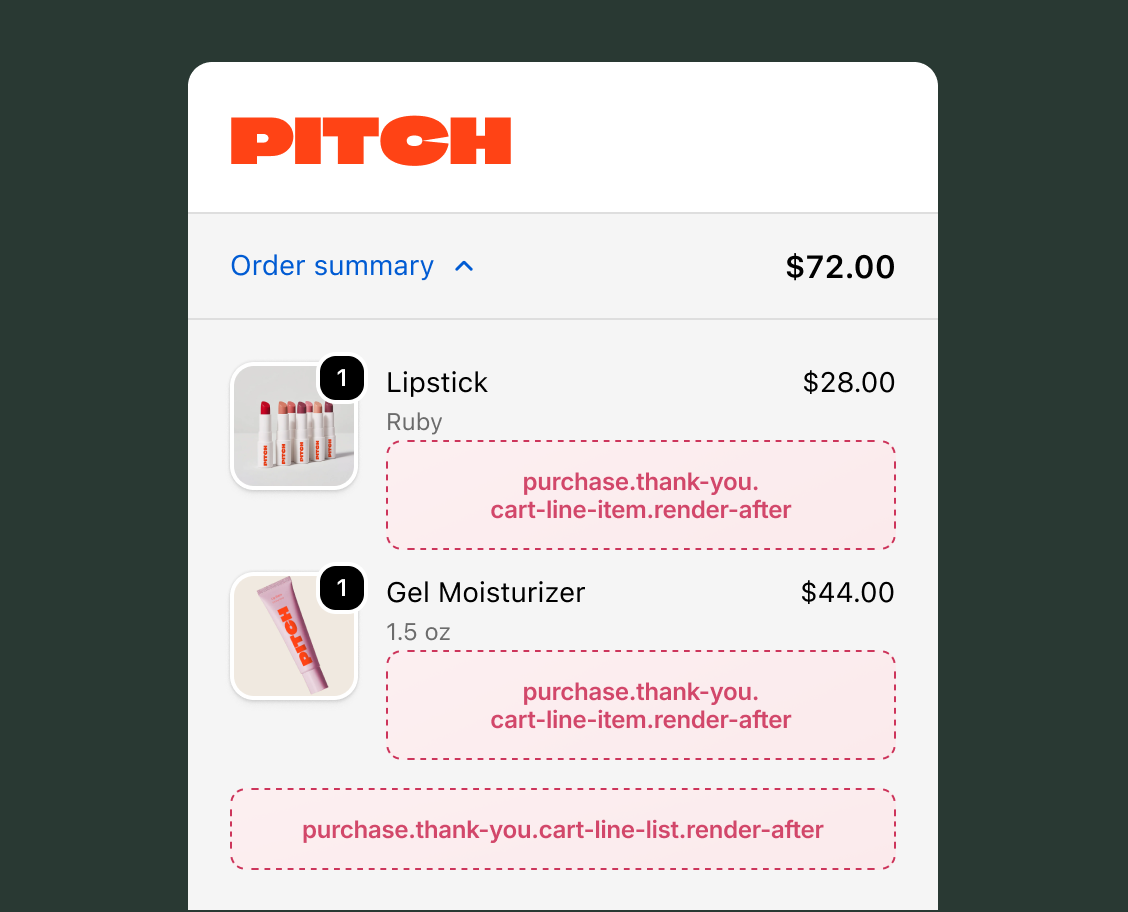
The order summary area on the Thank you page displays the purchased line items and order totals after the buyer completes their order. Extensions in this area help merchants build post-purchase engagement by surfacing product-specific instructions, review prompts, and follow-up actions alongside the order details.
Anchor to Use casesUse cases
- Product-specific post-purchase instructions: Show setup guides, care instructions, or download links for digital products next to each purchased item.
- Per-item review prompts: Invite buyers to leave reviews for individual products, linking directly to the review submission flow.
- Product registration and warranty activation: Prompt buyers to register specific products or activate warranties immediately after purchase.
- Post-purchase surveys: Collect buyer feedback through a compact form after the order summary.
- First-order welcome and onboarding: Display personalized welcome messages for new buyers with loyalty program enrollment or onboarding information.
- Referral program invitations: Generate shareable referral links or codes tied to the completed order for easy sharing.
Anchor to Line item targetsLine item targets
Use these static extension targets to extend the order summary line items area on the Thank you page. These targets support the full checkout component set, including form fields, banners, images, and interactive elements. The examples demonstrate using the OrderConfirmationApi for order data and API properties for reading checkout state.
Anchor to Thank you cart line item ,[object Object]Thank you cart line item target
purchase.thank-you.cart-line-item.render-after
Renders on every line item in the order summary on the Thank you page, inside the details under the line item properties element. This target is instantiated once for each item in the order. To selectively show content for specific items, inspect the cart line data from target and return null for items where your extension doesn't apply.
This target receives the CartLineItemApi, which provides the specific cart line through the target property with access to merchandise details, quantity, cost, attributes, and discount allocations.
The OrderConfirmationApi provides read access to order data, including the order number and whether it's the buyer's first order. Extensions also have read access through API properties to checkout state, including shop information, buyer identity, cost breakdowns, and cart lines. Write access isn't available on Thank you page targets because the order is complete.
Supported components
- Badge
- Banner
- Block
Layout - Block
Spacer - Block
Stack - Button
- Chat
- Checkbox
- Choice
- Choice
List - Clipboard
Item - Consent
Checkbox - Consent
Phone Field - Date
Field - Date
Picker - Disclosure
- Divider
- Drop
Zone - Form
- Grid
- Grid
Item - Heading
- Heading
Group - Icon
- Image
- Inline
Layout - Inline
Spacer - Inline
Stack - Link
- List
- List
Item - Map
- Map
Marker - Map
Popover - Modal
- Payment
Icon - Phone
Field - Popover
- Pressable
- Product
Thumbnail - Progress
- QR code
- Scroll
View - Select
- Sheet
- Skeleton
Image - Skeleton
Text - Skeleton
Text Block - Spinner
- Stepper
- Switch
- Tag
- Text
- Text
Block - Text
Field - Toggle
Button - Toggle
Button Group - Tooltip
- View
Supported components
- Badge
- Banner
- Block
Layout - Block
Spacer - Block
Stack - Button
- Chat
- Checkbox
- Choice
- Choice
List - Clipboard
Item - Consent
Checkbox - Consent
Phone Field - Date
Field - Date
Picker - Disclosure
- Divider
- Drop
Zone - Form
- Grid
- Grid
Item - Heading
- Heading
Group - Icon
- Image
- Inline
Layout - Inline
Spacer - Inline
Stack - Link
- List
- List
Item - Map
- Map
Marker - Map
Popover - Modal
- Payment
Icon - Phone
Field - Popover
- Pressable
- Product
Thumbnail - Progress
- QR code
- Scroll
View - Select
- Sheet
- Skeleton
Image - Skeleton
Text - Skeleton
Text Block - Spinner
- Stepper
- Switch
- Tag
- Text
- Text
Block - Text
Field - Toggle
Button - Toggle
Button Group - Tooltip
- View
Examples
Display a per-item review prompt
Description
Create an extension that shows a review prompt for each purchased item with a link to the review submission page.
React
import {
  reactExtension,
  InlineStack,
  Text,
  Link,
  useCartLineTarget,
  useShop,
} from '@shopify/ui-extensions-react/checkout';

export default reactExtension(
  'purchase.thank-you.cart-line-item.render-after',
  () => <Extension />,
);

function Extension() {
  const line = useCartLineTarget();
  const shop = useShop();
  const title = line.merchandise.title;

  return (
    <InlineStack spacing="base">
      <Text>
        How do you like your {title}?
      </Text>
      <Link
        to={`https://${shop.myshopifyDomain}/reviews`}
      >
        Leave a review
      </Link>
    </InlineStack>
  );
}
TS
import {
  extension,
  InlineStack,
  Text,
  Link,
} from '@shopify/ui-extensions/checkout';

export default extension(
  'purchase.thank-you.cart-line-item.render-after',
  (root, api) => {
    const line = api.target.current;
    const title = line.merchandise.title;
    const domain = api.shop.myshopifyDomain;

    const stack = root.createComponent(
      InlineStack,
      {spacing: 'base'},
    );

    stack.appendChild(
      root.createComponent(
        Text,
        {},
        `How do you like your ${title}?`,
      ),
    );

    stack.appendChild(
      root.createComponent(
        Link,
        {to: `https://${domain}/reviews`},
        'Leave a review',
      ),
    );

    root.appendChild(stack);
  },
);
Anchor to Thank you cart line list ,[object Object]Thank you cart line list target
purchase.thank-you.cart-line-list.render-after
Renders once after all line items in the order summary on the Thank you page. This target appears once per order, unlike the cart line item target, which is instantiated for each item.
The OrderConfirmationApi provides read access to order data, including the order number and whether it's the buyer's first order. Extensions also have read access through API properties to checkout state, including shop information, buyer identity, cost breakdowns, and cart lines. The Storefront API is available through the query method for fetching additional data like product recommendations. Write access isn't available on Thank you page targets because the order is complete.
Supported components
- Badge
- Banner
- Block
Layout - Block
Spacer - Block
Stack - Button
- Chat
- Checkbox
- Choice
- Choice
List - Clipboard
Item - Consent
Checkbox - Consent
Phone Field - Date
Field - Date
Picker - Disclosure
- Divider
- Drop
Zone - Form
- Grid
- Grid
Item - Heading
- Heading
Group - Icon
- Image
- Inline
Layout - Inline
Spacer - Inline
Stack - Link
- List
- List
Item - Map
- Map
Marker - Map
Popover - Modal
- Payment
Icon - Phone
Field - Popover
- Pressable
- Product
Thumbnail - Progress
- QR code
- Scroll
View - Select
- Sheet
- Skeleton
Image - Skeleton
Text - Skeleton
Text Block - Spinner
- Stepper
- Switch
- Tag
- Text
- Text
Block - Text
Field - Toggle
Button - Toggle
Button Group - Tooltip
- View
Supported components
- Badge
- Banner
- Block
Layout - Block
Spacer - Block
Stack - Button
- Chat
- Checkbox
- Choice
- Choice
List - Clipboard
Item - Consent
Checkbox - Consent
Phone Field - Date
Field - Date
Picker - Disclosure
- Divider
- Drop
Zone - Form
- Grid
- Grid
Item - Heading
- Heading
Group - Icon
- Image
- Inline
Layout - Inline
Spacer - Inline
Stack - Link
- List
- List
Item - Map
- Map
Marker - Map
Popover - Modal
- Payment
Icon - Phone
Field - Popover
- Pressable
- Product
Thumbnail - Progress
- QR code
- Scroll
View - Select
- Sheet
- Skeleton
Image - Skeleton
Text - Skeleton
Text Block - Spinner
- Stepper
- Switch
- Tag
- Text
- Text
Block - Text
Field - Toggle
Button - Toggle
Button Group - Tooltip
- View
Examples
Display a post-purchase survey
Description
Create an extension that shows a short feedback survey after the order summary.
React
import {useState} from 'react';
import {
  reactExtension,
  BlockStack,
  Text,
  ChoiceList,
  Choice,
  Button,
  Banner,
  useApi,
} from '@shopify/ui-extensions-react/checkout';

export default reactExtension(
  'purchase.thank-you.cart-line-list.render-after',
  () => <Extension />,
);

function Extension() {
  const [submitted, setSubmitted] =
    useState(false);
  const {orderConfirmation} = useApi();
  const isFirstOrder =
    orderConfirmation.current?.isFirstOrder;

  if (submitted) {
    return (
      <Banner status="success">
        Thanks for your feedback!
      </Banner>
    );
  }

  return (
    <BlockStack spacing="base">
      <Text>
        {isFirstOrder
          ? 'Welcome! How was your first experience?'
          : 'How was your experience?'}
      </Text>
      <ChoiceList
        name="rating"
        value={[]}
      >
        <Choice value="great">Great</Choice>
        <Choice value="ok">OK</Choice>
        <Choice value="bad">
          Needs improvement
        </Choice>
      </ChoiceList>
      <Button onPress={() => setSubmitted(true)}>
        Submit
      </Button>
    </BlockStack>
  );
}
TS
import {
  extension,
  BlockStack,
  Text,
  ChoiceList,
  Choice,
  Button,
  Banner,
} from '@shopify/ui-extensions/checkout';

export default extension(
  'purchase.thank-you.cart-line-list.render-after',
  (root, api) => {
    let submitted = false;
    const isFirstOrder =
      api.orderConfirmation.current?.isFirstOrder;

    const container = root.createFragment();

    function renderUI() {
      container.replaceChildren();

      if (submitted) {
        container.appendChild(
          root.createComponent(
            Banner,
            {status: 'success'},
            'Thanks for your feedback!',
          ),
        );
        root.appendChild(container);
        return;
      }

      const stack = root.createComponent(
        BlockStack,
        {spacing: 'base'},
      );

      stack.appendChild(
        root.createComponent(
          Text,
          {},
          isFirstOrder
            ? 'Welcome! How was your first experience?'
            : 'How was your experience?',
        ),
      );

      const choiceList = root.createComponent(
        ChoiceList,
        {name: 'rating', value: []},
      );
      choiceList.appendChild(
        root.createComponent(
          Choice, {value: 'great'}, 'Great',
        ),
      );
      choiceList.appendChild(
        root.createComponent(
          Choice, {value: 'ok'}, 'OK',
        ),
      );
      choiceList.appendChild(
        root.createComponent(
          Choice, {value: 'bad'},
          'Needs improvement',
        ),
      );
      stack.appendChild(choiceList);

      stack.appendChild(
        root.createComponent(
          Button,
          {
            onPress: () => {
              submitted = true;
              renderUI();
            },
          },
          'Submit',
        ),
      );

      container.appendChild(stack);
    }

    renderUI();
    root.appendChild(container);
  },
);
Anchor to Best practicesBest practices
- Reserve space for dynamic content: The order summary is visible throughout the Thank you page. If you load data asynchronously, use a skeleton paragraph or spinner to hold space while content loads.
- Use the Storage API to track interactions: Record whether a buyer has already submitted a survey or dismissed a prompt so it doesn't resurface on page refresh.
- Check
isFirstOrderfor personalization: UseorderConfirmation.value.isFirstOrderfrom theOrderConfirmationApito differentiate first-time buyers from returning customers and display appropriate messaging. - Keep per-item extensions lightweight: The cart line item target runs once for each item in the order. Avoid heavy network calls for each instance and consider caching data using the Storage API to reduce repeated requests.
- Use the cart line target property directly: In the cart line item target, read
shopify.target.valuefor the specific cart line rather than searching throughshopify.lines. TheCartLineItemApigives you direct access to the attached line item.
Anchor to LimitationsLimitations
- Draft order invoice exclusion: The cart line item target won't render for custom line items belonging to draft order invoices.