Version 2025-07 is the last API version to support React-based UI components. Later versions use Polaris web components, native UI elements with built-in accessibility, better performance, and consistent styling with Shopify's design system. Check out the upgrade guide to upgrade your extension and avoid being blocked from updating your extension after October 1st 2026.
Consent
Use the ConsentCheckbox component for collecting the buyer's approval for a given policy.
Supported targets
- Checkout::Actions::Render
Before - Checkout::Cart
Line Details::Render After - Checkout::Cart
Lines::Render After - Checkout::Contact::Render
After - Checkout::Customer
Information::Render After - Checkout::Delivery
Address::Render Before - Checkout::Dynamic::Render
- Checkout::Pickup
Locations::Render After - Checkout::Pickup
Locations::Render Before - Checkout::Pickup
Points::Render After - Checkout::Pickup
Points::Render Before - Checkout::Reductions::Render
After - Checkout::Reductions::Render
Before - Checkout::Shipping
Method Details::Render After - Checkout::Shipping
Method Details::Render Expanded - Checkout::Shipping
Methods::Render After - Checkout::Shipping
Methods::Render Before - Checkout::Thank
You::Cart Line Details::Render After - Checkout::Thank
You::Cart Lines::Render After - Checkout::Thank
You::Customer Information::Render After - Checkout::Thank
You::Dynamic::Render - purchase.
checkout. actions. render-before - purchase.
checkout. block. render - purchase.
checkout. cart-line-item. render-after - purchase.
checkout. cart-line-list. render-after - purchase.
checkout. contact. render-after - purchase.
checkout. delivery-address. render-after - purchase.
checkout. delivery-address. render-before - purchase.
checkout. footer. render-after - purchase.
checkout. header. render-after - purchase.
checkout. payment-method-list. render-after - purchase.
checkout. payment-method-list. render-before - purchase.
checkout. pickup-location-list. render-after - purchase.
checkout. pickup-location-list. render-before - purchase.
checkout. pickup-location-option-item. render-after - purchase.
checkout. pickup-point-list. render-after - purchase.
checkout. pickup-point-list. render-before - purchase.
checkout. reductions. render-after - purchase.
checkout. reductions. render-before - purchase.
checkout. shipping-option-item. details. render - purchase.
checkout. shipping-option-item. render-after - purchase.
checkout. shipping-option-list. render-after - purchase.
checkout. shipping-option-list. render-before - purchase.
thank-you. announcement. render - purchase.
thank-you. block. render - purchase.
thank-you. cart-line-item. render-after - purchase.
thank-you. cart-line-list. render-after - purchase.
thank-you. customer-information. render-after - purchase.
thank-you. footer. render-after - purchase.
thank-you. header. render-after
Supported targets
- Checkout::Actions::Render
Before - Checkout::Cart
Line Details::Render After - Checkout::Cart
Lines::Render After - Checkout::Contact::Render
After - Checkout::Customer
Information::Render After - Checkout::Delivery
Address::Render Before - Checkout::Dynamic::Render
- Checkout::Pickup
Locations::Render After - Checkout::Pickup
Locations::Render Before - Checkout::Pickup
Points::Render After - Checkout::Pickup
Points::Render Before - Checkout::Reductions::Render
After - Checkout::Reductions::Render
Before - Checkout::Shipping
Method Details::Render After - Checkout::Shipping
Method Details::Render Expanded - Checkout::Shipping
Methods::Render After - Checkout::Shipping
Methods::Render Before - Checkout::Thank
You::Cart Line Details::Render After - Checkout::Thank
You::Cart Lines::Render After - Checkout::Thank
You::Customer Information::Render After - Checkout::Thank
You::Dynamic::Render - purchase.
checkout. actions. render-before - purchase.
checkout. block. render - purchase.
checkout. cart-line-item. render-after - purchase.
checkout. cart-line-list. render-after - purchase.
checkout. contact. render-after - purchase.
checkout. delivery-address. render-after - purchase.
checkout. delivery-address. render-before - purchase.
checkout. footer. render-after - purchase.
checkout. header. render-after - purchase.
checkout. payment-method-list. render-after - purchase.
checkout. payment-method-list. render-before - purchase.
checkout. pickup-location-list. render-after - purchase.
checkout. pickup-location-list. render-before - purchase.
checkout. pickup-location-option-item. render-after - purchase.
checkout. pickup-point-list. render-after - purchase.
checkout. pickup-point-list. render-before - purchase.
checkout. reductions. render-after - purchase.
checkout. reductions. render-before - purchase.
checkout. shipping-option-item. details. render - purchase.
checkout. shipping-option-item. render-after - purchase.
checkout. shipping-option-list. render-after - purchase.
checkout. shipping-option-list. render-before - purchase.
thank-you. announcement. render - purchase.
thank-you. block. render - purchase.
thank-you. cart-line-item. render-after - purchase.
thank-you. cart-line-list. render-after - purchase.
thank-you. customer-information. render-after - purchase.
thank-you. footer. render-after - purchase.
thank-you. header. render-after
Use buyer consent checkboxes for collecting the buyer's approval for a given policy.
- Anchor to policypolicypolicy'sms-marketing''sms-marketing'requiredrequired
The policy for which buyer consent is being collected for.
sms-marketing: Represents the policy for SMS marketing consent.- Anchor to accessibilityLabelaccessibility
Labelaccessibility Label stringstring A label used for buyers using assistive technologies. When set, any
childrensupplied to this component will not be announced to screen reader users.- Anchor to checkedcheckedcheckedbooleanboolean
Whether the checkbox is active.
- Anchor to disableddisableddisabledbooleanboolean
Whether the checkbox can be changed.
- Anchor to errorerrorerrorstringstring
Indicate an error to the user. The field will be given a specific stylistic treatment to communicate problems that have to be resolved immediately.
- Anchor to idididstringstring
A unique identifier for the field. When no
idis set, a globally unique value will be used instead.- Anchor to namenamenamestringstring
An identifier for the field that is unique within the nearest containing
Formcomponent.- Anchor to onChangeon
Changeon Change (value: boolean) => void(value: boolean) => void A callback that is run whenever the checkbox is changed. This callback is called with a boolean indicating whether the checkbox should now be active or inactive. This component is controlled, so you must store this value in state and reflect it back in the
checkedorvalueprops.- Anchor to togglestogglestogglesstringstring
The component's identifier whose visibility will be toggled when this component is actioned.
Anchor to ExamplesExamples
Anchor to Basic ConsentCheckboxBasic Consent
Basic ConsentCheckbox

Basic ConsentCheckbox
React
import {
  reactExtension,
  ConsentCheckbox,
} from '@shopify/ui-extensions-react/checkout';

export default reactExtension(
  'purchase.checkout.block.render',
  () => <Extension />,
);

function Extension() {
  return (
    <ConsentCheckbox policy="sms-marketing">
      Text me with news and offers
    </ConsentCheckbox>
  );
}
JS
import {extension, ConsentCheckbox} from '@shopify/ui-extensions/checkout';

export default extension('purchase.checkout.block.render', (root) => {
  const consentCheckbox = root.createComponent(
    ConsentCheckbox,
    {policy: 'sms-marketing'},
    'Text me with news and promotions',
  );

  root.appendChild(consentCheckbox);
});ConsentCheckbox with ConsentPhoneField
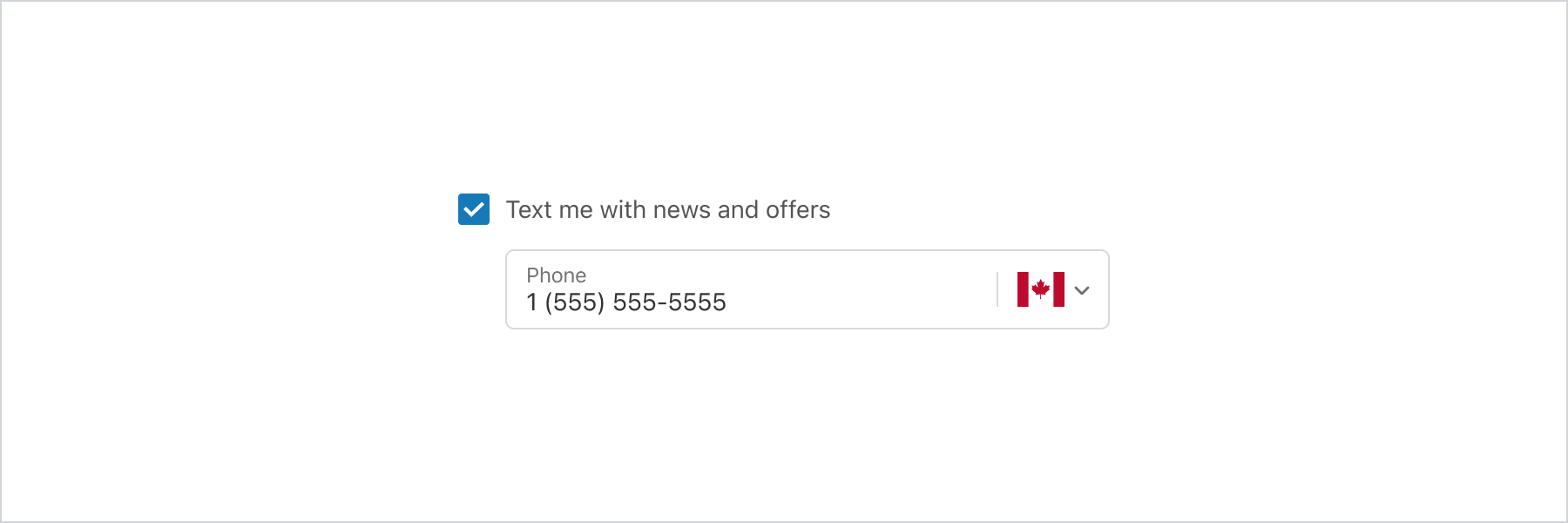
ConsentCheckbox with ConsentPhoneField
React
import {
  reactExtension,
  BlockStack,
  ConsentCheckbox,
  ConsentPhoneField,
  InlineStack,
  InlineSpacer,
} from '@shopify/ui-extensions-react/checkout';

export default reactExtension(
  'purchase.checkout.block.render',
  () => <Extension />,
);

function Extension() {
  return (
    <BlockStack>
      <ConsentCheckbox policy="sms-marketing">
        Text me with news and offers
      </ConsentCheckbox>
      <InlineStack
        inlineAlignment="start"
        padding={[
          'none',
          'none',
          'none',
          'tight',
        ]}
      >
        <InlineSpacer spacing="extraTight" />
        <ConsentPhoneField
          label="Phone"
          policy="sms-marketing"
        />
      </InlineStack>
    </BlockStack>
  );
}
JS
import {
  extension,
  BlockStack,
  ConsentCheckbox,
  ConsentPhoneField,
  InlineStack,
  InlineSpacer,
} from '@shopify/ui-extensions/checkout';

export default extension('purchase.checkout.block.render', (root) => {
  const consentCheckbox = root.createComponent(
    ConsentCheckbox,
    {
      policy: 'sms-marketing',
    },
    'Text me with news and offers',
  );

  const inlineSpacer = root.createComponent(InlineSpacer, {
    spacing: 'extraTight',
  });

  const consentPhoneField = root.createComponent(ConsentPhoneField, {
    label: 'Phone',
    policy: 'sms-marketing',
  });

  const inlineStack = root.createComponent(
    InlineStack,
    {
      inlineAlignment: 'start',
      padding: ['none', 'none', 'none', 'tight'],
    },
    [inlineSpacer, consentPhoneField],
  );

  const layout = root.createComponent(BlockStack, undefined, [
    consentCheckbox,
    inlineStack,
  ]);

  root.appendChild(layout);
});
Anchor to Best practicesBest practices
- Write transparent labels: Clearly describe what the buyer is agreeing to receive, including the type and frequency of messages.
- Use supported policies: For SMS marketing, set
policytosms-marketingso that Shopify can track consent automatically. - Respect opt-in preferences: Use default checked state when opt-out is the norm. Leave it unchecked when explicit opt-in is required by regulation.
Anchor to LimitationsLimitations
- Only the
sms-marketingpolicy is currently supported. Other policy types aren't available.

