Version 2025-07 is the last API version to support React-based UI components. Later versions use Polaris web components, native UI elements with built-in accessibility, better performance, and consistent styling with Shopify's design system. Check out the upgrade guide to upgrade your extension and avoid being blocked from updating your extension after October 1st 2026.
Skeleton
SkeletonText is used to provide a low fidelity representation of text content before it appears on the page.
Optionally you can use any text content inside a SkeletonText component as a base for the rendered skeleton
Supported targets
- Checkout::Actions::Render
Before - Checkout::Cart
Line Details::Render After - Checkout::Cart
Lines::Render After - Checkout::Contact::Render
After - Checkout::Customer
Information::Render After - Checkout::Delivery
Address::Render Before - Checkout::Dynamic::Render
- Checkout::Pickup
Locations::Render After - Checkout::Pickup
Locations::Render Before - Checkout::Pickup
Points::Render After - Checkout::Pickup
Points::Render Before - Checkout::Reductions::Render
After - Checkout::Reductions::Render
Before - Checkout::Shipping
Method Details::Render After - Checkout::Shipping
Method Details::Render Expanded - Checkout::Shipping
Methods::Render After - Checkout::Shipping
Methods::Render Before - Checkout::Thank
You::Cart Line Details::Render After - Checkout::Thank
You::Cart Lines::Render After - Checkout::Thank
You::Customer Information::Render After - Checkout::Thank
You::Dynamic::Render - purchase.
checkout. actions. render-before - purchase.
checkout. block. render - purchase.
checkout. cart-line-item. render-after - purchase.
checkout. cart-line-list. render-after - purchase.
checkout. contact. render-after - purchase.
checkout. delivery-address. render-after - purchase.
checkout. delivery-address. render-before - purchase.
checkout. footer. render-after - purchase.
checkout. header. render-after - purchase.
checkout. payment-method-list. render-after - purchase.
checkout. payment-method-list. render-before - purchase.
checkout. pickup-location-list. render-after - purchase.
checkout. pickup-location-list. render-before - purchase.
checkout. pickup-location-option-item. render-after - purchase.
checkout. pickup-point-list. render-after - purchase.
checkout. pickup-point-list. render-before - purchase.
checkout. reductions. render-after - purchase.
checkout. reductions. render-before - purchase.
checkout. shipping-option-item. details. render - purchase.
checkout. shipping-option-item. render-after - purchase.
checkout. shipping-option-list. render-after - purchase.
checkout. shipping-option-list. render-before - purchase.
thank-you. announcement. render - purchase.
thank-you. block. render - purchase.
thank-you. cart-line-item. render-after - purchase.
thank-you. cart-line-list. render-after - purchase.
thank-you. customer-information. render-after - purchase.
thank-you. footer. render-after - purchase.
thank-you. header. render-after
Supported targets
- Checkout::Actions::Render
Before - Checkout::Cart
Line Details::Render After - Checkout::Cart
Lines::Render After - Checkout::Contact::Render
After - Checkout::Customer
Information::Render After - Checkout::Delivery
Address::Render Before - Checkout::Dynamic::Render
- Checkout::Pickup
Locations::Render After - Checkout::Pickup
Locations::Render Before - Checkout::Pickup
Points::Render After - Checkout::Pickup
Points::Render Before - Checkout::Reductions::Render
After - Checkout::Reductions::Render
Before - Checkout::Shipping
Method Details::Render After - Checkout::Shipping
Method Details::Render Expanded - Checkout::Shipping
Methods::Render After - Checkout::Shipping
Methods::Render Before - Checkout::Thank
You::Cart Line Details::Render After - Checkout::Thank
You::Cart Lines::Render After - Checkout::Thank
You::Customer Information::Render After - Checkout::Thank
You::Dynamic::Render - purchase.
checkout. actions. render-before - purchase.
checkout. block. render - purchase.
checkout. cart-line-item. render-after - purchase.
checkout. cart-line-list. render-after - purchase.
checkout. contact. render-after - purchase.
checkout. delivery-address. render-after - purchase.
checkout. delivery-address. render-before - purchase.
checkout. footer. render-after - purchase.
checkout. header. render-after - purchase.
checkout. payment-method-list. render-after - purchase.
checkout. payment-method-list. render-before - purchase.
checkout. pickup-location-list. render-after - purchase.
checkout. pickup-location-list. render-before - purchase.
checkout. pickup-location-option-item. render-after - purchase.
checkout. pickup-point-list. render-after - purchase.
checkout. pickup-point-list. render-before - purchase.
checkout. reductions. render-after - purchase.
checkout. reductions. render-before - purchase.
checkout. shipping-option-item. details. render - purchase.
checkout. shipping-option-item. render-after - purchase.
checkout. shipping-option-list. render-after - purchase.
checkout. shipping-option-list. render-before - purchase.
thank-you. announcement. render - purchase.
thank-you. block. render - purchase.
thank-you. cart-line-item. render-after - purchase.
thank-you. cart-line-list. render-after - purchase.
thank-you. customer-information. render-after - purchase.
thank-you. footer. render-after - purchase.
thank-you. header. render-after
SkeletonText is used to provide a low fidelity representation of text content before it appears on the page.
Optionally you can use any text content inside to be used as a base for the rendered skeleton
- Anchor to idididstringstring
A unique identifier for the component.
- Anchor to inlineSizeinline
Sizeinline Size 'small' | 'large' | 'base''small' | 'large' | 'base' Adjust the length of the text when no children are passed.
- Anchor to sizesizesizeTextSizeTextSize
Size of the text the skeleton replaces.
TextSize
Extract<Size, 'extraSmall' | 'small' | 'base' | 'large' | 'extraLarge'> | 'medium'Size
A keyword that maps to a predefined size from the design system's size scale. Components use a subset of these values depending on which sizes they support. - `extraSmall`: The smallest available size. - `small`: A compact size, smaller than the default. - `base`: The default size, appropriate for most contexts. - `large`: A larger size for increased visual prominence. - `extraLarge`: The largest available keyword size. - `fill`: Stretches to fill the available space in the container.
'extraSmall' | 'small' | 'base' | 'large' | 'extraLarge' | 'fill'Anchor to ExamplesExamples
Anchor to Basic SkeletonTextBasic Skeleton
Basic SkeletonText

Basic SkeletonText
React
import {
  reactExtension,
  SkeletonText,
} from '@shopify/ui-extensions-react/checkout';

export default reactExtension(
  'purchase.checkout.block.render',
  () => <Extension />,
);

function Extension() {
  return <SkeletonText />;
}
JS
import {extension, SkeletonText} from '@shopify/ui-extensions/checkout';

export default extension('purchase.checkout.block.render', (root) => {
  const skeletonText = root.createComponent(SkeletonText);

  root.appendChild(skeletonText);
});
Anchor to Using skeleton loaders to prevent layout shifts on content load.Using skeleton loaders to prevent layout shifts on content load.
When adding content to a layout, incorporate a skeleton loader that renders the approximate size and position of the content during loading. This will provide a seamless transition from skeleton loaders to the content, and prevent any layout shift when the resulting content loads.
Using skeleton loaders to prevent layout shifts on content load.
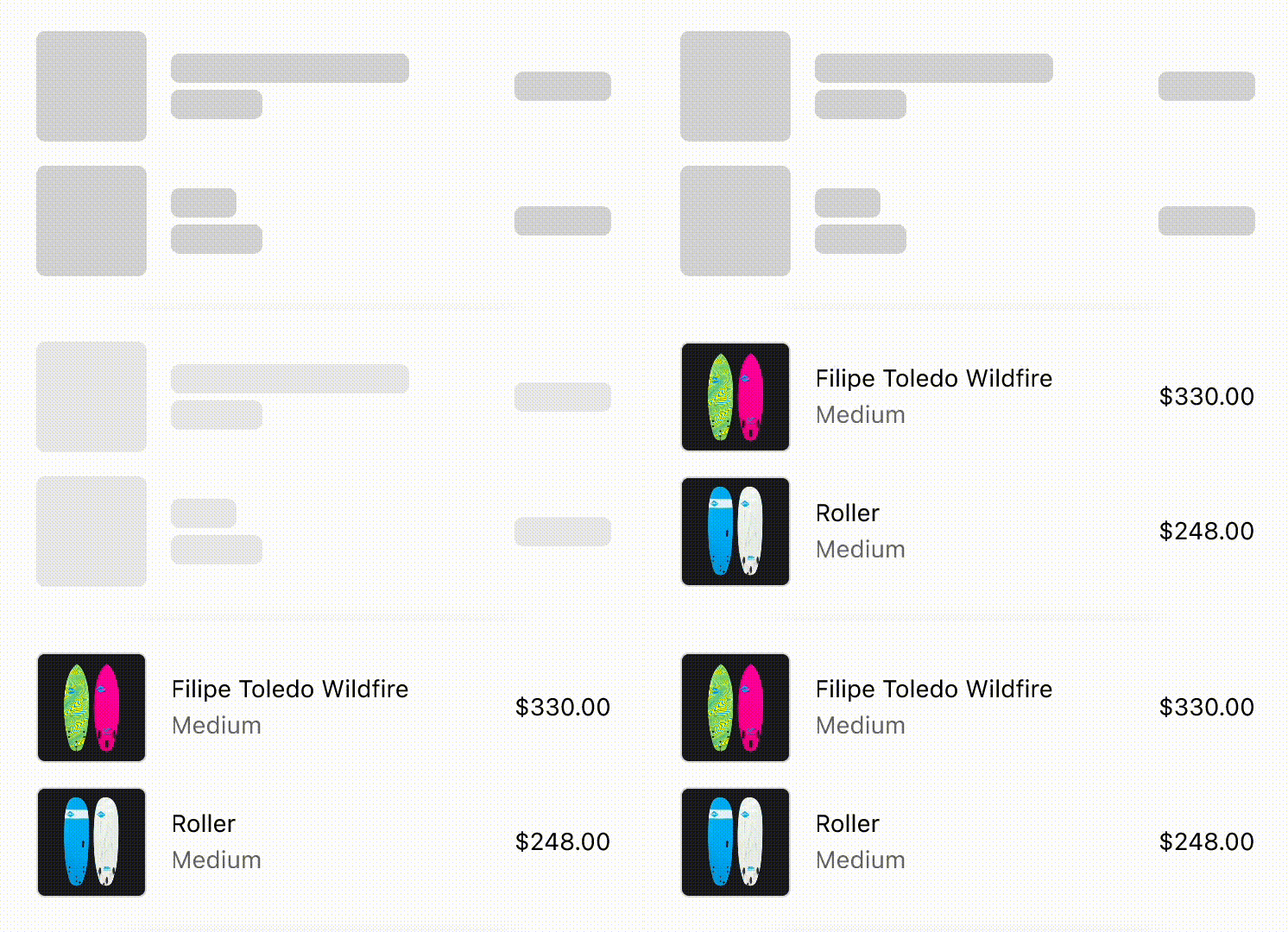
Using skeleton loaders to prevent layout shifts on content load.
React
import {
  reactExtension,
  View,
  BlockStack,
  InlineLayout,
  SkeletonImage,
  Image,
  Icon,
  SkeletonText,
  Text,
} from '@shopify/ui-extensions-react/checkout';

export default reactExtension(
  'purchase.checkout.block.render',
  () => <LoadingStateSkeletons />,
);

export const ProductThumbnail = ({
  source = 'https://yourawesomeimage.com',
}) => (
  <View
    minBlockSize={64}
    cornerRadius="large"
    maxInlineSize={64}
    minInlineSize={64}
    border="base"
  >
    {source ? (
      <Image
        fit="cover"
        aspectRatio={1}
        source={source}
        cornerRadius="large"
      />
    ) : (
      <View maxInlineSize={33}>
        <Icon source="camera" size="fill" />
      </View>
    )}
  </View>
);
export const LoadingStateSkeletons = () => {
  const loading = true;
  const [item1, item2] = [
    {
      title: 'Felipe Toledo WildFire',
      variantTitle: 'Medium',
      price: '$330.00',
    },
    {
      title: 'Roller',
      variantTitle: 'Medium',
      price: '$248.00',
    },
  ];
  const itemInfo = ({title, variantTitle}) =>
    loading ? (
      <>
        <SkeletonText>{title}</SkeletonText>
        <SkeletonText>
          {variantTitle}
        </SkeletonText>
      </>
    ) : (
      <>
        <Text emphasis="bold">{title}</Text>
        <Text appearance="subdued">
          {variantTitle}
        </Text>
      </>
    );
  const order = (item) => (
    <InlineLayout
      columns={['auto', 'fill', 'auto']}
      spacing="base"
      blockAlignment="center"
    >
      {loading ? (
        <SkeletonImage
          blockSize={64}
          inlineSize={64}
        />
      ) : (
        <ProductThumbnail />
      )}
      <BlockStack spacing="extraTight">
        {itemInfo(item)}
      </BlockStack>
      {loading ? (
        <SkeletonText>{item.price}</SkeletonText>
      ) : (
        <Text emphasis="bold">{item.price}</Text>
      )}
    </InlineLayout>
  );
  return (
    <View maxInlineSize={400}>
      <BlockStack>
        {order(item1)}
        {order(item2)}
      </BlockStack>
    </View>
  );
};
JavaScript
import {
  extension,
  BlockStack,
  View,
  InlineLayout,
  Image,
  Icon,
  Text,
  SkeletonImage,
  SkeletonText,
} from '@shopify/ui-extensions/checkout';

export default extension(
  'purchase.checkout.block.render',
  (root) => {
    const source = 'https://yourawesomeimage.com';
    const loading = true;
    const [item1, item2] = [
      {
        title: 'Felipe Toledo WildFire',
        variantTitle: 'Medium',
        price: '$330.00',
      },
      {
        title: 'Roller',
        variantTitle: 'Medium',
        price: '$248.00',
      },
    ];
    const thumbnail = root.createComponent(
      View,
      {
        minBlockSize: 64,
        cornerRadius: 'large',
        maxInlineSize: 64,
        minInlineSize: 64,
        border: 'base',
      },
      [
        source
          ? root.createComponent(Image, {
              fit: 'cover',
              aspectRatio: 1,
              source,
              cornerRadius: 'large',
            })
          : root.createComponent(
              View,
              {maxInlineSize: 33},
              [
                root.createComponent(Icon, {
                  source: 'camera',
                  size: 'fill',
                }),
              ],
            ),
      ],
    );
    const itemInfo = ({title, variantTitle}) =>
      root.createComponent(
        BlockStack,
        {
          spacing: 'extraTight',
        },
        [
          loading
            ? (root.createComponent(
                SkeletonText,
                {},
                title,
              ),
              root.createComponent(
                SkeletonText,
                {},
                variantTitle,
              ))
            : (root.createComponent(
                Text,
                {},
                title,
              ),
              root.createComponent(
                Text,
                {},
                variantTitle,
              )),
        ],
      );
    const order = (item) =>
      root.createComponent(
        InlineLayout,
        {
          columns: ['auto', 'fill', 'auto'],
          spacing: 'base',
          blockAlignment: 'center',
        },
        [
          loading
            ? root.createComponent(
                SkeletonImage,
                {
                  blockSize: 64,
                  inlineSize: 64,
                },
              )
            : thumbnail,
          itemInfo(item),
          loading
            ? root.createComponent(
                SkeletonText,
                {},
                item.price,
              )
            : root.createComponent(
                Text,
                {},
                item.price,
              ),
        ],
      );
    const view = root.createComponent(
      View,
      {
        maxInlineSize: 400,
      },
      [
        root.createComponent(BlockStack, {}, [
          order(item1),
          order(item2),
        ]),
      ],
    );
    root.appendChild(view);
  },
);