Version 2025-07 is the last API version to support React-based UI components. Later versions use Polaris web components, native UI elements with built-in accessibility, better performance, and consistent styling with Shopify's design system. Check out the upgrade guide to upgrade your extension and avoid being blocked from updating your extension after October 1st 2026.
Information
The customer information section on the Thank you page displays the buyer's contact details and, for shipping orders, their delivery address. Use this target to add UI immediately after the customer information section, such as referral program prompts, loyalty enrollment offers, or order follow-up messaging.
Anchor to Use casesUse cases
- Referral program: Display a shareable referral link or discount code below the customer's contact details, encouraging buyers to refer friends immediately after completing their purchase.
- Loyalty enrollment: Prompt first-time buyers to join a loyalty program, using order data to show how many points their purchase would earn.
- Order follow-up: Display a personalized message with the order number, estimated delivery timeline, and tracking information.
- Account creation: Encourage guest buyers to create an account by highlighting benefits like order history and faster future checkouts.
- Feedback request: Show a compact survey or feedback link below the customer information section.
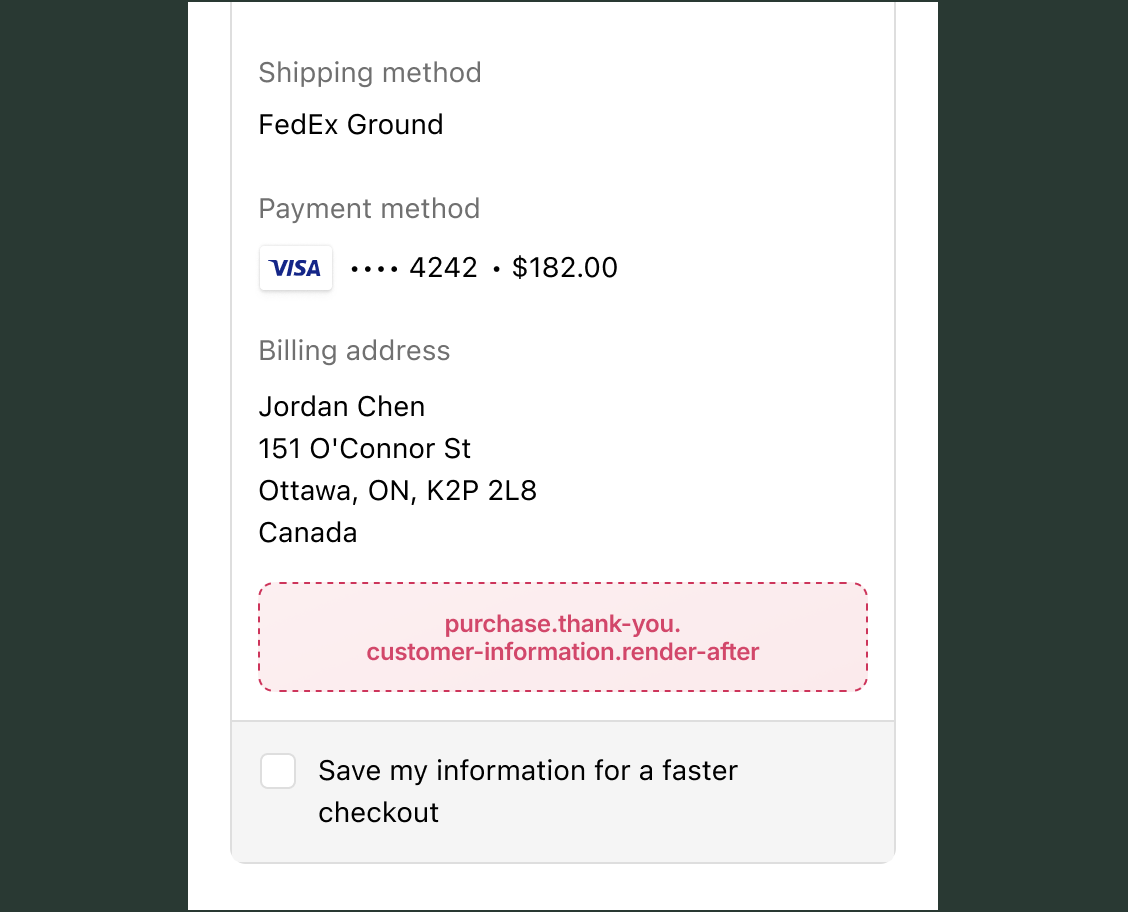
Anchor to Information targetInformation target
A static extension target that renders below the customer information section on the Thank you page. Unlike block targets, this target always renders in a fixed position relative to the customer information.
Anchor to Render after customer information ,[object Object]Render after customer information target
purchase.thank-you.customer-information.render-after
The OrderConfirmationApi provides read access to order data, including the order number and whether it's the buyer's first order. Extensions also have read access through API properties to checkout state, including shop details, buyer identity, cost totals, and cart lines. Write access isn't available on Thank you page targets because the order is complete.
Supported components
- Badge
- Banner
- Block
Layout - Block
Spacer - Block
Stack - Button
- Chat
- Checkbox
- Choice
- Choice
List - Clipboard
Item - Consent
Checkbox - Consent
Phone Field - Date
Field - Date
Picker - Disclosure
- Divider
- Drop
Zone - Form
- Grid
- Grid
Item - Heading
- Heading
Group - Icon
- Image
- Inline
Layout - Inline
Spacer - Inline
Stack - Link
- List
- List
Item - Map
- Map
Marker - Map
Popover - Modal
- Payment
Icon - Phone
Field - Popover
- Pressable
- Product
Thumbnail - Progress
- QR code
- Scroll
View - Select
- Sheet
- Skeleton
Image - Skeleton
Text - Skeleton
Text Block - Spinner
- Stepper
- Switch
- Tag
- Text
- Text
Block - Text
Field - Toggle
Button - Toggle
Button Group - Tooltip
- View
Supported components
- Badge
- Banner
- Block
Layout - Block
Spacer - Block
Stack - Button
- Chat
- Checkbox
- Choice
- Choice
List - Clipboard
Item - Consent
Checkbox - Consent
Phone Field - Date
Field - Date
Picker - Disclosure
- Divider
- Drop
Zone - Form
- Grid
- Grid
Item - Heading
- Heading
Group - Icon
- Image
- Inline
Layout - Inline
Spacer - Inline
Stack - Link
- List
- List
Item - Map
- Map
Marker - Map
Popover - Modal
- Payment
Icon - Phone
Field - Popover
- Pressable
- Product
Thumbnail - Progress
- QR code
- Scroll
View - Select
- Sheet
- Skeleton
Image - Skeleton
Text - Skeleton
Text Block - Spinner
- Stepper
- Switch
- Tag
- Text
- Text
Block - Text
Field - Toggle
Button - Toggle
Button Group - Tooltip
- View
Examples
Prompt first-time buyers to join a referral program
Description
Display a personalized referral message below the customer information section. This example reads the order confirmation to check whether it's the buyer's first order and displays a referral banner with a link for new customers.
React
import {
  reactExtension,
  Banner,
  Text,
  Link,
  useApi,
  useTotalAmount,
} from '@shopify/ui-extensions-react/checkout';

export default reactExtension(
  'purchase.thank-you.customer-information.render-after',
  () => <Extension />,
);

function Extension() {
  const {orderConfirmation} = useApi();
  const order = orderConfirmation.current;

  if (!order?.isFirstOrder) return null;

  const {amount} = useTotalAmount();
  const pointsEarned = Math.floor(
    parseFloat(amount),
  );

  return (
    <Banner title="Welcome to our referral program">
      <Text>
        {`You earned ${pointsEarned} bonus points on your first order. Refer a friend and earn 100 more points when they place an order.`}
      </Text>
      <Link to="https://example.com/referrals">
        Learn more about referrals
      </Link>
    </Banner>
  );
}
TS
import {
  extension,
  Banner,
  Text,
  Link,
} from '@shopify/ui-extensions/checkout';

export default extension(
  'purchase.thank-you.customer-information.render-after',
  (root, {orderConfirmation, cost}) => {
    const order = orderConfirmation.current;

    if (!order?.isFirstOrder) return;

    const total = parseFloat(
      cost.totalAmount.current.amount,
    );
    const pointsEarned = Math.floor(total);

    root.appendChild(
      root.createComponent(
        Banner,
        {title: 'Welcome to our referral program'},
        [
          root.createComponent(
            Text,
            {},
            `You earned ${pointsEarned} bonus points on your first order. Refer a friend and earn 100 more points when they place an order.`,
          ),
          root.createComponent(
            Link,
            {to: 'https://example.com/referrals'},
            'Learn more about referrals',
          ),
        ],
      ),
    );
  },
);
Anchor to Best practicesBest practices
- Personalize for first-time buyers: Use
orderConfirmation.current.isFirstOrderfromuseApi()to tailor messaging. First-time buyers are more receptive to loyalty enrollment and referral program prompts. - Keep content contextually relevant: This target renders directly below the customer's contact details. Content should relate to the buyer's identity or post-purchase actions, not to products or order summary information.
Anchor to LimitationsLimitations
- Limited order data: The
OrderConfirmationApionly exposesisFirstOrderandnumber. Detailed order information like line items, payment method, or fulfillment status isn't available through this API.