Version 2025-07 is the last API version to support React-based UI components. Later versions use Polaris web components, native UI elements with built-in accessibility, better performance, and consistent styling with Shopify's design system. Check out the upgrade guide to upgrade your extension and avoid being blocked from updating your extension after October 1st 2026.
Header
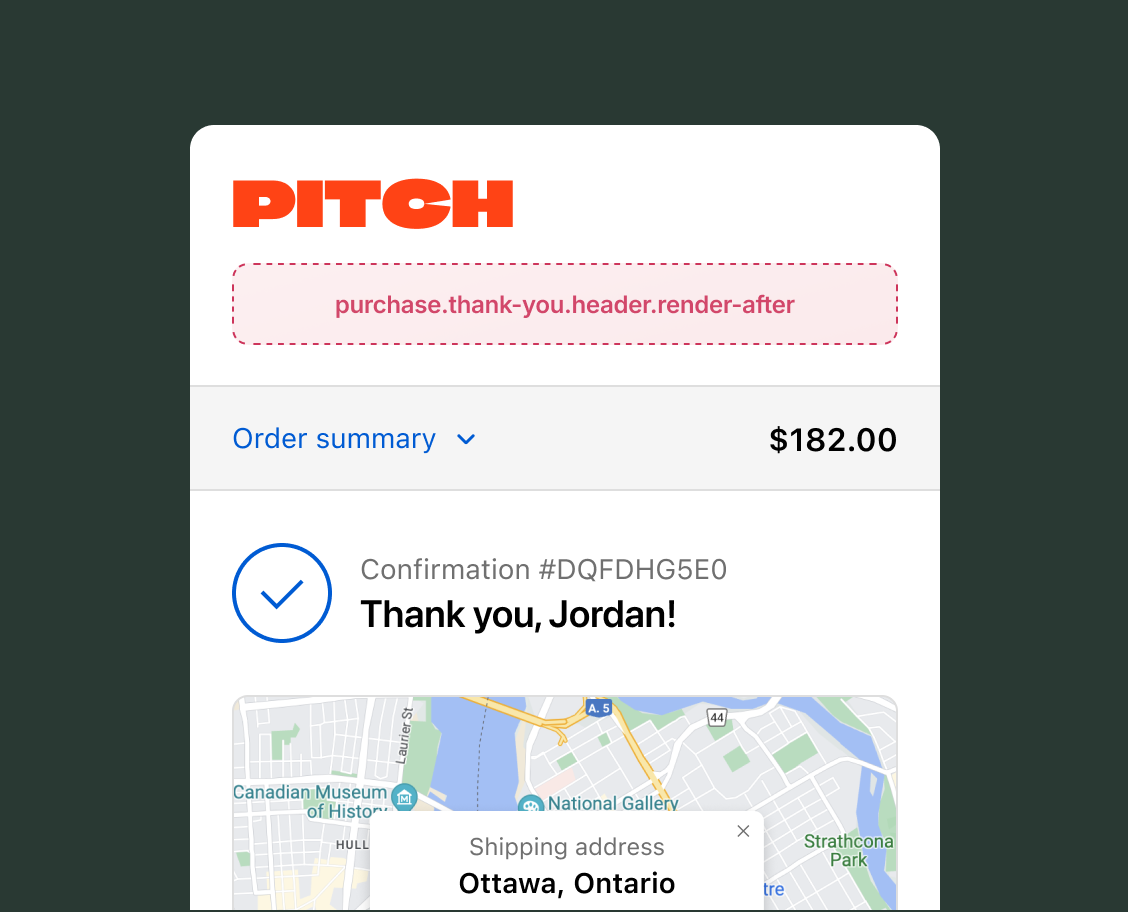
The header area appears at the top of the Thank you page, directly below the store logo and navigation. Extensions in this area add high-visibility content to the post-purchase experience that buyers see immediately after completing their order.
Anchor to Use casesUse cases
- First-time buyer welcome: Display a personalized welcome message for new customers and encourage account creation to build long-term engagement.
- Post-purchase surveys: Collect buyer feedback through a compact form.
- Loyalty program enrollment: Prompt unenrolled buyers to join a rewards program, or show enrolled buyers how many points they earned from the purchase.
- Referral program prompts: Generate shareable referral URLs tied to the completed order, with a copy-to-clipboard action for easy sharing.
- Order tracking and delivery estimates: Display expected delivery information or show a map for local pickup orders.
- App install prompts: Encourage buyers to download the store's mobile app for order tracking and reorder convenience.
Anchor to Header targetHeader target
Use this static extension target to extend the area directly below the Thank you page header. This target supports the full checkout component set, including form fields, banners, images, and interactive elements. The examples demonstrate using the OrderConfirmationApi for order data and API properties for reading checkout state.
Anchor to Thank you header ,[object Object]Thank you header target
purchase.thank-you.header.render-after
Adds persistent content directly below the header on the Thank you page. The OrderConfirmationApi provides read access to order data, including the order number and whether it's the customer's first order.
Extensions also have read access through API properties to shop information, buyer identity, cost breakdowns, cart lines, delivery groups, discount codes, localization, and other checkout state. The Storefront API is available through the query method for fetching additional data like product recommendations. Write access isn't available on Thank you page targets because the order is complete.
Supported components
- Badge
- Banner
- Block
Layout - Block
Spacer - Block
Stack - Button
- Chat
- Checkbox
- Choice
- Choice
List - Clipboard
Item - Consent
Checkbox - Consent
Phone Field - Date
Field - Date
Picker - Disclosure
- Divider
- Drop
Zone - Form
- Grid
- Grid
Item - Heading
- Heading
Group - Icon
- Image
- Inline
Layout - Inline
Spacer - Inline
Stack - Link
- List
- List
Item - Map
- Map
Marker - Map
Popover - Modal
- Payment
Icon - Phone
Field - Popover
- Pressable
- Product
Thumbnail - Progress
- QR code
- Scroll
View - Select
- Sheet
- Skeleton
Image - Skeleton
Text - Skeleton
Text Block - Spinner
- Stepper
- Switch
- Tag
- Text
- Text
Block - Text
Field - Toggle
Button - Toggle
Button Group - Tooltip
- View
Supported components
- Badge
- Banner
- Block
Layout - Block
Spacer - Block
Stack - Button
- Chat
- Checkbox
- Choice
- Choice
List - Clipboard
Item - Consent
Checkbox - Consent
Phone Field - Date
Field - Date
Picker - Disclosure
- Divider
- Drop
Zone - Form
- Grid
- Grid
Item - Heading
- Heading
Group - Icon
- Image
- Inline
Layout - Inline
Spacer - Inline
Stack - Link
- List
- List
Item - Map
- Map
Marker - Map
Popover - Modal
- Payment
Icon - Phone
Field - Popover
- Pressable
- Product
Thumbnail - Progress
- QR code
- Scroll
View - Select
- Sheet
- Skeleton
Image - Skeleton
Text - Skeleton
Text Block - Spinner
- Stepper
- Switch
- Tag
- Text
- Text
Block - Text
Field - Toggle
Button - Toggle
Button Group - Tooltip
- View
Examples
Display a first-time buyer welcome message
Description
Create a header extension that checks whether the buyer is a first-time customer and displays a personalized welcome message.
React
import {
  reactExtension,
  Banner,
  useApi,
  useShop,
} from '@shopify/ui-extensions-react/checkout';

export default reactExtension(
  'purchase.thank-you.header.render-after',
  () => <Extension />,
);

function Extension() {
  const {orderConfirmation} = useApi();
  const shop = useShop();
  const isFirstOrder =
    orderConfirmation.current?.isFirstOrder;

  if (isFirstOrder) {
    return (
      <Banner status="success">
        Welcome to {shop.name}! Thanks for your
        first order.
      </Banner>
    );
  }

  return (
    <Banner>
      Thanks for your order, {shop.name}{' '}
      appreciates your continued support.
    </Banner>
  );
}
TS
import {
  extension,
  Banner,
} from '@shopify/ui-extensions/checkout';

export default extension(
  'purchase.thank-you.header.render-after',
  (root, api) => {
    const isFirstOrder =
      api.orderConfirmation.current?.isFirstOrder;
    const shopName = api.shop.name;

    if (isFirstOrder) {
      root.appendChild(
        root.createComponent(
          Banner,
          {status: 'success'},
          `Welcome to ${shopName}! Thanks for your first order.`,
        ),
      );
      return;
    }

    root.appendChild(
      root.createComponent(
        Banner,
        {},
        `Thanks for your order, ${shopName} appreciates your continued support.`,
      ),
    );
  },
);
Anchor to Best practicesBest practices
- Reserve space for dynamic content: Layout shifts are highly visible in the header. If you load data asynchronously, use a skeleton paragraph or spinner to hold space while content loads.
- Use the Storage API to track interactions: Record whether a buyer has already submitted a survey or dismissed an enrollment prompt so it doesn't re-show on page refresh.