Version 2025-07 is the last API version to support React-based UI components. Later versions use Polaris web components, native UI elements with built-in accessibility, better performance, and consistent styling with Shopify's design system. Check out the upgrade guide to upgrade your extension and avoid being blocked from updating your extension after October 1st 2026.
Block
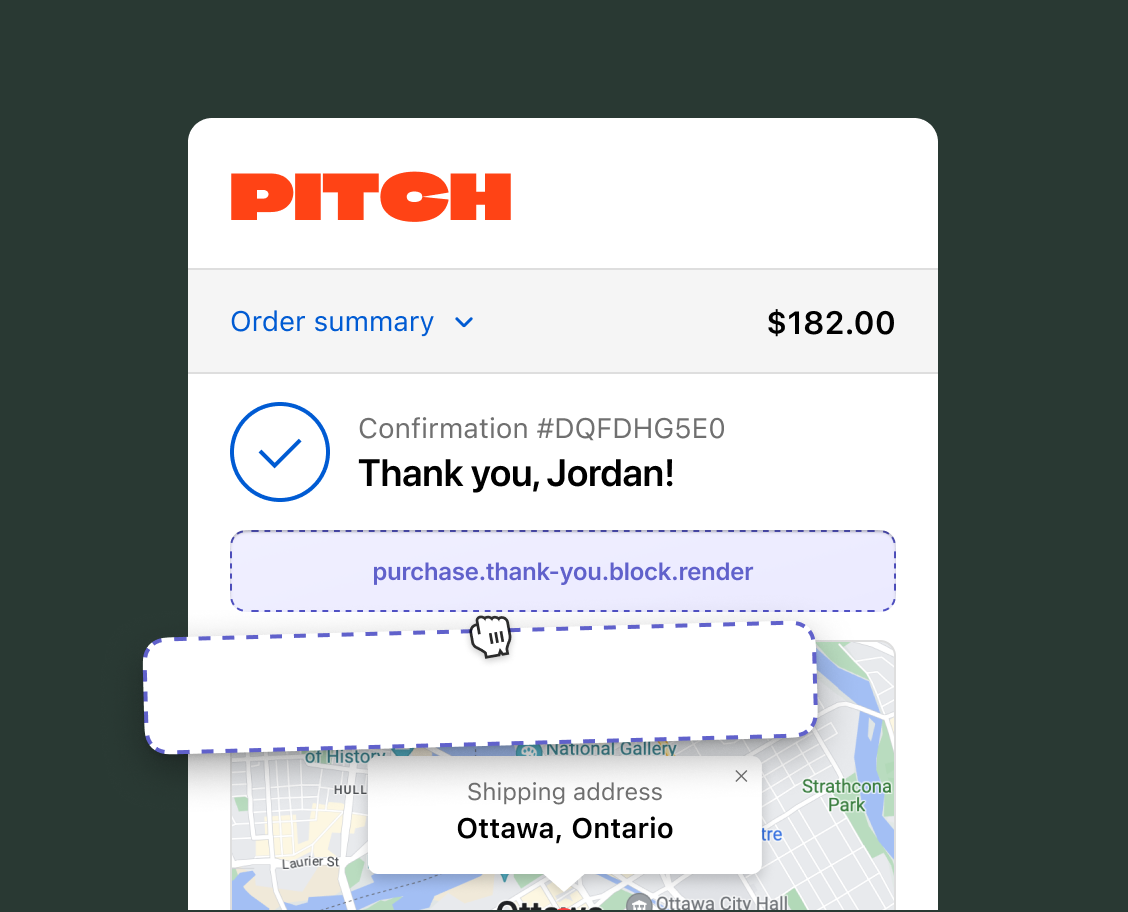
Use block targets to build general-purpose extensions which merchants can reposition using the checkout and accounts editor. Unlike static extension targets that render at fixed locations, block targets can be displayed across different areas of the Thank you page according to merchants' needs.
Anchor to Use casesUse cases
- Loyalty points summary: Display how many loyalty points the buyer earned on their purchase, with personalized messaging for first-time buyers.
- Post-purchase survey: Collect feedback about the buying experience through a compact form, using the Storage API to track whether the survey has already been submitted.
- Referral program: Generate and display shareable referral links or discount codes tied to the completed order.
- Order confirmation details: Show the order number or additional confirmation information in a merchant-placed block.
- First-order welcome: Display a personalized welcome message for new customers with information about loyalty programs or account benefits.
Anchor to Block targetBlock target
A block extension target on the Thank you page that isn't tied to a specific section. Merchants control the placement using the checkout and accounts editor. During development, you can preview the target at different locations by using a URL parameter.
Anchor to Render block ,[object Object]Render block target
purchase.thank-you.block.render
The OrderConfirmationApi provides read access to order data, including the order number and whether it's the buyer's first order. Extensions also have read access through API properties to checkout state, including shop details, buyer identity, cost totals, and cart lines. Write access isn't available on Thank you page targets because the order is complete.
Supported components
- Badge
- Banner
- Block
Layout - Block
Spacer - Block
Stack - Button
- Chat
- Checkbox
- Choice
- Choice
List - Clipboard
Item - Consent
Checkbox - Consent
Phone Field - Date
Field - Date
Picker - Disclosure
- Divider
- Drop
Zone - Form
- Grid
- Grid
Item - Heading
- Heading
Group - Icon
- Image
- Inline
Layout - Inline
Spacer - Inline
Stack - Link
- List
- List
Item - Map
- Map
Marker - Map
Popover - Modal
- Payment
Icon - Phone
Field - Popover
- Pressable
- Product
Thumbnail - Progress
- QR code
- Scroll
View - Select
- Sheet
- Skeleton
Image - Skeleton
Text - Skeleton
Text Block - Spinner
- Stepper
- Switch
- Tag
- Text
- Text
Block - Text
Field - Toggle
Button - Toggle
Button Group - Tooltip
- View
Supported components
- Badge
- Banner
- Block
Layout - Block
Spacer - Block
Stack - Button
- Chat
- Checkbox
- Choice
- Choice
List - Clipboard
Item - Consent
Checkbox - Consent
Phone Field - Date
Field - Date
Picker - Disclosure
- Divider
- Drop
Zone - Form
- Grid
- Grid
Item - Heading
- Heading
Group - Icon
- Image
- Inline
Layout - Inline
Spacer - Inline
Stack - Link
- List
- List
Item - Map
- Map
Marker - Map
Popover - Modal
- Payment
Icon - Phone
Field - Popover
- Pressable
- Product
Thumbnail - Progress
- QR code
- Scroll
View - Select
- Sheet
- Skeleton
Image - Skeleton
Text - Skeleton
Text Block - Spinner
- Stepper
- Switch
- Tag
- Text
- Text
Block - Text
Field - Toggle
Button - Toggle
Button Group - Tooltip
- View
Examples
Display a loyalty points summary
Description
Show buyers how many loyalty points they earned on their purchase. This example reads the order total and personalizes the message for first-time buyers.
React
import {
  reactExtension,
  Banner,
  useApi,
  useTotalAmount,
} from '@shopify/ui-extensions-react/checkout';

export default reactExtension(
  'purchase.thank-you.block.render',
  () => <Extension />,
);

function Extension() {
  const {orderConfirmation} = useApi();
  const order = orderConfirmation.current;
  const {amount} = useTotalAmount();
  const total = parseFloat(amount);
  const pointsEarned = Math.floor(total);

  return (
    <Banner>
      {order?.isFirstOrder
        ? `Welcome! You earned ${pointsEarned} loyalty points on your first order.`
        : `You earned ${pointsEarned} loyalty points on this order.`}
    </Banner>
  );
}
TS
import {
  extension,
  Banner,
} from '@shopify/ui-extensions/checkout';

export default extension(
  'purchase.thank-you.block.render',
  (root, {orderConfirmation, cost}) => {
    const order = orderConfirmation.current;
    const total = parseFloat(
      cost.totalAmount.current.amount,
    );
    const pointsEarned = Math.floor(total);

    const message = order?.isFirstOrder
      ? `Welcome! You earned ${pointsEarned} loyalty points on your first order.`
      : `You earned ${pointsEarned} loyalty points on this order.`;

    root.appendChild(
      root.createComponent(
        Banner,
        {},
        message,
      ),
    );
  },
);
Anchor to Best practicesBest practices
- Design for flexible placement: The merchant controls where this extension appears, so avoid assumptions about surrounding content. Test the extension in multiple supported locations to confirm it renders well in each.
Anchor to Placement referencesPlacement references
During development, preview each supported placement by appending ?placement-reference={name} to the Thank you page URL printed by Shopify CLI. For example, ?placement-reference=ORDER_STATUS1 previews the extension above the order status card.
You can also set default_placement in your extension's TOML configuration file to recommend an initial placement to merchants in the checkout and accounts editor.
| Reference | Location |
|---|---|
ORDER_STATUS1 | Above the order status card, at the top of the Thank you page content. |
ORDER_STATUS2 | Below Shop ads and upsells, above the buyer information details. |
ORDER_STATUS3 | Below the buyer information, at the bottom of the Thank you page content. |
ORDER_SUMMARY1 | Above the line items in the order summary. |
ORDER_SUMMARY2 | Below the line items in the order summary. |
ORDER_SUMMARY3 | Below the money lines in the order summary. On checkout, this same reference renders above the money lines. |
ORDER_SUMMARY4 isn't supported on the Thank you page.