Version 2025-07 is the last API version to support React-based UI components. Later versions use Polaris web components, native UI elements with built-in accessibility, better performance, and consistent styling with Shopify's design system. Check out the upgrade guide to upgrade your extension and avoid being blocked from updating your extension after October 1st 2026.
Pickup points
When buyers choose pickup point delivery, checkout displays a location search form and a list of nearby collection points, such as parcel lockers and carrier service points. Use these targets to add content before and after that UI.
Anchor to Use casesUse cases
- Location guidance: Display a message above the location search form, such as coverage areas or tips for finding the nearest pickup point.
- Carrier information: Display carrier names, collection hours, or network details for available pickup points.
- Collection instructions: Show what buyers need when collecting their package, such as a photo ID or order confirmation number.
- Pickup promotion: Reinforce the buyer's choice with a discount or reward when they select pickup point delivery.
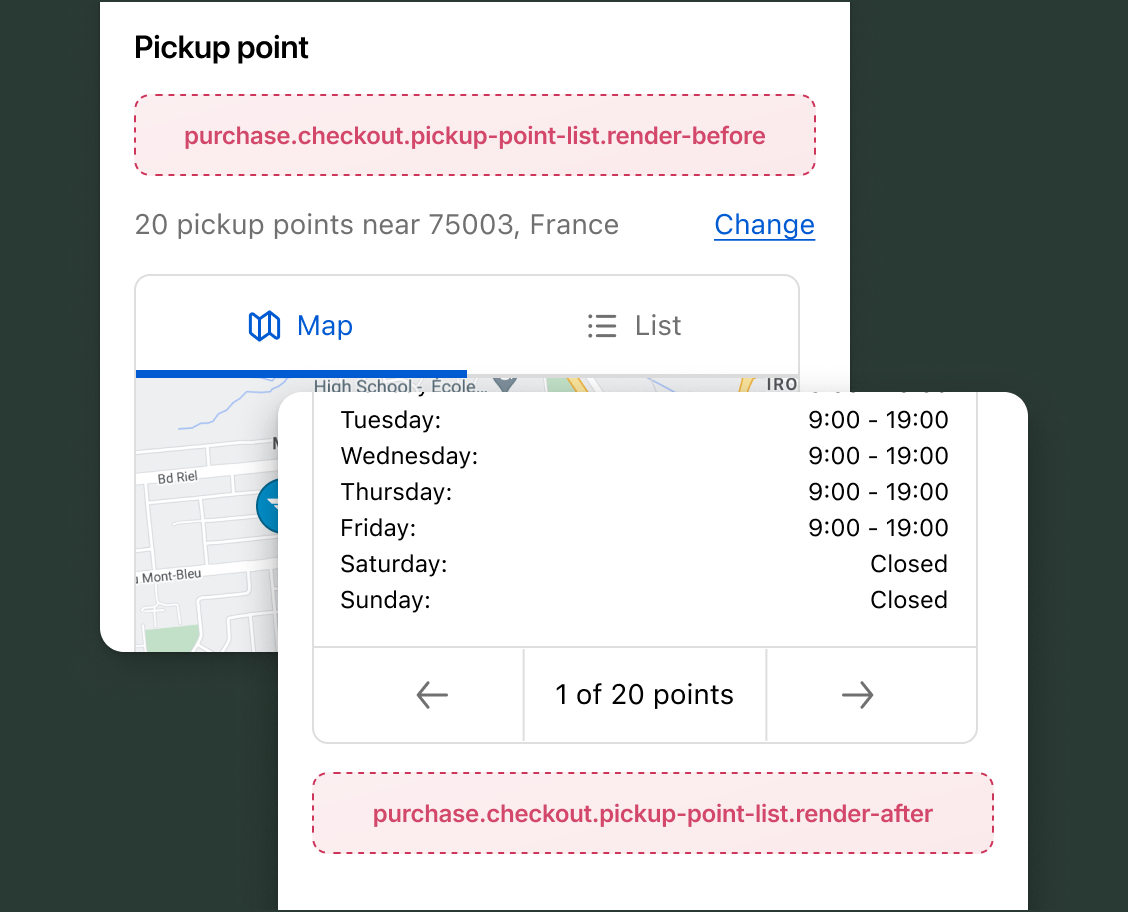
Anchor to Pickup points targetsPickup points targets
Use these targets to add content around the pickup point selection UI. Buyers move through two views: a location search form and a results list. The extension receives isLocationFormVisible to distinguish between them. For UX guidance, see UX for pickup points.
Anchor to Render before pickup points ,[object Object]Render before pickup points target
purchase.checkout.pickup-point-list.render-before
Renders before the pickup point UI, covering both the location search form and the results list. Use api.isLocationFormVisible.current to determine which view the buyer is in and adapt your content. Pickup point details, including carrier names, location addresses, and costs, are accessible through deliveryGroups.
Supported components
- Badge
- Banner
- Block
Layout - Block
Spacer - Block
Stack - Button
- Chat
- Checkbox
- Choice
- Choice
List - Clipboard
Item - Consent
Checkbox - Consent
Phone Field - Date
Field - Date
Picker - Disclosure
- Divider
- Drop
Zone - Form
- Grid
- Grid
Item - Heading
- Heading
Group - Icon
- Image
- Inline
Layout - Inline
Spacer - Inline
Stack - Link
- List
- List
Item - Map
- Map
Marker - Map
Popover - Modal
- Payment
Icon - Phone
Field - Popover
- Pressable
- Product
Thumbnail - Progress
- QR code
- Scroll
View - Select
- Sheet
- Skeleton
Image - Skeleton
Text - Skeleton
Text Block - Spinner
- Stepper
- Switch
- Tag
- Text
- Text
Block - Text
Field - Toggle
Button - Toggle
Button Group - Tooltip
- View
Available APIs
- Addresses API
- Analytics API
- Attributes API
- Buyer Identity API
- Buyer Journey API
- Cart Instructions API
- Cart Lines API
- Checkout Token API
- Cost API
- Customer Privacy API
- Delivery API
- Discounts API
- Extension API
- Gift Cards API
- Localization API
- Localized Fields API
- Metafields API
- Note API
- Payments API
- Session Token API
- Settings API
- Shop API
- Storage API
- Storefront API
- UI API
Supported components
- Badge
- Banner
- Block
Layout - Block
Spacer - Block
Stack - Button
- Chat
- Checkbox
- Choice
- Choice
List - Clipboard
Item - Consent
Checkbox - Consent
Phone Field - Date
Field - Date
Picker - Disclosure
- Divider
- Drop
Zone - Form
- Grid
- Grid
Item - Heading
- Heading
Group - Icon
- Image
- Inline
Layout - Inline
Spacer - Inline
Stack - Link
- List
- List
Item - Map
- Map
Marker - Map
Popover - Modal
- Payment
Icon - Phone
Field - Popover
- Pressable
- Product
Thumbnail - Progress
- QR code
- Scroll
View - Select
- Sheet
- Skeleton
Image - Skeleton
Text - Skeleton
Text Block - Spinner
- Stepper
- Switch
- Tag
- Text
- Text
Block - Text
Field - Toggle
Button - Toggle
Button Group - Tooltip
- View
Available APIs
- Addresses API
- Analytics API
- Attributes API
- Buyer Identity API
- Buyer Journey API
- Cart Instructions API
- Cart Lines API
- Checkout Token API
- Cost API
- Customer Privacy API
- Delivery API
- Discounts API
- Extension API
- Gift Cards API
- Localization API
- Localized Fields API
- Metafields API
- Note API
- Payments API
- Session Token API
- Settings API
- Shop API
- Storage API
- Storefront API
- UI API
Examples
Show guidance based on the current pickup point view
Description
Display different content depending on whether the buyer is entering their location or viewing the list of pickup points.
React
import {
  reactExtension,
  Banner,
  useApi,
} from '@shopify/ui-extensions-react/checkout';

export default reactExtension(
  'purchase.checkout.pickup-point-list.render-before',
  () => <Extension />,
);

function Extension() {
  const api = useApi();
  const isLocationFormVisible = api.isLocationFormVisible.current;

  if (isLocationFormVisible) {
    return (
      <Banner>
        Enter your postal code or address to find pickup points near you.
      </Banner>
    );
  }

  return (
    <Banner>
      Packages are held for up to 14 days. Bring a valid photo ID to collect.
    </Banner>
  );
}
TS
import {extension, Banner} from '@shopify/ui-extensions/checkout';

export default extension(
  'purchase.checkout.pickup-point-list.render-before',
  (root, api) => {
    if (api.isLocationFormVisible.current) {
      const banner = root.createComponent(
        Banner,
        {},
        'Enter your postal code or address to find pickup points near you.',
      );
      root.appendChild(banner);
    } else {
      const banner = root.createComponent(
        Banner,
        {},
        'Packages are held for up to 14 days. Bring a valid photo ID to collect.',
      );
      root.appendChild(banner);
    }
  },
);
Anchor to Render after pickup points ,[object Object]Render after pickup points target
purchase.checkout.pickup-point-list.render-after
Renders after the pickup point list. Use this target for content that's relevant after the buyer views or selects a pickup point, such as collection reminders or package handling instructions.
Supported components
- Badge
- Banner
- Block
Layout - Block
Spacer - Block
Stack - Button
- Chat
- Checkbox
- Choice
- Choice
List - Clipboard
Item - Consent
Checkbox - Consent
Phone Field - Date
Field - Date
Picker - Disclosure
- Divider
- Drop
Zone - Form
- Grid
- Grid
Item - Heading
- Heading
Group - Icon
- Image
- Inline
Layout - Inline
Spacer - Inline
Stack - Link
- List
- List
Item - Map
- Map
Marker - Map
Popover - Modal
- Payment
Icon - Phone
Field - Popover
- Pressable
- Product
Thumbnail - Progress
- QR code
- Scroll
View - Select
- Sheet
- Skeleton
Image - Skeleton
Text - Skeleton
Text Block - Spinner
- Stepper
- Switch
- Tag
- Text
- Text
Block - Text
Field - Toggle
Button - Toggle
Button Group - Tooltip
- View
Available APIs
- Addresses API
- Analytics API
- Attributes API
- Buyer Identity API
- Buyer Journey API
- Cart Instructions API
- Cart Lines API
- Checkout Token API
- Cost API
- Customer Privacy API
- Delivery API
- Discounts API
- Extension API
- Gift Cards API
- Localization API
- Localized Fields API
- Metafields API
- Note API
- Payments API
- Session Token API
- Settings API
- Shop API
- Storage API
- Storefront API
- UI API
Supported components
- Badge
- Banner
- Block
Layout - Block
Spacer - Block
Stack - Button
- Chat
- Checkbox
- Choice
- Choice
List - Clipboard
Item - Consent
Checkbox - Consent
Phone Field - Date
Field - Date
Picker - Disclosure
- Divider
- Drop
Zone - Form
- Grid
- Grid
Item - Heading
- Heading
Group - Icon
- Image
- Inline
Layout - Inline
Spacer - Inline
Stack - Link
- List
- List
Item - Map
- Map
Marker - Map
Popover - Modal
- Payment
Icon - Phone
Field - Popover
- Pressable
- Product
Thumbnail - Progress
- QR code
- Scroll
View - Select
- Sheet
- Skeleton
Image - Skeleton
Text - Skeleton
Text Block - Spinner
- Stepper
- Switch
- Tag
- Text
- Text
Block - Text
Field - Toggle
Button - Toggle
Button Group - Tooltip
- View
Available APIs
- Addresses API
- Analytics API
- Attributes API
- Buyer Identity API
- Buyer Journey API
- Cart Instructions API
- Cart Lines API
- Checkout Token API
- Cost API
- Customer Privacy API
- Delivery API
- Discounts API
- Extension API
- Gift Cards API
- Localization API
- Localized Fields API
- Metafields API
- Note API
- Payments API
- Session Token API
- Settings API
- Shop API
- Storage API
- Storefront API
- UI API
Examples
Display collection instructions after the pickup point list
Description
Show what buyers need to bring when collecting their package. This example renders a static informational banner below the list of pickup points.
React
import {
  reactExtension,
  Text,
  useApi,
} from '@shopify/ui-extensions-react/checkout';

export default reactExtension(
  'purchase.checkout.pickup-point-list.render-after',
  () => <Extension />,
);

function Extension() {
  const api = useApi();
  const isLocationFormVisible = api.isLocationFormVisible.current;

  if (isLocationFormVisible) return null;

  return (
    <Text>
      Bring a valid photo ID and your order number when collecting your package.
    </Text>
  );
}
TS
import {extension, Text} from '@shopify/ui-extensions/checkout';

export default extension(
  'purchase.checkout.pickup-point-list.render-after',
  (root, api) => {
    if (api.isLocationFormVisible.current) return;

    const text = root.createComponent(
      Text,
      {},
      'Bring a valid photo ID and your order number when collecting your package.',
    );

    root.appendChild(text);
  },
);
Anchor to Best practicesBest practices
- Adapt content to the current view: The buyer moves through two distinct views when selecting a pickup point: the location search form and the results list. Use
api.isLocationFormVisible.currentto show content relevant to each view. - Keep location guidance brief: Buyers entering their location are completing a focused task. Content in
render-beforeduring the location search step sits above the form and pushes it down. Keep any guidance concise and directly relevant to the search.
Anchor to LimitationsLimitations
- Limited
PickupPointListApi:PickupPointListApiprovides onlyisLocationFormVisible. Carrier names, location addresses, and costs are accessible throughdeliveryGroups, but collection hours and service area details aren't. The buyer's search address isn't exposed. isLocationFormVisibleis load-time only:isLocationFormVisiblereflects which view was active when the extension loaded. When the buyer moves to the next view, the extension restarts with the current value rather than updating in place.- Read-only selection: The available write operations (cart notes, metafields, discount codes) don't include setting or changing the pickup point selection or modifying the search address.