Version 2025-07 is the last API version to support React-based UI components. Later versions use Polaris web components, native UI elements with built-in accessibility, better performance, and consistent styling with Shopify's design system. Check out the upgrade guide to upgrade your extension and avoid being blocked from updating your extension after October 1st 2026.
Payment
Checkout displays the payment methods available to the buyer, including digital wallets, credit cards, buy-now-pay-later plans, and regional options. Use these targets to add contextual messaging, security details, or incentives based on which methods are available and what the buyer has selected.
Anchor to Use casesUse cases
- Express checkout promotion: Promote wallet options like Apple Pay or Google Pay when they're available to the buyer.
- Installment plan details: Display information about deferred payment options when they're offered, such as how the installment plan works.
- Credit card security: Display encryption assurances or purchase protection details when a credit card is selected, so buyers feel confident entering their card details.
- Gift card or store credit: Display messaging when gift-card or store-credit payment options are available, such as instructions on how to apply them.
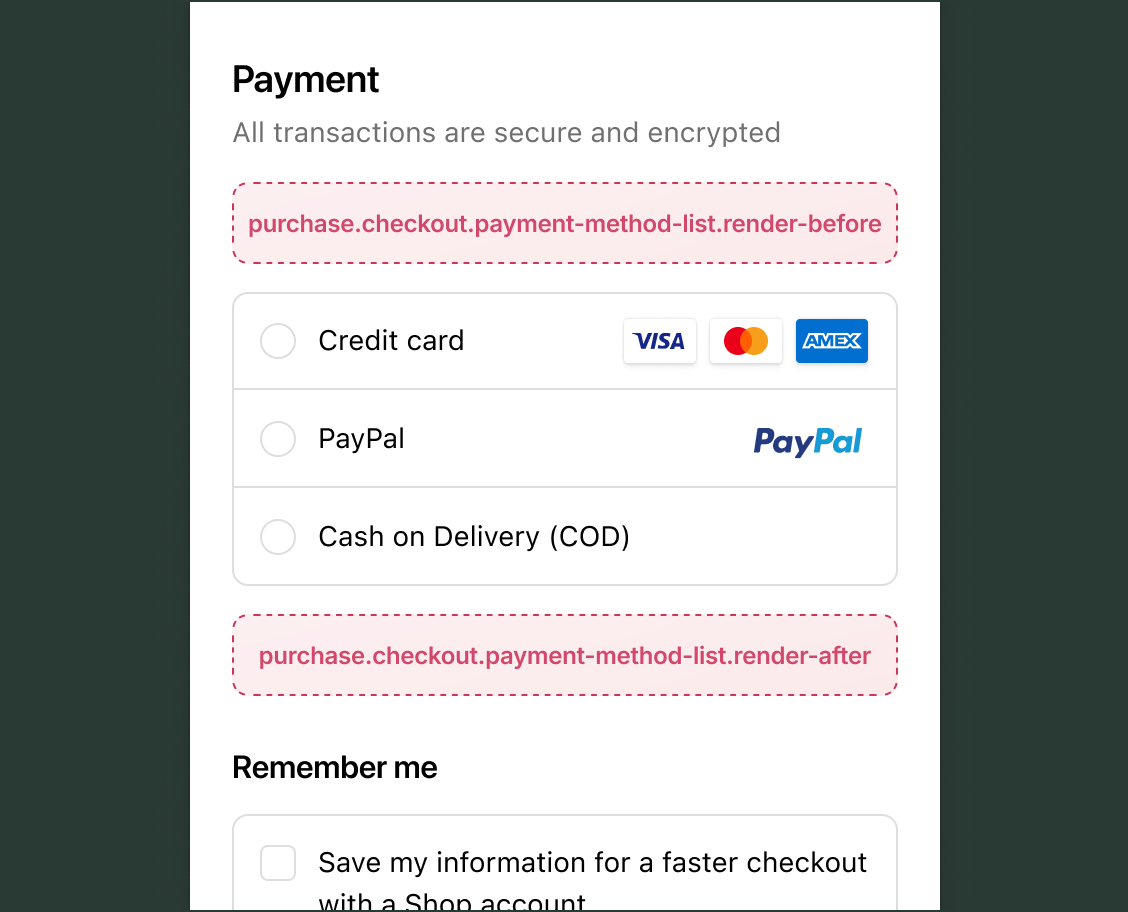
Anchor to Payment targetsPayment targets
Use these targets to add content that helps buyers understand and choose their payment method.
Anchor to Render before payment methods ,[object Object]Render before payment methods target
purchase.checkout.payment-method-list.render-before
Renders before the list of payment methods. Use this target to display messaging that applies to all payment options before the buyer makes a selection.
Read available payment options through useAvailablePaymentOptions() and the buyer's current selection through useSelectedPaymentOptions(). Both update reactively as the buyer interacts with payment choices.
Supported components
- Badge
- Banner
- Block
Layout - Block
Spacer - Block
Stack - Button
- Chat
- Checkbox
- Choice
- Choice
List - Clipboard
Item - Consent
Checkbox - Consent
Phone Field - Date
Field - Date
Picker - Disclosure
- Divider
- Drop
Zone - Form
- Grid
- Grid
Item - Heading
- Heading
Group - Icon
- Image
- Inline
Layout - Inline
Spacer - Inline
Stack - Link
- List
- List
Item - Map
- Map
Marker - Map
Popover - Modal
- Payment
Icon - Phone
Field - Popover
- Pressable
- Product
Thumbnail - Progress
- QR code
- Scroll
View - Select
- Sheet
- Skeleton
Image - Skeleton
Text - Skeleton
Text Block - Spinner
- Stepper
- Switch
- Tag
- Text
- Text
Block - Text
Field - Toggle
Button - Toggle
Button Group - Tooltip
- View
Available APIs
- Addresses API
- Analytics API
- Attributes API
- Buyer Identity API
- Buyer Journey API
- Cart Instructions API
- Cart Lines API
- Checkout Token API
- Cost API
- Customer Privacy API
- Delivery API
- Discounts API
- Extension API
- Gift Cards API
- Localization API
- Localized Fields API
- Metafields API
- Note API
- Payments API
- Session Token API
- Settings API
- Shop API
- Storage API
- Storefront API
- UI API
Supported components
- Badge
- Banner
- Block
Layout - Block
Spacer - Block
Stack - Button
- Chat
- Checkbox
- Choice
- Choice
List - Clipboard
Item - Consent
Checkbox - Consent
Phone Field - Date
Field - Date
Picker - Disclosure
- Divider
- Drop
Zone - Form
- Grid
- Grid
Item - Heading
- Heading
Group - Icon
- Image
- Inline
Layout - Inline
Spacer - Inline
Stack - Link
- List
- List
Item - Map
- Map
Marker - Map
Popover - Modal
- Payment
Icon - Phone
Field - Popover
- Pressable
- Product
Thumbnail - Progress
- QR code
- Scroll
View - Select
- Sheet
- Skeleton
Image - Skeleton
Text - Skeleton
Text Block - Spinner
- Stepper
- Switch
- Tag
- Text
- Text
Block - Text
Field - Toggle
Button - Toggle
Button Group - Tooltip
- View
Available APIs
- Addresses API
- Analytics API
- Attributes API
- Buyer Identity API
- Buyer Journey API
- Cart Instructions API
- Cart Lines API
- Checkout Token API
- Cost API
- Customer Privacy API
- Delivery API
- Discounts API
- Extension API
- Gift Cards API
- Localization API
- Localized Fields API
- Metafields API
- Note API
- Payments API
- Session Token API
- Settings API
- Shop API
- Storage API
- Storefront API
- UI API
Examples
Promote wallet payments before the payment list
Description
Display a banner encouraging buyers to use wallet payment options like Apple Pay or Google Pay when those options are available. This example reads availablePaymentOptions and only renders when a wallet option is present.
React
import {
  reactExtension,
  Banner,
  useAvailablePaymentOptions,
} from '@shopify/ui-extensions-react/checkout';

export default reactExtension(
  'purchase.checkout.payment-method-list.render-before',
  () => <Extension />,
);

function Extension() {
  const paymentOptions =
    useAvailablePaymentOptions();
  const hasWallet = paymentOptions.some(
    (option) => option.type === 'wallet',
  );

  if (!hasWallet) return null;

  return (
    <Banner>
      Use Apple Pay or Google Pay to check out
      faster.
    </Banner>
  );
}
TS
import {
  extension,
  Banner,
} from '@shopify/ui-extensions/checkout';

export default extension(
  'purchase.checkout.payment-method-list.render-before',
  (root, api) => {
    const banner = root.createComponent(
      Banner,
      {},
      'Use Apple Pay or Google Pay to check out faster.',
    );
    let mounted = false;

    function update() {
      const paymentOptions =
        api.availablePaymentOptions.current;
      const hasWallet = paymentOptions.some(
        (option) => option.type === 'wallet',
      );

      if (hasWallet && !mounted) {
        root.appendChild(banner);
        mounted = true;
      } else if (!hasWallet && mounted) {
        banner.remove();
        mounted = false;
      }
    }

    api.availablePaymentOptions.subscribe(update);
    update();
  },
);
Anchor to Render after payment methods ,[object Object]Render after payment methods target
purchase.checkout.payment-method-list.render-after
Renders below the list of payment methods. Use this target for content that responds to the buyer's payment selection, such as security details or payment-specific messaging.
Supported components
- Badge
- Banner
- Block
Layout - Block
Spacer - Block
Stack - Button
- Chat
- Checkbox
- Choice
- Choice
List - Clipboard
Item - Consent
Checkbox - Consent
Phone Field - Date
Field - Date
Picker - Disclosure
- Divider
- Drop
Zone - Form
- Grid
- Grid
Item - Heading
- Heading
Group - Icon
- Image
- Inline
Layout - Inline
Spacer - Inline
Stack - Link
- List
- List
Item - Map
- Map
Marker - Map
Popover - Modal
- Payment
Icon - Phone
Field - Popover
- Pressable
- Product
Thumbnail - Progress
- QR code
- Scroll
View - Select
- Sheet
- Skeleton
Image - Skeleton
Text - Skeleton
Text Block - Spinner
- Stepper
- Switch
- Tag
- Text
- Text
Block - Text
Field - Toggle
Button - Toggle
Button Group - Tooltip
- View
Available APIs
- Addresses API
- Analytics API
- Attributes API
- Buyer Identity API
- Buyer Journey API
- Cart Instructions API
- Cart Lines API
- Checkout Token API
- Cost API
- Customer Privacy API
- Delivery API
- Discounts API
- Extension API
- Gift Cards API
- Localization API
- Localized Fields API
- Metafields API
- Note API
- Payments API
- Session Token API
- Settings API
- Shop API
- Storage API
- Storefront API
- UI API
Supported components
- Badge
- Banner
- Block
Layout - Block
Spacer - Block
Stack - Button
- Chat
- Checkbox
- Choice
- Choice
List - Clipboard
Item - Consent
Checkbox - Consent
Phone Field - Date
Field - Date
Picker - Disclosure
- Divider
- Drop
Zone - Form
- Grid
- Grid
Item - Heading
- Heading
Group - Icon
- Image
- Inline
Layout - Inline
Spacer - Inline
Stack - Link
- List
- List
Item - Map
- Map
Marker - Map
Popover - Modal
- Payment
Icon - Phone
Field - Popover
- Pressable
- Product
Thumbnail - Progress
- QR code
- Scroll
View - Select
- Sheet
- Skeleton
Image - Skeleton
Text - Skeleton
Text Block - Spinner
- Stepper
- Switch
- Tag
- Text
- Text
Block - Text
Field - Toggle
Button - Toggle
Button Group - Tooltip
- View
Available APIs
- Addresses API
- Analytics API
- Attributes API
- Buyer Identity API
- Buyer Journey API
- Cart Instructions API
- Cart Lines API
- Checkout Token API
- Cost API
- Customer Privacy API
- Delivery API
- Discounts API
- Extension API
- Gift Cards API
- Localization API
- Localized Fields API
- Metafields API
- Note API
- Payments API
- Session Token API
- Settings API
- Shop API
- Storage API
- Storefront API
- UI API
Examples
Show security messaging after credit card selection
Description
Display a security banner when the buyer selects a credit card. This example reads selectedPaymentOptions and renders only when a credit card type is active.
React
import {
  reactExtension,
  Banner,
  useSelectedPaymentOptions,
} from '@shopify/ui-extensions-react/checkout';

export default reactExtension(
  'purchase.checkout.payment-method-list.render-after',
  () => <Extension />,
);

function Extension() {
  const selectedOptions =
    useSelectedPaymentOptions();
  const hasCreditCard = selectedOptions.some(
    (option) => option.type === 'creditCard',
  );

  if (!hasCreditCard) return null;

  return (
    <Banner>
      Your payment information is encrypted and
      secure.
    </Banner>
  );
}
TS
import {
  extension,
  Banner,
} from '@shopify/ui-extensions/checkout';

export default extension(
  'purchase.checkout.payment-method-list.render-after',
  (root, api) => {
    const banner = root.createComponent(
      Banner,
      {},
      'Your payment information is encrypted and secure.',
    );
    let mounted = false;

    function update() {
      const selectedOptions =
        api.selectedPaymentOptions.current;
      const hasCreditCard = selectedOptions.some(
        (option) => option.type === 'creditCard',
      );

      if (hasCreditCard && !mounted) {
        root.appendChild(banner);
        mounted = true;
      } else if (!hasCreditCard && mounted) {
        banner.remove();
        mounted = false;
      }
    }

    api.selectedPaymentOptions.subscribe(update);
    update();
  },
);
Anchor to Best practicesBest practices
- Check payment method availability: Not all payment methods are available to every buyer. Read
useAvailablePaymentOptions()to confirm the relevant payment type is offered before displaying type-specific messaging. Without this check, type-specific content can appear for payment methods the buyer can't use. - Match target to intent: Use
render-beforefor messaging about available payment options before the buyer selects. Userender-afterfor content that responds to the buyer's selection, such as security details for a specific payment type. - Keep content brief at the payment step: The payment step is where buyers enter sensitive information. Keep content before and after the payment list brief to avoid distracting from the payment flow.
- Don't recreate native payment UI: Checkout renders each payment method's own interactive UI. Adding buttons, form fields, or selection controls at these targets can confuse buyers about where to complete their payment.
Anchor to LimitationsLimitations
- Read-only payment selection: The payment targets can read available and selected payment methods but can't modify the payment list, pre-select options, or reorder or hide payment methods. Write operations in these targets are cart-scoped: notes, metafields, discount codes, and gift card codes.
- Limited payment method data:
availablePaymentOptionsandselectedPaymentOptionsexposehandleandtypefor each option. Provider names, logos, fees, and installment terms aren't available through these properties.