Version 2025-07 is the last API version to support React-based UI components. Later versions use Polaris web components, native UI elements with built-in accessibility, better performance, and consistent styling with Shopify's design system. Check out the upgrade guide to upgrade your extension and avoid being blocked from updating your extension after October 1st 2026.
Navigation
Checkout presents buyers with an action button at the end of each section. Use this target to add UI before those buttons, giving you a place to collect marketing consent, capture gift notes, or show cart-based messages.
Anchor to Use casesUse cases
- Email and SMS marketing opt-in: Collect buyer consent for email or SMS marketing before checkout completes.
- Gift notes: Let buyers add a personalized gift message to their order.
- Cart messaging: Show contextual messages based on cart contents, such as a free shipping threshold or a discount code.
- Reward points: Fetch the buyer's reward points balance from your backend and display how many points the current order will earn.
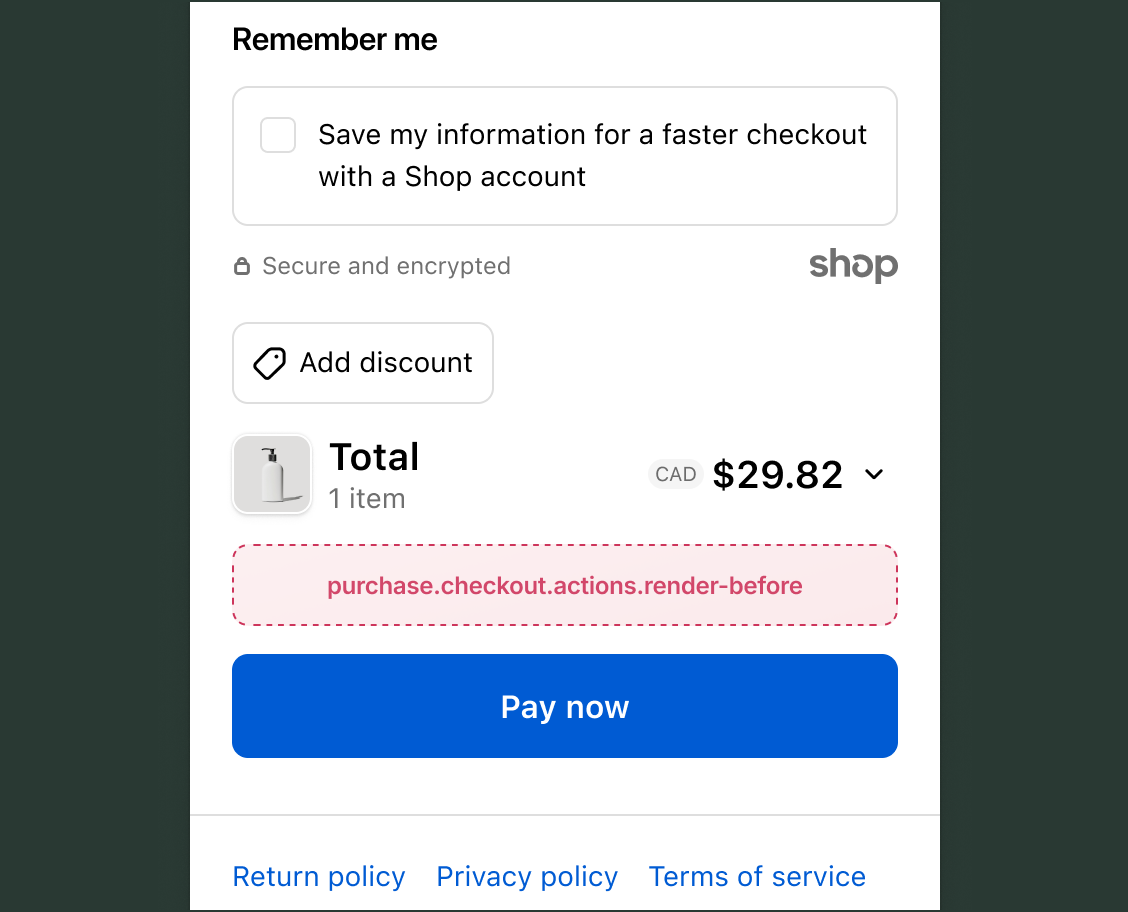
Use this target to render UI before the action buttons on each checkout section. The examples below demonstrate note and metafield writes, the two most common write operations at this target.
Anchor to Render before checkout actions ,[object Object]Render before checkout actions target
purchase.checkout.actions.render-before
Renders before the action button on each checkout step, including information, shipping, payment, and review. Read access to cart contents, buyer identity, delivery details, and cost is available.
Write operations are available through the Note API and Metafields API. Use cart instructions to check which mutations are available before calling them.
Supported components
- Badge
- Banner
- Block
Layout - Block
Spacer - Block
Stack - Button
- Chat
- Checkbox
- Choice
- Choice
List - Clipboard
Item - Consent
Checkbox - Consent
Phone Field - Date
Field - Date
Picker - Disclosure
- Divider
- Drop
Zone - Form
- Grid
- Grid
Item - Heading
- Heading
Group - Icon
- Image
- Inline
Layout - Inline
Spacer - Inline
Stack - Link
- List
- List
Item - Map
- Map
Marker - Map
Popover - Modal
- Payment
Icon - Phone
Field - Popover
- Pressable
- Product
Thumbnail - Progress
- QR code
- Scroll
View - Select
- Sheet
- Skeleton
Image - Skeleton
Text - Skeleton
Text Block - Spinner
- Stepper
- Switch
- Tag
- Text
- Text
Block - Text
Field - Toggle
Button - Toggle
Button Group - Tooltip
- View
Available APIs
- Addresses API
- Analytics API
- Attributes API
- Buyer Identity API
- Buyer Journey API
- Cart Instructions API
- Cart Lines API
- Checkout Token API
- Cost API
- Customer Privacy API
- Delivery API
- Discounts API
- Extension API
- Gift Cards API
- Localization API
- Localized Fields API
- Metafields API
- Note API
- Payments API
- Session Token API
- Settings API
- Shop API
- Storage API
- Storefront API
- UI API
Supported components
- Badge
- Banner
- Block
Layout - Block
Spacer - Block
Stack - Button
- Chat
- Checkbox
- Choice
- Choice
List - Clipboard
Item - Consent
Checkbox - Consent
Phone Field - Date
Field - Date
Picker - Disclosure
- Divider
- Drop
Zone - Form
- Grid
- Grid
Item - Heading
- Heading
Group - Icon
- Image
- Inline
Layout - Inline
Spacer - Inline
Stack - Link
- List
- List
Item - Map
- Map
Marker - Map
Popover - Modal
- Payment
Icon - Phone
Field - Popover
- Pressable
- Product
Thumbnail - Progress
- QR code
- Scroll
View - Select
- Sheet
- Skeleton
Image - Skeleton
Text - Skeleton
Text Block - Spinner
- Stepper
- Switch
- Tag
- Text
- Text
Block - Text
Field - Toggle
Button - Toggle
Button Group - Tooltip
- View
Available APIs
- Addresses API
- Analytics API
- Attributes API
- Buyer Identity API
- Buyer Journey API
- Cart Instructions API
- Cart Lines API
- Checkout Token API
- Cost API
- Customer Privacy API
- Delivery API
- Discounts API
- Extension API
- Gift Cards API
- Localization API
- Localized Fields API
- Metafields API
- Note API
- Payments API
- Session Token API
- Settings API
- Shop API
- Storage API
- Storefront API
- UI API
Examples
Add a gift note checkbox
Description
Let buyers attach a gift message to their order with a checkbox before the action button. This example checks `canUpdateNote` through cart instructions, renders a checkbox, and applies a note change when the buyer opts in.
React
import {useState} from 'react';
import {
  reactExtension,
  Checkbox,
  useApplyNoteChange,
  useInstructions,
} from '@shopify/ui-extensions-react/checkout';

export default reactExtension(
  'purchase.checkout.actions.render-before',
  () => <Extension />,
);

function Extension() {
  const [checked, setChecked] = useState(false);
  const applyNoteChange = useApplyNoteChange();
  const instructions = useInstructions();

  async function onCheckboxChange(isChecked) {
    if (!instructions.notes.canUpdateNote) {
      return;
    }
    setChecked(isChecked);
    const result = await applyNoteChange(
      isChecked
        ? {type: 'updateNote', note: 'This is a gift order'}
        : {type: 'removeNote'},
    );
    if (result.type === 'error') {
      setChecked(!isChecked);
    }
  }

  return (
    <Checkbox checked={checked} onChange={onCheckboxChange}>
      Add a gift message to my order
    </Checkbox>
  );
}
TS
import {extension, Checkbox} from '@shopify/ui-extensions/checkout';

export default extension(
  'purchase.checkout.actions.render-before',
  (root, api) => {
    const checkbox = root.createComponent(Checkbox, {
      onChange: async (isChecked) => {
        if (!api.instructions.value.notes.canUpdateNote) {
          return;
        }
        const result = await api.applyNoteChange(
          isChecked
            ? {type: 'updateNote', note: 'This is a gift order'}
            : {type: 'removeNote'},
        );
        if (result.type === 'error') {
          console.error('Note update failed:', result.message);
        }
      },
    }, 'Add a gift message to my order');

    root.appendChild(checkbox);
  },
);
Store a marketing opt-in as a cart metafield
Description
Collect buyer consent for email marketing and store it as a cart metafield. This example checks `canSetCartMetafields` and `canDeleteCartMetafield` through cart instructions and uses `MetafieldUpdateCartChange` to write the opt-in status.
React
import {useState} from 'react';
import {
  reactExtension,
  Checkbox,
  useApplyMetafieldsChange,
  useInstructions,
} from '@shopify/ui-extensions-react/checkout';

export default reactExtension(
  'purchase.checkout.actions.render-before',
  () => <Extension />,
);

function Extension() {
  const [checked, setChecked] = useState(false);
  const applyMetafieldChange = useApplyMetafieldsChange();
  const instructions = useInstructions();

  async function onCheckboxChange(isChecked) {
    if (isChecked && !instructions.metafields.canSetCartMetafields) return;
    if (!isChecked && !instructions.metafields.canDeleteCartMetafield) return;

    setChecked(isChecked);
    const result = isChecked
      ? await applyMetafieldChange({
          type: 'updateCartMetafield',
          metafield: {
            namespace: '$app:marketing',
            key: 'email_opt_in',
            value: 'true',
            type: 'single_line_text_field',
          },
        })
      : await applyMetafieldChange({
          type: 'removeCartMetafield',
          namespace: '$app:marketing',
          key: 'email_opt_in',
        });

    if (result.type === 'error') {
      setChecked(!isChecked);
    }
  }

  return (
    <Checkbox checked={checked} onChange={onCheckboxChange}>
      Send me emails about new products and promotions
    </Checkbox>
  );
}
TS
import {extension, Checkbox} from '@shopify/ui-extensions/checkout';

export default extension(
  'purchase.checkout.actions.render-before',
  (root, api) => {
    const checkbox = root.createComponent(Checkbox, {
      onChange: async (isChecked) => {
        const {metafields} = api.instructions.value;
        if (isChecked && !metafields.canSetCartMetafields) return;
        if (!isChecked && !metafields.canDeleteCartMetafield) return;

        const result = isChecked
          ? await api.applyMetafieldChange({
              type: 'updateCartMetafield',
              metafield: {
                namespace: '$app:marketing',
                key: 'email_opt_in',
                value: 'true',
                type: 'single_line_text_field',
              },
            })
          : await api.applyMetafieldChange({
              type: 'removeCartMetafield',
              namespace: '$app:marketing',
              key: 'email_opt_in',
            });

        if (result.type === 'error') {
          console.error('Metafield update failed:', result.message);
        }
      },
    }, 'Send me emails about new products and promotions');

    root.appendChild(checkbox);
  },
);
Anchor to Best practicesBest practices
- Check note permissions before writing: Use
instructions.notes.canUpdateNotebefore callingapplyNoteChange. When the instruction isfalse, the method returns an error result instead of applying the change. - Check metafield write permissions: Use
instructions.metafields.canSetCartMetafieldsbefore callingapplyMetafieldChange. When the instruction isfalse, the method returns an error result instead of applying the change. - Revert UI state on failure: Check the mutation's return value for
{type: 'error'}and revert the UI element to its previous state. Leaving a checkbox checked after a failed mutation misleads buyers into thinking their input was saved. - Keep extensions concise: Multiple extensions at this target stack vertically before the action button. Keep each extension's output brief to avoid pushing the button below the visible area.
Anchor to LimitationsLimitations
- Accelerated checkout: This target doesn't render when Shop Pay is the active checkout method. During Apple Pay and Google Pay sessions, the target renders but cart mutation APIs such as
applyNoteChangeandapplyMetafieldChangereturn error results. - Per-section targeting: This target renders before the action button on every checkout section. Conditional rendering based on checkout state is the only way to limit content to a specific section.
- Action button control: Shopify's checkout action buttons, such as Continue to payment and Pay now, can't be modified by any extension. The labels, disabled states, and appearance are controlled by Shopify.
- Buyer journey interception: Rendering at this target doesn't intercept or block navigation. To prevent buyers from advancing, use
buyerJourney.intercept(), which is available from any checkout extension target.