Version 2025-07 is the last API version to support React-based UI components. Later versions use Polaris web components, native UI elements with built-in accessibility, better performance, and consistent styling with Shopify's design system. Check out the upgrade guide to upgrade your extension and avoid being blocked from updating your extension after October 1st 2026.
Header
The header area appears at the top of the checkout page, directly below the store logo and navigation. Extensions in this area add high-visibility content to the checkout experience that buyers see immediately on page load.
Anchor to Use casesUse cases
- Sitewide promotion banners: Display time-limited offers like free shipping thresholds or volume discounts based on the buyer's cart total.
- Loyalty program status: Show the buyer's loyalty points and how many they'll earn from the current purchase, with account creation prompts for new customers.
- Discount code automation: Detect when a buyer qualifies for an automatic discount and apply it, displaying a confirmation banner with the savings amount.
- Geo-targeted messaging: Display region-specific content like customs notices for international orders or currency conversion reminders based on the buyer's location.
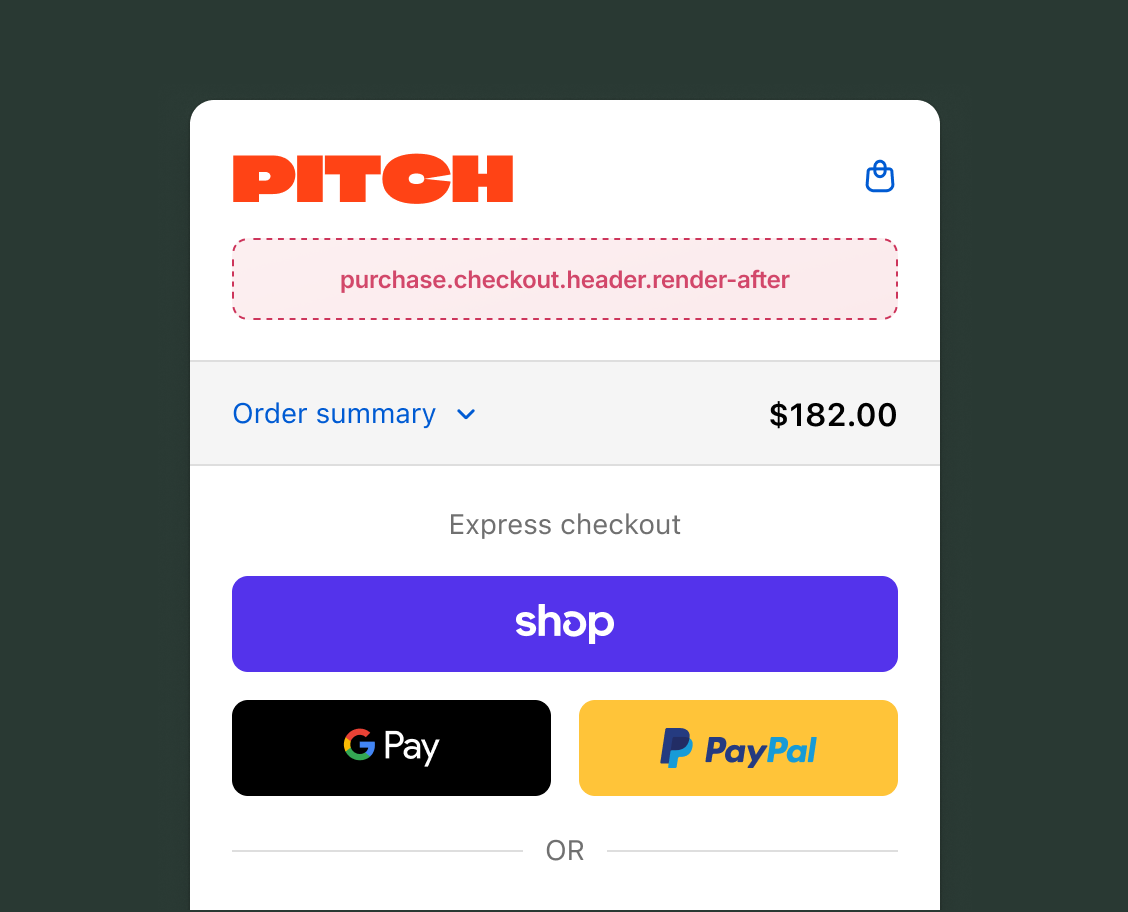
Anchor to Header targetHeader target
Use this static extension target to extend the area directly below the checkout header. This target supports the full checkout component set, including form fields, banners, images, and interactive elements. The examples demonstrate using API methods for cart mutations and API properties for reading checkout state.
Anchor to Checkout header ,[object Object]Checkout header target
purchase.checkout.header.render-after
Adds persistent content directly below the checkout header. Like all checkout targets, this target has write access through API methods for cart lines, discount codes, gift cards, notes, attributes, metafields, and shipping address changes.
Extensions also have read access through API properties to shop information, buyer identity, cost breakdowns, cart lines, delivery groups, discount codes, localization, and other checkout state.
Supported components
- Badge
- Banner
- Block
Layout - Block
Spacer - Block
Stack - Button
- Chat
- Checkbox
- Choice
- Choice
List - Clipboard
Item - Consent
Checkbox - Consent
Phone Field - Date
Field - Date
Picker - Disclosure
- Divider
- Drop
Zone - Form
- Grid
- Grid
Item - Heading
- Heading
Group - Icon
- Image
- Inline
Layout - Inline
Spacer - Inline
Stack - Link
- List
- List
Item - Map
- Map
Marker - Map
Popover - Modal
- Payment
Icon - Phone
Field - Popover
- Pressable
- Product
Thumbnail - Progress
- QR code
- Scroll
View - Select
- Sheet
- Skeleton
Image - Skeleton
Text - Skeleton
Text Block - Spinner
- Stepper
- Switch
- Tag
- Text
- Text
Block - Text
Field - Toggle
Button - Toggle
Button Group - Tooltip
- View
Available APIs
- Addresses API
- Analytics API
- Attributes API
- Buyer Identity API
- Buyer Journey API
- Cart Instructions API
- Cart Lines API
- Checkout Token API
- Cost API
- Customer Privacy API
- Delivery API
- Discounts API
- Extension API
- Gift Cards API
- Localization API
- Localized Fields API
- Metafields API
- Note API
- Payments API
- Session Token API
- Settings API
- Shop API
- Storage API
- Storefront API
- UI API
Supported components
- Badge
- Banner
- Block
Layout - Block
Spacer - Block
Stack - Button
- Chat
- Checkbox
- Choice
- Choice
List - Clipboard
Item - Consent
Checkbox - Consent
Phone Field - Date
Field - Date
Picker - Disclosure
- Divider
- Drop
Zone - Form
- Grid
- Grid
Item - Heading
- Heading
Group - Icon
- Image
- Inline
Layout - Inline
Spacer - Inline
Stack - Link
- List
- List
Item - Map
- Map
Marker - Map
Popover - Modal
- Payment
Icon - Phone
Field - Popover
- Pressable
- Product
Thumbnail - Progress
- QR code
- Scroll
View - Select
- Sheet
- Skeleton
Image - Skeleton
Text - Skeleton
Text Block - Spinner
- Stepper
- Switch
- Tag
- Text
- Text
Block - Text
Field - Toggle
Button - Toggle
Button Group - Tooltip
- View
Available APIs
- Addresses API
- Analytics API
- Attributes API
- Buyer Identity API
- Buyer Journey API
- Cart Instructions API
- Cart Lines API
- Checkout Token API
- Cost API
- Customer Privacy API
- Delivery API
- Discounts API
- Extension API
- Gift Cards API
- Localization API
- Localized Fields API
- Metafields API
- Note API
- Payments API
- Session Token API
- Settings API
- Shop API
- Storage API
- Storefront API
- UI API
Examples
Display a free shipping promotion banner
Description
Create a header extension that calculates the gap between the buyer's cart total and a free shipping threshold, then displays a promotional banner with the remaining amount.
React
import {
  reactExtension,
  Banner,
  useTotalAmount,
} from '@shopify/ui-extensions-react/checkout';

export default reactExtension(
  'purchase.checkout.header.render-after',
  () => <Extension />,
);

const FREE_SHIPPING_THRESHOLD = 75;

function Extension() {
  const totalAmount = useTotalAmount();
  const total = Number(totalAmount.amount);
  const remaining =
    FREE_SHIPPING_THRESHOLD - total;

  if (remaining <= 0) {
    return (
      <Banner status="success">
        You've qualified for free shipping!
      </Banner>
    );
  }

  return (
    <Banner>
      Add ${remaining.toFixed(2)} more for free
      shipping.
    </Banner>
  );
}
TS
import {
  extension,
  Banner,
} from '@shopify/ui-extensions/checkout';

const FREE_SHIPPING_THRESHOLD = 75;

export default extension(
  'purchase.checkout.header.render-after',
  (root, api) => {
    const container = root.createFragment();

    function update() {
      container.replaceChildren();

      const totalAmount =
        api.cost.totalAmount.current;
      const total = Number(totalAmount.amount);
      const remaining =
        FREE_SHIPPING_THRESHOLD - total;

      if (remaining <= 0) {
        container.appendChild(
          root.createComponent(
            Banner,
            {status: 'success'},
            "You've qualified for free shipping!",
          ),
        );
      } else {
        container.appendChild(
          root.createComponent(
            Banner,
            {},
            `Add $${remaining.toFixed(2)} more for free shipping.`,
          ),
        );
      }
    }

    api.cost.totalAmount.subscribe(update);
    update();
    root.appendChild(container);
  },
);
Anchor to Best practicesBest practices
- Reserve space for dynamic content: Layout shifts are highly visible in the header. If you load data asynchronously, use a skeleton paragraph or spinner to hold space while content loads.