Version 2025-07 is the last API version to support React-based UI components. Later versions use Polaris web components, native UI elements with built-in accessibility, better performance, and consistent styling with Shopify's design system. Check out the upgrade guide to upgrade your extension and avoid being blocked from updating your extension after October 1st 2026.
Payments and returns
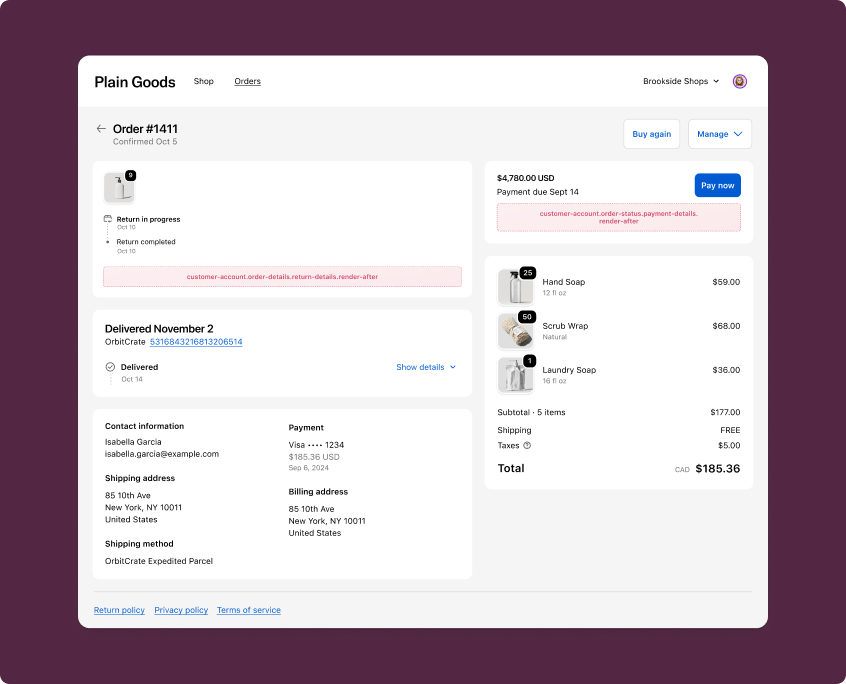
Payments and returns extensions render inside the payment status and return status cards on the Order status page. These cards appear alongside Shopify's native payment and return UI so customers see your extension content in direct context with their order's financial and return details.
Anchor to Use casesUse cases
- Payment reminders: Display notices about outstanding balances, payment terms, or upcoming due dates for orders with pending payments.
- Cost breakdowns: Show supplementary payment information such as installment details, loyalty point usage, or custom surcharges.
- Return status updates: Provide customers with additional context about their return, such as estimated refund timelines or return shipping instructions.
- Return processing details: Display app-specific return information, such as restocking status, exchange options, or return policy reminders.
- Order-specific messaging: Surface contextual messages related to payment or return activity on an order.
Anchor to Payments and returns targetsPayments and returns targets
Payments and returns targets render inside the payment status and return status cards on the Order status page. They're useful for adding contextual information about payments and returns tied to an order.
Anchor to Payment details (render after) ,[object Object]Payment details (render after) target
customer-account.order-status.payment-details.render-after
Renders after the payment details in the payment status card on the Order status page.
Use this target to display payment reminders, cost summaries, or supplementary payment information for an order. This target gives you access to the Order API and the Cart Lines API.
Supported components
- Avatar
- Badge
- Banner
- Block
Layout - Block
Spacer - Block
Stack - Button
- Card
- Checkbox
- Choice
- Choice
List - Clipboard
Item - Customer
Account Action - Date
Field - Date
Picker - Disclosure
- Divider
- Drop
Zone - Form
- Grid
- Grid
Item - Heading
- Heading
Group - Icon
- Image
- Image
Group - Inline
Layout - Inline
Spacer - Inline
Stack - Link
- List
- List
Item - Map
- Map
Marker - Map
Popover - Menu
- Modal
- Page
- Payment
Icon - Phone
Field - Popover
- Pressable
- Product
Thumbnail - Progress
- QRCode
- Resource
Item - Scroll
View - Select
- Sheet
- Skeleton
Image - Skeleton
Text - Skeleton
Text Block - Spinner
- Stepper
- Switch
- Tag
- Text
- Text
Block - Text
Field - Toggle
Button - Toggle
Button Group - Tooltip
- View
Available APIs
- Addresses API
- Analytics API
- Attributes API
- Authenticated Account API
- Authentication State API
- Buyer Identity API
- Cart Lines API
- Checkout Settings API
- Cost API
- Customer Account API
- Customer Privacy API
- Discounts API
- Extension API
- Gift Cards API
- Localization API
- Metafields API
- Navigation API
- Note API
- Order API
- Order Status Localization API
- Require Login API
- Session Token API
- Settings API
- Shop API
- Storage API
- Storefront API
- UI API
- Version API
Supported components
- Avatar
- Badge
- Banner
- Block
Layout - Block
Spacer - Block
Stack - Button
- Card
- Checkbox
- Choice
- Choice
List - Clipboard
Item - Customer
Account Action - Date
Field - Date
Picker - Disclosure
- Divider
- Drop
Zone - Form
- Grid
- Grid
Item - Heading
- Heading
Group - Icon
- Image
- Image
Group - Inline
Layout - Inline
Spacer - Inline
Stack - Link
- List
- List
Item - Map
- Map
Marker - Map
Popover - Menu
- Modal
- Page
- Payment
Icon - Phone
Field - Popover
- Pressable
- Product
Thumbnail - Progress
- QRCode
- Resource
Item - Scroll
View - Select
- Sheet
- Skeleton
Image - Skeleton
Text - Skeleton
Text Block - Spinner
- Stepper
- Switch
- Tag
- Text
- Text
Block - Text
Field - Toggle
Button - Toggle
Button Group - Tooltip
- View
Available APIs
- Addresses API
- Analytics API
- Attributes API
- Authenticated Account API
- Authentication State API
- Buyer Identity API
- Cart Lines API
- Checkout Settings API
- Cost API
- Customer Account API
- Customer Privacy API
- Discounts API
- Extension API
- Gift Cards API
- Localization API
- Metafields API
- Navigation API
- Note API
- Order API
- Order Status Localization API
- Require Login API
- Session Token API
- Settings API
- Shop API
- Storage API
- Storefront API
- UI API
- Version API
Examples
Display a payment reminder
Description
Show a banner in the payment status card reminding customers about pending payment. This example reads order data using `useOrder()` (React) or `order` (TS) to include the order name for context.
React
import {
  reactExtension,
  Banner,
  useOrder,
} from '@shopify/ui-extensions-react/customer-account';

export default reactExtension(
  'customer-account.order-status.payment-details.render-after',
  () => <Extension />,
);

function Extension() {
  const order = useOrder();

  if (!order) {
    return null;
  }

  return (
    <Banner status="warning">
      Order {order.name} has an outstanding balance. Contact the merchant to
      complete your payment.
    </Banner>
  );
}
TS
import {
  Banner,
  extension,
} from '@shopify/ui-extensions/customer-account';

export default extension(
  'customer-account.order-status.payment-details.render-after',
  (root, {order}) => {
    function render() {
      root.replaceChildren();

      const currentOrder = order.current;

      if (!currentOrder) {
        return;
      }

      root.appendChild(
        root.createComponent(
          Banner,
          {status: 'warning'},
          `Order ${currentOrder.name} has an outstanding balance. Contact the merchant to complete your payment.`,
        ),
      );
    }

    order.subscribe(() => render());
    render();
  },
);
Show a payment summary
Description
Display a cost breakdown in the payment status card. This example reads cost data using `useApi()` and `useSubscription()` (React) or `cost` (TS), along with order data using `useOrder()` (React) or `order` (TS), to display subtotal, shipping, tax, and total amounts.
React
import {
  reactExtension,
  BlockStack,
  Divider,
  Heading,
  Text,
  useApi,
  useOrder,
  useSubscription,
} from '@shopify/ui-extensions-react/customer-account';

export default reactExtension(
  'customer-account.order-status.payment-details.render-after',
  () => <Extension />,
);

function Extension() {
  const {cost} = useApi<'customer-account.order-status.payment-details.render-after'>();
  const order = useOrder();
  const subtotal = useSubscription(cost.subtotalAmount);
  const shipping = useSubscription(cost.totalShippingAmount);
  const tax = useSubscription(cost.totalTaxAmount);
  const total = useSubscription(cost.totalAmount);

  if (!order) {
    return null;
  }

  return (
    <BlockStack spacing="base">
      <Heading>Payment summary for {order.name}</Heading>
      <BlockStack spacing="tight">
        <Text>Subtotal: {subtotal.amount} {subtotal.currencyCode}</Text>
        {shipping && (
          <Text>Shipping: {shipping.amount} {shipping.currencyCode}</Text>
        )}
        {tax && (
          <Text>Tax: {tax.amount} {tax.currencyCode}</Text>
        )}
        <Divider />
        <Text emphasis="bold">Total: {total.amount} {total.currencyCode}</Text>
      </BlockStack>
    </BlockStack>
  );
}
TS
import {
  BlockStack,
  Divider,
  extension,
  Heading,
  Text,
} from '@shopify/ui-extensions/customer-account';

export default extension(
  'customer-account.order-status.payment-details.render-after',
  (root, {order, cost}) => {
    function render() {
      root.replaceChildren();

      const currentOrder = order.current;
      const subtotal = cost.subtotalAmount.current;
      const shipping = cost.totalShippingAmount.current;
      const tax = cost.totalTaxAmount.current;
      const total = cost.totalAmount.current;

      if (!currentOrder) {
        return;
      }

      const details = [
        root.createComponent(
          Text,
          undefined,
          `Subtotal: ${subtotal.amount} ${subtotal.currencyCode}`,
        ),
      ];

      if (shipping) {
        details.push(
          root.createComponent(
            Text,
            undefined,
            `Shipping: ${shipping.amount} ${shipping.currencyCode}`,
          ),
        );
      }

      if (tax) {
        details.push(
          root.createComponent(
            Text,
            undefined,
            `Tax: ${tax.amount} ${tax.currencyCode}`,
          ),
        );
      }

      details.push(root.createComponent(Divider));
      details.push(
        root.createComponent(
          Text,
          {emphasis: 'bold'},
          `Total: ${total.amount} ${total.currencyCode}`,
        ),
      );

      root.appendChild(
        root.createComponent(BlockStack, {spacing: 'base'}, [
          root.createComponent(
            Heading,
            undefined,
            `Payment summary for ${currentOrder.name}`,
          ),
          root.createComponent(BlockStack, {spacing: 'tight'}, details),
        ]),
      );
    }

    order.subscribe(() => render());
    cost.totalAmount.subscribe(() => render());
    render();
  },
);
Anchor to Return details (render after) ,[object Object]Return details (render after) target
customer-account.order-status.return-details.render-after
Renders after the return details in the return status card on the Order status page. This card only appears when a return has been requested. A separate instance of this extension is rendered for each return.
Use this target to display return processing updates, refund estimates, or supplementary return information for a specific return. This target provides returnId to identify the current return, and gives you access to the Order API and the Cart Lines API.
Supported components
- Avatar
- Badge
- Banner
- Block
Layout - Block
Spacer - Block
Stack - Button
- Card
- Checkbox
- Choice
- Choice
List - Clipboard
Item - Customer
Account Action - Date
Field - Date
Picker - Disclosure
- Divider
- Drop
Zone - Form
- Grid
- Grid
Item - Heading
- Heading
Group - Icon
- Image
- Image
Group - Inline
Layout - Inline
Spacer - Inline
Stack - Link
- List
- List
Item - Map
- Map
Marker - Map
Popover - Menu
- Modal
- Page
- Payment
Icon - Phone
Field - Popover
- Pressable
- Product
Thumbnail - Progress
- QRCode
- Resource
Item - Scroll
View - Select
- Sheet
- Skeleton
Image - Skeleton
Text - Skeleton
Text Block - Spinner
- Stepper
- Switch
- Tag
- Text
- Text
Block - Text
Field - Toggle
Button - Toggle
Button Group - Tooltip
- View
Available APIs
- Addresses API
- Analytics API
- Attributes API
- Authenticated Account API
- Authentication State API
- Buyer Identity API
- Cart Lines API
- Checkout Settings API
- Cost API
- Customer Account API
- Customer Privacy API
- Discounts API
- Extension API
- Gift Cards API
- Localization API
- Metafields API
- Navigation API
- Note API
- Order API
- Order Status Localization API
- Require Login API
- Session Token API
- Settings API
- Shop API
- Storage API
- Storefront API
- UI API
- Version API
Supported components
- Avatar
- Badge
- Banner
- Block
Layout - Block
Spacer - Block
Stack - Button
- Card
- Checkbox
- Choice
- Choice
List - Clipboard
Item - Customer
Account Action - Date
Field - Date
Picker - Disclosure
- Divider
- Drop
Zone - Form
- Grid
- Grid
Item - Heading
- Heading
Group - Icon
- Image
- Image
Group - Inline
Layout - Inline
Spacer - Inline
Stack - Link
- List
- List
Item - Map
- Map
Marker - Map
Popover - Menu
- Modal
- Page
- Payment
Icon - Phone
Field - Popover
- Pressable
- Product
Thumbnail - Progress
- QRCode
- Resource
Item - Scroll
View - Select
- Sheet
- Skeleton
Image - Skeleton
Text - Skeleton
Text Block - Spinner
- Stepper
- Switch
- Tag
- Text
- Text
Block - Text
Field - Toggle
Button - Toggle
Button Group - Tooltip
- View
Available APIs
- Addresses API
- Analytics API
- Attributes API
- Authenticated Account API
- Authentication State API
- Buyer Identity API
- Cart Lines API
- Checkout Settings API
- Cost API
- Customer Account API
- Customer Privacy API
- Discounts API
- Extension API
- Gift Cards API
- Localization API
- Metafields API
- Navigation API
- Note API
- Order API
- Order Status Localization API
- Require Login API
- Session Token API
- Settings API
- Shop API
- Storage API
- Storefront API
- UI API
- Version API
Examples
Display a return processing notice
Description
Show a banner in the return status card informing customers about return processing. This example reads order data using `useOrder()` (React) or `order` (TS) to include the order name for context.
React
import {
  reactExtension,
  Banner,
  useOrder,
} from '@shopify/ui-extensions-react/customer-account';

export default reactExtension(
  'customer-account.order-status.return-details.render-after',
  () => <Extension />,
);

function Extension() {
  const order = useOrder();

  if (!order) {
    return null;
  }

  return (
    <Banner status="info">
      Your return for order {order.name} is being processed. Refunds typically
      take 5–10 business days to appear on your statement.
    </Banner>
  );
}
TS
import {
  Banner,
  extension,
} from '@shopify/ui-extensions/customer-account';

export default extension(
  'customer-account.order-status.return-details.render-after',
  (root, {order}) => {
    function render() {
      root.replaceChildren();

      const currentOrder = order.current;

      if (!currentOrder) {
        return;
      }

      root.appendChild(
        root.createComponent(
          Banner,
          {status: 'info'},
          `Your return for order ${currentOrder.name} is being processed. Refunds typically take 5–10 business days to appear on your statement.`,
        ),
      );
    }

    order.subscribe(() => render());
    render();
  },
);
Show return details with shipping instructions
Description
Display return shipping instructions specific to a return. This example uses `returnId` from `useApi()` (React) or the API object (TS) to reference the current return and provides contextual return information.
React
import {
  reactExtension,
  BlockStack,
  Heading,
  Text,
  useApi,
  useOrder,
} from '@shopify/ui-extensions-react/customer-account';

export default reactExtension(
  'customer-account.order-status.return-details.render-after',
  () => <Extension />,
);

function Extension() {
  const {returnId} = useApi<'customer-account.order-status.return-details.render-after'>();
  const order = useOrder();

  if (!order) {
    return null;
  }

  return (
    <BlockStack spacing="base">
      <Heading>Return shipping instructions</Heading>
      <Text>
        Please ship your items back within 14 days. Include return reference{' '}
        {returnId} on the shipping label.
      </Text>
      <Text appearance="subdued">
        Order {order.name}
      </Text>
    </BlockStack>
  );
}
TS
import {
  BlockStack,
  extension,
  Heading,
  Text,
} from '@shopify/ui-extensions/customer-account';

export default extension(
  'customer-account.order-status.return-details.render-after',
  (root, {returnId, order}) => {
    function render() {
      root.replaceChildren();

      const currentOrder = order.current;

      if (!currentOrder) {
        return;
      }

      root.appendChild(
        root.createComponent(BlockStack, {spacing: 'base'}, [
          root.createComponent(Heading, undefined, 'Return shipping instructions'),
          root.createComponent(
            Text,
            undefined,
            `Please ship your items back within 14 days. Include return reference ${returnId} on the shipping label.`,
          ),
          root.createComponent(
            Text,
            {appearance: 'subdued'},
            `Order ${currentOrder.name}`,
          ),
        ]),
      );
    }

    order.subscribe(() => render());
    render();
  },
);
Anchor to Best practicesBest practices
- Keep content contextual: These extensions render inside payment and return status cards, so content should be directly relevant to the payment or return being displayed.
- Guard against missing data: Always check that
useOrder()(React) ororder.current(TS) is defined before rendering order-specific content. The order data loads asynchronously and may beundefinedon the initial render. - Subscribe to data changes in TS extensions: When using the imperative
extension()API, subscribe toorderandcostto re-render when data becomes available or changes. Callroot.replaceChildren()before re-rendering to avoid duplicate content. - Avoid heavy rendering: These targets render inline within the Order status page. Avoid complex layouts or large data fetches that could cause layout shifts. Use Banner or lightweight BlockStack layouts for the best experience.
Anchor to LimitationsLimitations
- Return card visibility: The return status card only appears when a return has been requested for the order. The
customer-account.order-status.return-details.render-aftertarget won't render if no returns exist.