Technologies for customizing Shopify checkout
This guide describes the various technologies that you can use to customize Shopify checkout. The primary technology for adding custom UI is checkout UI extensions, which are built with Polaris — Shopify's unified system for building app interfaces. Polaris provides targets that define where your extension appears in the checkout flow, target APIs that give your extension access to checkout data and functionality, and web components that render the UI.
Anchor to TechnologiesTechnologies
You can customize Shopify checkout using the following technologies:
| Technology | Customization type | Availability |
|---|---|---|
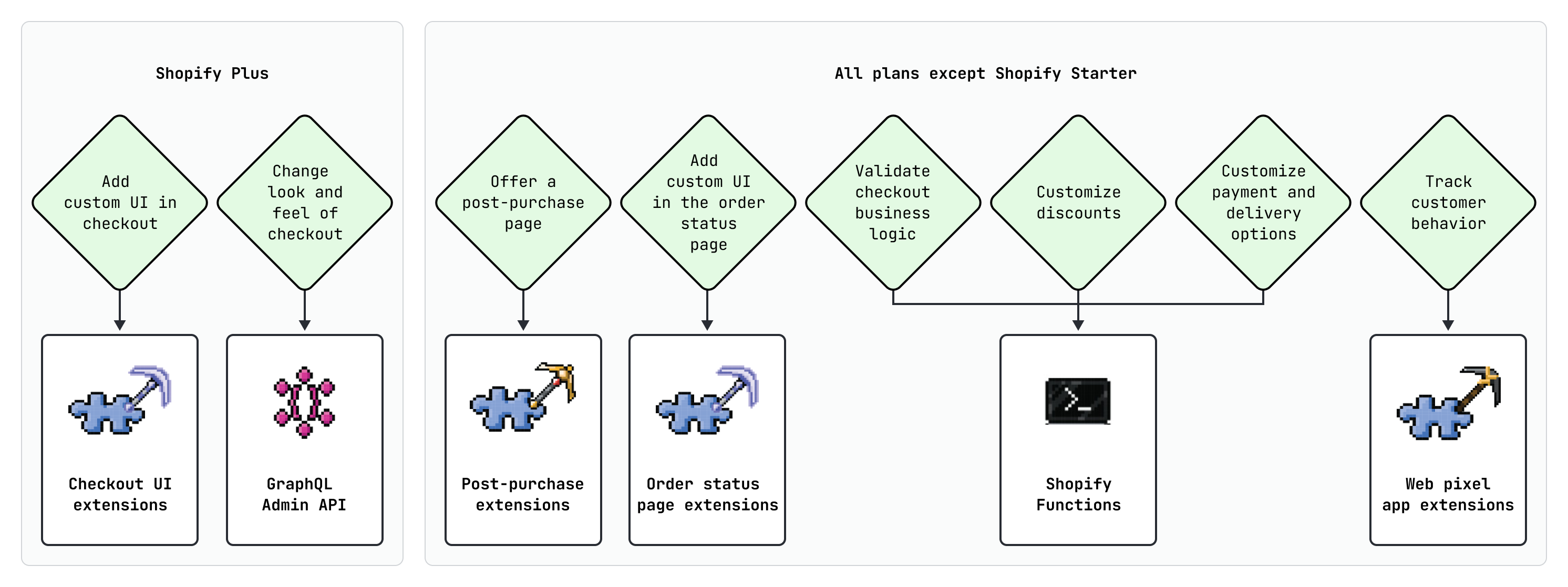
| Checkout UI extensions | Add custom UI or content to the checkout process and Order status page | Shopify Plus. Thank you and Order status extensions are available to all plans except Shopify Starter. Market overrides are available to Advanced. |
| Checkout UI extensions: post-purchase | Add new content to the post-purchase page | All plans except Shopify Starter. Currently in beta. Can be used without restrictions in a dev store. To use post-purchase extensions on a live store, you need to request access. |
| GraphQL Admin API | Customize the look and feel of checkout | Shopify Plus |
| Shopify Functions | Extend or replace key parts of Shopify's backend with custom logic | All plans except Shopify Starter. Some Function APIs are only available in feature preview. Merchants that have checkout.liquid customizations need to upgrade to Shopify Extensions in Checkout to use Function APIs. |
| Web pixel extensions | Track customer behavior | All plans except Shopify Starter. |
The following diagram provides a decision tree for choosing a technology:
Anchor to Use casesUse cases
There are a variety of ways that you can customize Shopify checkout. The following table describes some common use cases that you can build:
| Technology | Customization type | Use cases |
|---|---|---|
| Checkout UI extensions | Add custom UI or content to the checkout process and Order status page |
|
| Checkout UI extensions: post-purchase | Add new content to the post-purchase page |
|
| GraphQL Admin API | Customize the look and feel of checkout |
|
| Shopify Functions | Extend or replace key parts of Shopify's backend with custom logic |
|
| Web pixel extensions | Track customer behavior |
|
Anchor to Market overridesMarket overrides
Merchants on Advanced or Plus who use markets can tailor their checkout and customer accounts experience for regional and company location markets.
In the checkout and accounts editor, merchants can create market-specific overrides in either their published or draft configurations. Overrides inherit from their parent market override or from the store's default experience when no parent override exists. A market override can include changes to branding and settings, and can add, reorder, or remove extensions.
If the buyer's resolved markets change while they're in checkout or customer accounts (for example, due to a delivery address change), updated settings are dynamically reloaded. Extensions might also be added or removed as a result. If an extension is moved to a different target for a market, it's treated as a new activation and will be unmounted and remounted.
To ensure the best merchant and buyer experience:
- Prefer native market overrides in the editor over re-implementing your custom market contextualization for market types already supported by Shopify.
- Don't rely on
useLocalizationMarket()for market-specific conditions. Market definitions are merchant-defined and this API returns only the most precise regional market. Use delivery address or company location information for regional/B2B logic. - Use local storage to persist state across extension activations and target changes.
Anchor to Next stepsNext steps
- Get started building for checkout to scaffold your first checkout UI extension.
- Explore the checkout UI extensions reference for available targets, target APIs, and web components.
- If your extension calls your own app backend, build it with one of Shopify's official libraries, including
shopify-app-phpfor PHP frameworks like Laravel andshopify-app-pythonfor Python frameworks like Django.