Events delivery structure
Each qualifying change sends an Events delivery to the destination configured in your subscription's uri.
Events supports HTTPS, Amazon EventBridge, and Google Cloud Pub/Sub. See Subscription fields to configure your destination.
For HTTPS destinations, Shopify sends an HTTP POST with a JSON payload in the request body and delivery metadata in HTTP headers. For Amazon EventBridge and Google Cloud Pub/Sub, delivery metadata accompanies the payload in the message.
By default, the payload includes metadata about the subscription and the change.
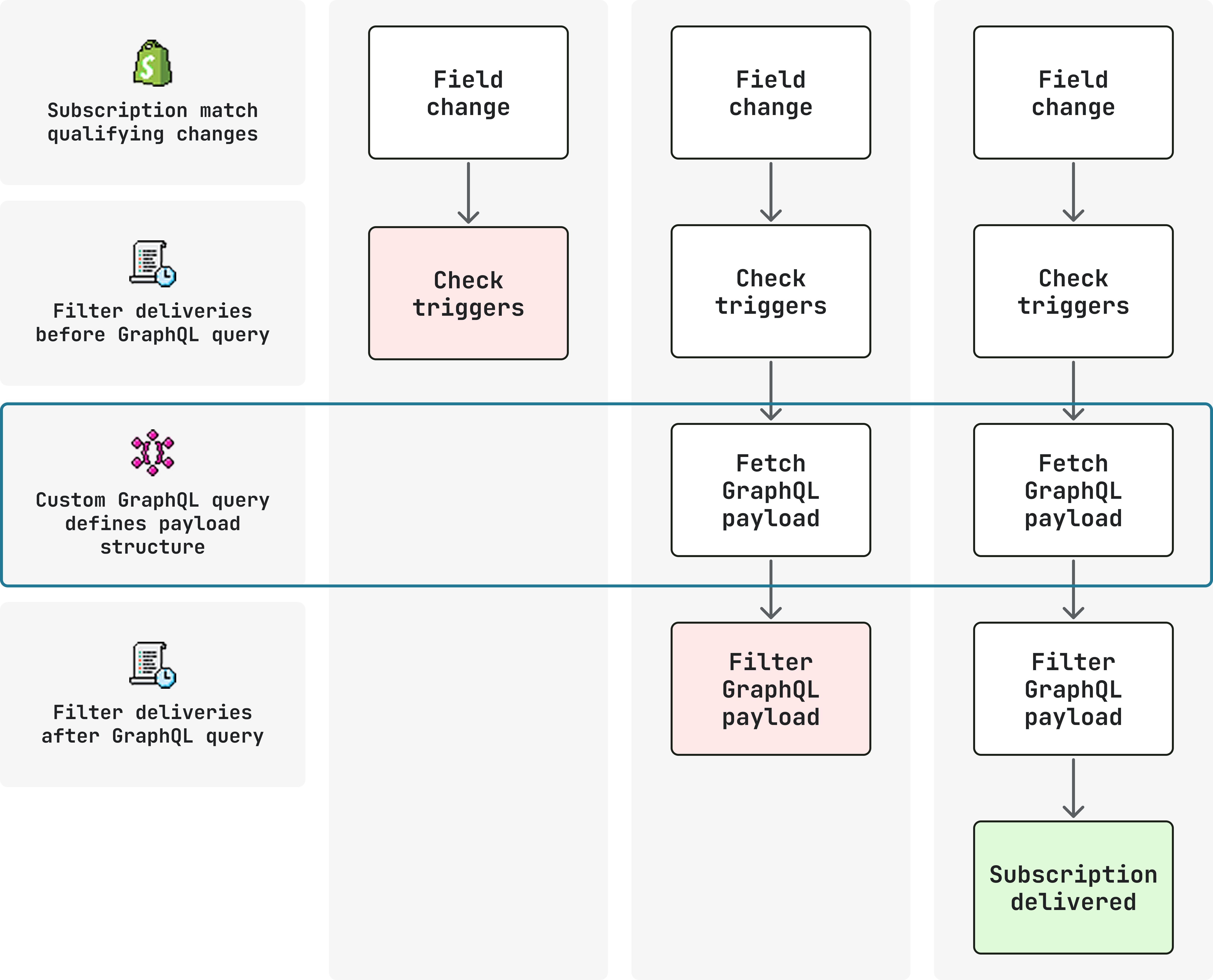
Add a query to include custom data from the GraphQL Admin API, and combine with a query_filter to define conditions where the delivery is sent or suppressed.
Anchor to PayloadPayload
The JSON payload includes the following fields, except when the delivery uses a large-payload URL:
| Field | Description |
|---|---|
topic | The resource name for this delivery (for example, Product). |
action | The operation that occurred: create, update, or delete. |
handle | The subscription handle from your TOML configuration. Useful for routing when you have multiple subscriptions on the same topic. |
fields_changed | An object containing added, updated, and removed arrays of dot-notation paths with embedded GIDs. Every payload includes all three arrays. |
query_variables | The entity IDs resolved for this delivery in a flat key-value format, matching the variables available to your query. |
topic, action, and handle are also repeated in the delivery metadata.
These fields are set in your subscription configuration.
Example payload
The following fields are present only when a query is configured:
| Field | Description |
|---|---|
data | The result of your GraphQL query. |
errors | A GraphQL errors array, returned when your query fails to execute (for example, referencing a removed field or a deleted resource). |
See Custom queries for more details on how queries change the response.
Anchor to [object Object]fields_changed
fields_changedfields_changed always includes added, updated, and removed arrays. Each array lists paths for that type of change. The action describes the operation on the topic resource independently of these arrays. For example, adding or removing a product variant has action: "update" and a path in added or removed, respectively.
Each path embeds GIDs so you can identify exactly which entity and field changed:
fields_changed
Use the arrays in fields_changed to branch logic when a subscription covers multiple trigger paths.
Anchor to [object Object]query_variables
query_variablesquery_variables contains the same IDs in a flat shape suitable for use as GraphQL variables in your handler code.
The available variables depend on the topic and triggers configured for the subscription.
The Events reference lists the variables available for each trigger.
Although you can combine any collection of triggers together in an Event subscription to a particular topic, there will be cases when variables available to some triggers in your subscription aren't available to others. This mismatch can result in errors when attempting to reference unavailable variables in your queries.
For example, consider the following subscription:
shopify.app.toml
The following variables are available to each trigger (see the product Events reference):
product.title:productIdproduct.variants.price:productIdandvariantsId
If you try to define your query in this way, the subscription is invalid and you'll receive an error stating variantsId is not available in product.title.
Anchor to Large payloadsLarge payloads
When the payload would exceed the limit for the delivery channel, Shopify stores the full content and sends a small payload that includes only topic, action, handle, payload_url, payload_size_bytes, and expires_at.
fields_changed, query_variables, and data are present in the full content available at payload_url.
When handling overflow payloads:
- For HTTPS deliveries, verify the HMAC signature on the small payload, not on the downloaded content.
- Download the full content from
payload_urlbefore it expires. - Treat
payload_urlas a short-lived credential. It's unguessable and expires.
Your handlers must be prepared for both inline and overflow payloads.
Check for the presence of payload_url before attempting to read fields_changed, query_variables, or data from the payload.
| Channel | Limit |
|---|---|
| HTTPS | 5 MB |
| Google Cloud Pub/Sub | 10 MB |
| Amazon EventBridge | 256 KB |
Keep queries only as large as your app needs to reduce overflow risk.
Keep queries only as large as your app needs to reduce overflow risk.
Anchor to HeadersHeaders
HTTPS deliveries include HTTP headers with metadata about the subscription and change. For HTTPS, treat header names as case-insensitive in your code, as HTTP/2 often lowercases them. For Google Cloud Pub/Sub and Amazon EventBridge deliveries, metadata accompanies the payload in the message.
Use the delivery metadata to verify HTTPS deliveries and detect duplicates:
Shopify-Hmac-Sha256: Verify before processing an HTTPS delivery. Google Cloud Pub/Sub and Amazon EventBridge deliveries don't require HMAC verification.Shopify-Webhook-Id: Use to detect and ignore duplicate deliveries.
For HTTPS deliveries, the topic, action, and handle values from your subscription are also present as headers, useful for routing at the HTTP layer without parsing the body.
For the complete list, see HTTP headers in the Events reference.
Anchor to Custom queriesCustom queries
query is an optional GraphQL Admin API operation defined in your subscription.
When set, Shopify runs it after a qualifying change and includes the result in the delivery's data field.
The query isn't limited to the subscribed topic, can reference multiple root fields in a single operation, and can include any valid fields your app's scopes allow.
Without a query, deliveries include fields_changed and query_variables but no data:
Without query
shopify.app.toml
[[events.subscription]]
handle = "product-updates"

topic = "Product"
actions = ["update"]
triggers = ["product.variants.price"]

uri = "https://your-app.example.com/events"
{} Response
{
  "topic": "Product",
  "action": "update",
  "handle": "product-updates",
  "fields_changed": {
    "added": [],
    "updated": [
      "product[id: 'gid://shopify/Product/123'].variants[id: 'gid://shopify/ProductVariant/456'].price"
    ],
    "removed": []
  },
  "query_variables": {
    "productId": "gid://shopify/Product/123",
    "variantsId": "gid://shopify/ProductVariant/456"
  }
}
Adding query tells Shopify to run a GraphQL Admin API operation after the change and include the result in data:
With query
shopify.app.toml
[[events.subscription]]
handle = "price-sync"

topic = "Product"
actions = ["update"]
triggers = ["product.variants.price"]

uri = "https://your-app.example.com/events"

query = """
  query price_change($productId: ID!, $variantsId: ID!) {
    product(id: $productId) {
      title
      status
    }
    productVariant(id: $variantsId) {
      id
      price
      sku
    }
  }
"""
{} Response
{
  "topic": "Product",
  "action": "update",
  "handle": "price-sync",
  "data": {
    "product": {
      "title": "Widget",
      "status": "ACTIVE"
    },
    "productVariant": {
      "id": "gid://shopify/ProductVariant/456",
      "price": "29.99",
      "sku": "WIDGET-BLUE"
    }
  },
  "fields_changed": {
    "added": [],
    "updated": [
      "product[id: 'gid://shopify/Product/123'].variants[id: 'gid://shopify/ProductVariant/456'].price"
    ],
    "removed": []
  },
  "query_variables": {
    "variantsId": "gid://shopify/ProductVariant/456",
    "productId": "gid://shopify/Product/123"
  }
}
IDs from the change bubble up as GraphQL variables (for example $productId, $variantsId) so the query can target the specific entities involved.
Anchor to Combining with ,[object Object]Combining with query_filter
query_filterAdd query_filter to gate whether the delivery is sent based on current values from the query result.
When both are set, Shopify runs them in sequence:
queryruns first to builddataquery_filterevaluates against that result and suppresses the delivery if it resolves to false
If query_filter is set, query must also be configured.
With query and query_filter
shopify.app.toml
[[events.subscription]]
handle = "price-sync"

topic = "Product"
actions = ["update"]
triggers = ["product.variants.price"]

uri = "https://your-app.example.com/events"

query = """
  query price_change($productId: ID!, $variantsId: ID!) {
    product(id: $productId) {
      title
      status
    }
    productVariant(id: $variantsId) {
      id
      price
    }
  }
"""

query_filter = "product.status:'ACTIVE' AND productVariant.price:>100"
{} Response
{
  "topic": "Product",
  "action": "update",
  "handle": "price-sync",
  "data": {
    "product": {
      "title": "Widget",
      "status": "ACTIVE"
    },
    "productVariant": {
      "id": "gid://shopify/ProductVariant/456",
      "price": "129.99"
    }
  },
  "fields_changed": {
    "added": [],
    "updated": [
      "product[id: 'gid://shopify/Product/123'].variants[id: 'gid://shopify/ProductVariant/456'].price"
    ],
    "removed": []
  },
  "query_variables": {
    "variantsId": "gid://shopify/ProductVariant/456",
    "productId": "gid://shopify/Product/123"
  }
}
See Filter Events deliveries for filter syntax and examples.
Anchor to Query variables and bubble-upQuery variables and bubble-up
IDs flow up from the changed entity through the ownership hierarchy, so a variant change also provides $productId.
Variable names follow the field path pattern in camelCase (for example $variantsId, $productId).
Available variables for your topic and triggers are listed in the Events reference.
Anchor to Validation and runtime errorsValidation and runtime errors
The query is validated when the subscription is saved and must only reference variables that your triggers can supply.
At runtime, GraphQL errors from the query appear in the payload's errors field.
Check errors in your handler to detect and log query failures.
Common query issues:
- The query references a field that doesn't exist on the type.
- A required variable isn't available. Variables like
$variantsIdand$productIdare injected automatically, but only when the entity they reference is involved in the change.
Queries run with your app's access scopes.
Fields you can't read might return null rather than an error.
Anchor to ExampleExample
The following subscription delivers only when a variant's price changes on a product that is currently active and priced above $100:
Product price change
shopify.app.toml
[events]
api_version = "2026-10"

[[events.subscription]]
handle = "product-price-change"
topic = "Product"
actions = ["update"]

triggers = [
  "product.variants.price",
  "product.variants.compareAtPrice"
]

uri = "https://your-app.example.com/events"

query = """
  query price_change($productId: ID!, $variantsId: ID!) {
    productVariant(id: $variantsId) {
      id
      price
      compareAtPrice
    }
    product(id: $productId) {
      id
      title
      status
    }
  }
"""

query_filter = "product.status:'ACTIVE' AND productVariant.price:>100"
{} Response
{
  "topic": "Product",
  "action": "update",
  "handle": "product-price-change",
  "data": {
    "productVariant": {
      "id": "gid://shopify/ProductVariant/456",
      "price": "129.99",
      "compareAtPrice": "149.99"
    },
    "product": {
      "id": "gid://shopify/Product/123",
      "title": "Widget",
      "status": "ACTIVE"
    }
  },
  "fields_changed": {
    "added": [],
    "updated": [
      "product[id: 'gid://shopify/Product/123'].variants[id: 'gid://shopify/ProductVariant/456'].price"
    ],
    "removed": []
  },
  "query_variables": {
    "variantsId": "gid://shopify/ProductVariant/456",
    "productId": "gid://shopify/Product/123"
  }
}
Anchor to Next stepsNext steps
- Delivery filtering: Control which changes qualify and whether a delivery is sent.
- Optimizing your subscriptions: Split broad subscriptions into focused deliveries without losing data coverage.
- Verify deliveries: HMAC verification and deduplication.