Filter Events deliveries
An Events subscription fires on qualifying changes to the topic. Delivery filtering lets you narrow that without changing your topic or actions.
Two mechanisms run in sequence: triggers gates at the change level before any query runs, and query_filter gates afterward on the query result.
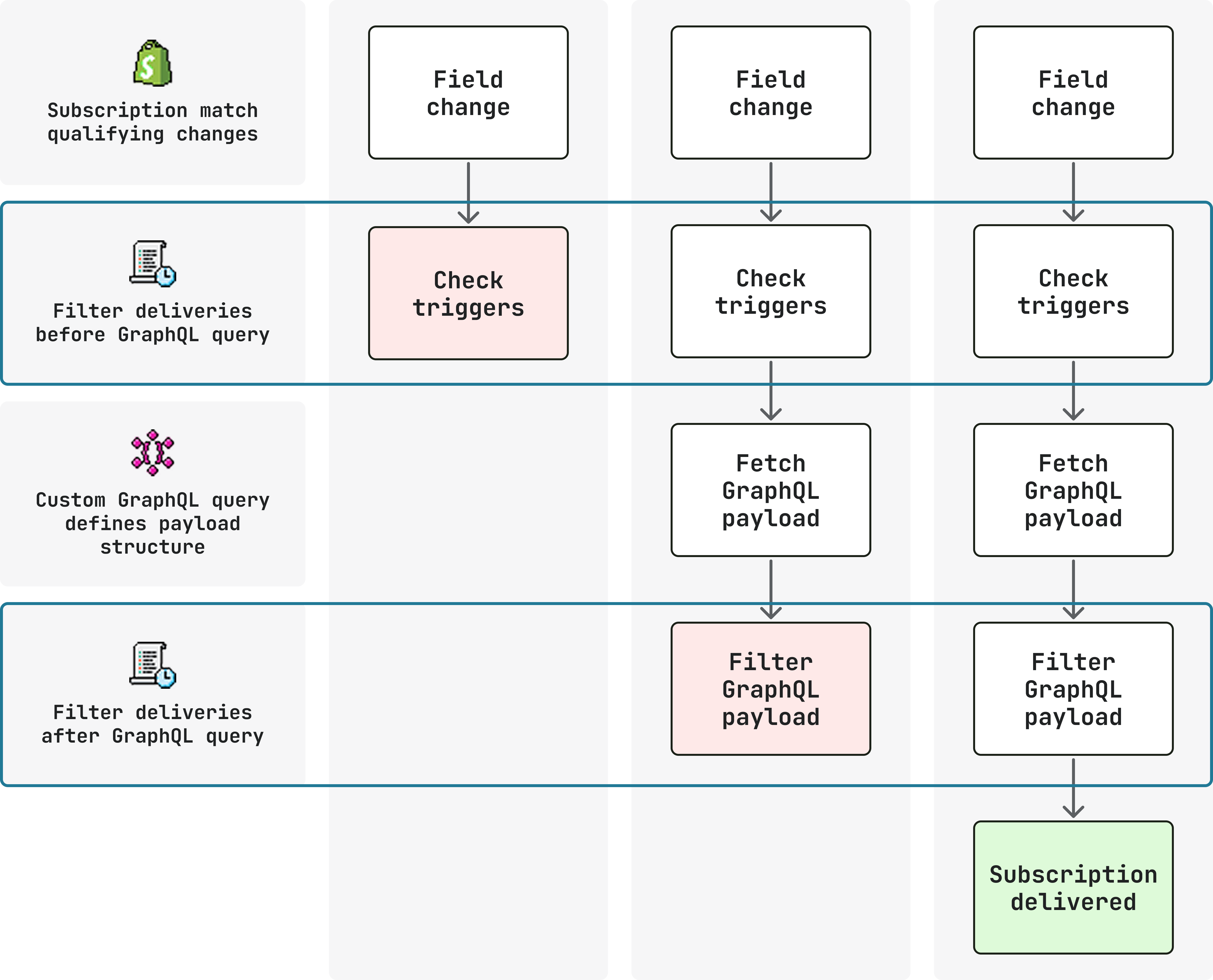
Anchor to TriggersTriggers
triggers is an array of field paths on the subscribed topic, required when actions includes update. Subscriptions with only create or delete actions don't require triggers.
Use a parent trigger such as product.* to receive deliveries for all supported field changes under that topic, including nested triggers:
Parent trigger
shopify.app.toml
[events]
api_version = "2026-10"

[[events.subscription]]
handle = "product-updates"
topic = "Product"
actions = ["update"]
triggers = ["product.*"]

uri = "https://your-app.example.com/events"
{} Response
{
  "topic": "Product",
  "action": "update",
  "handle": "product-updates",
  "fields_changed": {
    "added": [],
    "updated": [
      "product[id: 'gid://shopify/Product/123'].title"
    ],
    "removed": []
  },
  "query_variables": {
    "productId": "gid://shopify/Product/123"
  }
}
Choose specific trigger paths to narrow deliveries to changes on those paths:
Specific triggers
shopify.app.toml
[events]
api_version = "2026-10"

[[events.subscription]]
handle = "product-updates"
topic = "Product"
actions = ["update"]

triggers = [
    "product.variants.price",
    "product.variants.barcode"
]

uri = "https://your-app.example.com/events"
{} Response
{
  "topic": "Product",
  "action": "update",
  "handle": "product-updates",
  "fields_changed": {
    "added": [],
    "updated": [
      "product[id: 'gid://shopify/Product/123'].variants[id: 'gid://shopify/ProductVariant/456'].price"
    ],
    "removed": []
  },
  "query_variables": {
    "productId": "gid://shopify/Product/123",
    "variantsId": "gid://shopify/ProductVariant/456"
  }
}
Anchor to ConstraintsConstraints
Each entry in triggers must be a supported field path for the subscribed topic:
- Validation: Shopify validates paths per topic at deploy time. An invalid path prevents the subscription from being created. Always use the Events reference as the source of valid trigger paths, not the GraphQL schema alone.
- Derived fields: Derived fields (for example,
product.compareAtPriceRange) aren't valid triggers, because they don't have an independent change signal in the pipeline (it's derived from the highest and lowest product variant's compare-at prices). - Deprecated fields: Deprecated fields can still be valid trigger paths. Deprecation signals that a field will eventually be removed from the API, but it doesn't remove the change signal from the pipeline. If both old and new field names exist (for example
bodyHtmlanddescriptionHtml), changes to either can trigger. Check the Events reference to confirm which deprecated paths remain supported.
triggers only applies to update and is evaluated after topic and actions have matched.
When multiple paths are listed, any one matching path qualifies the delivery.
Anchor to Query filtersQuery filters
query_filter runs after the query response exists.
It decides whether to send a delivery using current values from the query output, not change deltas.
It supports AND and OR combinations.
With query_filter
shopify.app.toml
[events]
api_version = "2026-10"

[[events.subscription]]
handle = "product-price-change"
topic = "Product"
actions = ["update"]

triggers = [
    "product.variants.price"
]

uri = "https://your-app.example.com/events"

query = """
  query price_change($productId: ID!, $variantsId: ID!) {
    productVariant(id: $variantsId) {
      id
      price
    }
    product(id: $productId) {
      id
      title
      status
    }
  }
"""

query_filter = "product.status:'ACTIVE' AND productVariant.price:>100"
{} Response
{
  "topic": "Product",
  "action": "update",
  "handle": "product-price-change",
  "data": {
    "productVariant": {
      "id": "gid://shopify/ProductVariant/456",
      "price": "129.99"
    },
    "product": {
      "id": "gid://shopify/Product/123",
      "title": "Widget",
      "status": "ACTIVE"
    }
  },
  "fields_changed": {
    "added": [],
    "updated": [
      "product[id: 'gid://shopify/Product/123'].variants[id: 'gid://shopify/ProductVariant/456'].price"
    ],
    "removed": []
  },
  "query_variables": {
    "variantsId": "gid://shopify/ProductVariant/456",
    "productId": "gid://shopify/Product/123"
  }
}
Without query_filter, the subscription above would deliver for every qualifying change regardless of the current field values.
A price change on an inactive product would still fire.
Adding the query_filter restricts deliveries to only variant price changes on active products.
Anchor to ConstraintsConstraints
Each query_filter expression must reference fields your query returns using the right syntax:
- Query root: Filter paths must start from the same root as your
query. If your query starts atproductVariant, the filter path must beproductVariant.price, notproduct.variants.price. - Limitations:
query_filtercan't express previous-value vs. new-value comparisons, reference fields not returned by yourquery, or replace multi-step business logic that belongs in your app. - Syntax: There must be no space between
:and the field value.product.status:'ACTIVE'is valid;product.status: 'ACTIVE'fails. Shopify validates the filter expression at deploy time.
Anchor to ExampleExample
Suppose you want your app to be notified only when a variant's price or compare-at price changes on an active product.
With a broad trigger such as product.*, your subscription fires for all supported product field changes, including title, tags, and status changes you don't care about.
The following subscription uses triggers to gate on price-related changes, a query to fetch current values, and query_filter to suppress deliveries for inactive products:
Product price change
shopify.app.toml
[events]
api_version = "2026-10"

[[events.subscription]]
handle = "product-price-change"
topic = "Product"
actions = ["update"]

triggers = [
  "product.variants.price",
  "product.variants.compareAtPrice"
]

uri = "https://your-app.example.com/events"

query = """
  query price_change($productId: ID!, $variantsId: ID!) {
    productVariant(id: $variantsId) {
      id
      price
      compareAtPrice
    }
    product(id: $productId) {
      id
      title
      status
    }
  }
"""

query_filter = "product.status:'ACTIVE' AND productVariant.price:>100"
{} Response
{
  "topic": "Product",
  "action": "update",
  "handle": "product-price-change",
  "data": {
    "productVariant": {
      "id": "gid://shopify/ProductVariant/456",
      "price": "129.99",
      "compareAtPrice": "149.99"
    },
    "product": {
      "id": "gid://shopify/Product/123",
      "title": "Widget",
      "status": "ACTIVE"
    }
  },
  "fields_changed": {
    "added": [],
    "updated": [
      "product[id: 'gid://shopify/Product/123'].variants[id: 'gid://shopify/ProductVariant/456'].price"
    ],
    "removed": []
  },
  "query_variables": {
    "variantsId": "gid://shopify/ProductVariant/456",
    "productId": "gid://shopify/Product/123"
  }
}
This subscription delivers only when a variant's price or compare-at price changes on a product that is currently active and priced above $100.
Anchor to Next stepsNext steps
- Delivery structure: Payload fields, headers, and large payloads.
- Verify deliveries: HMAC verification and deduplication.