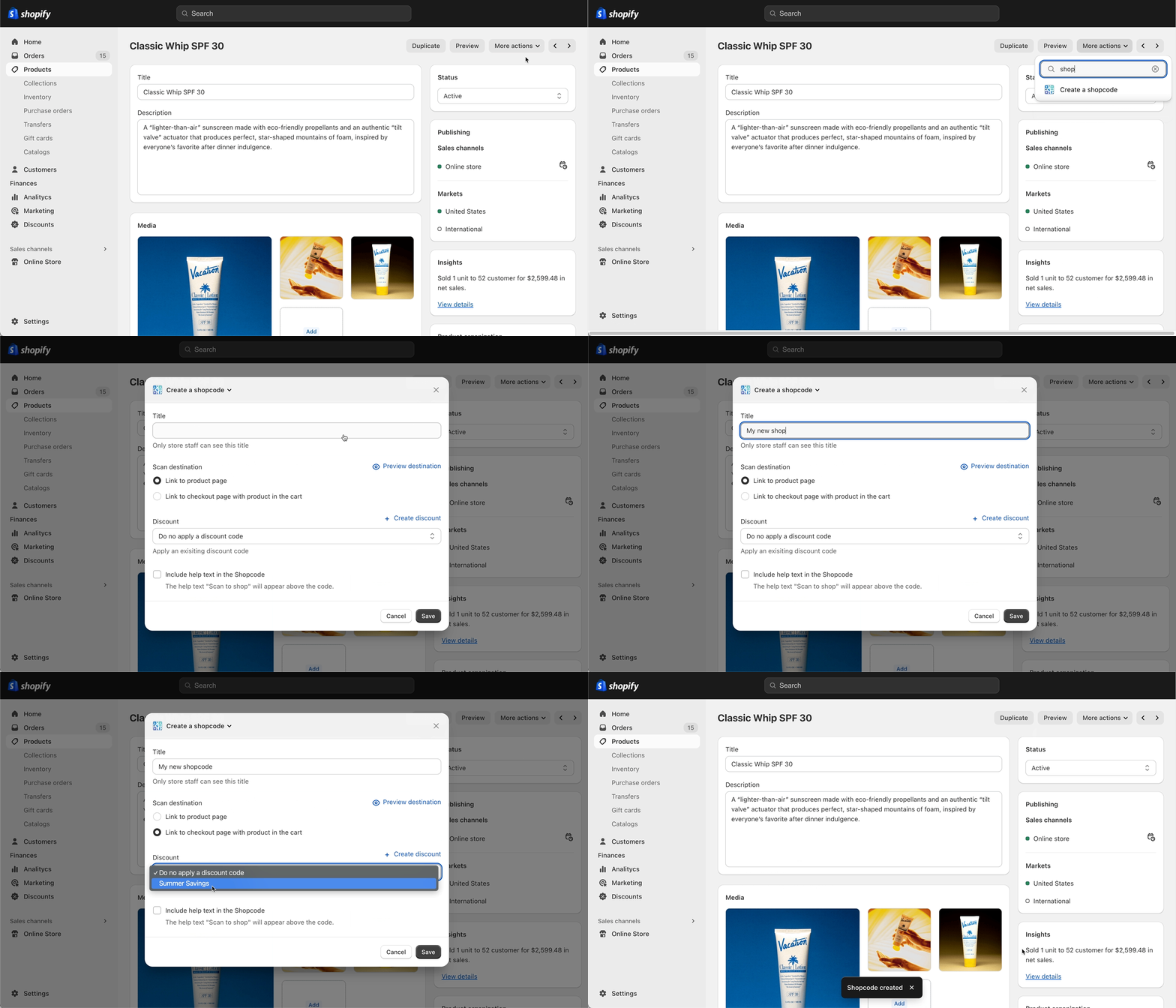
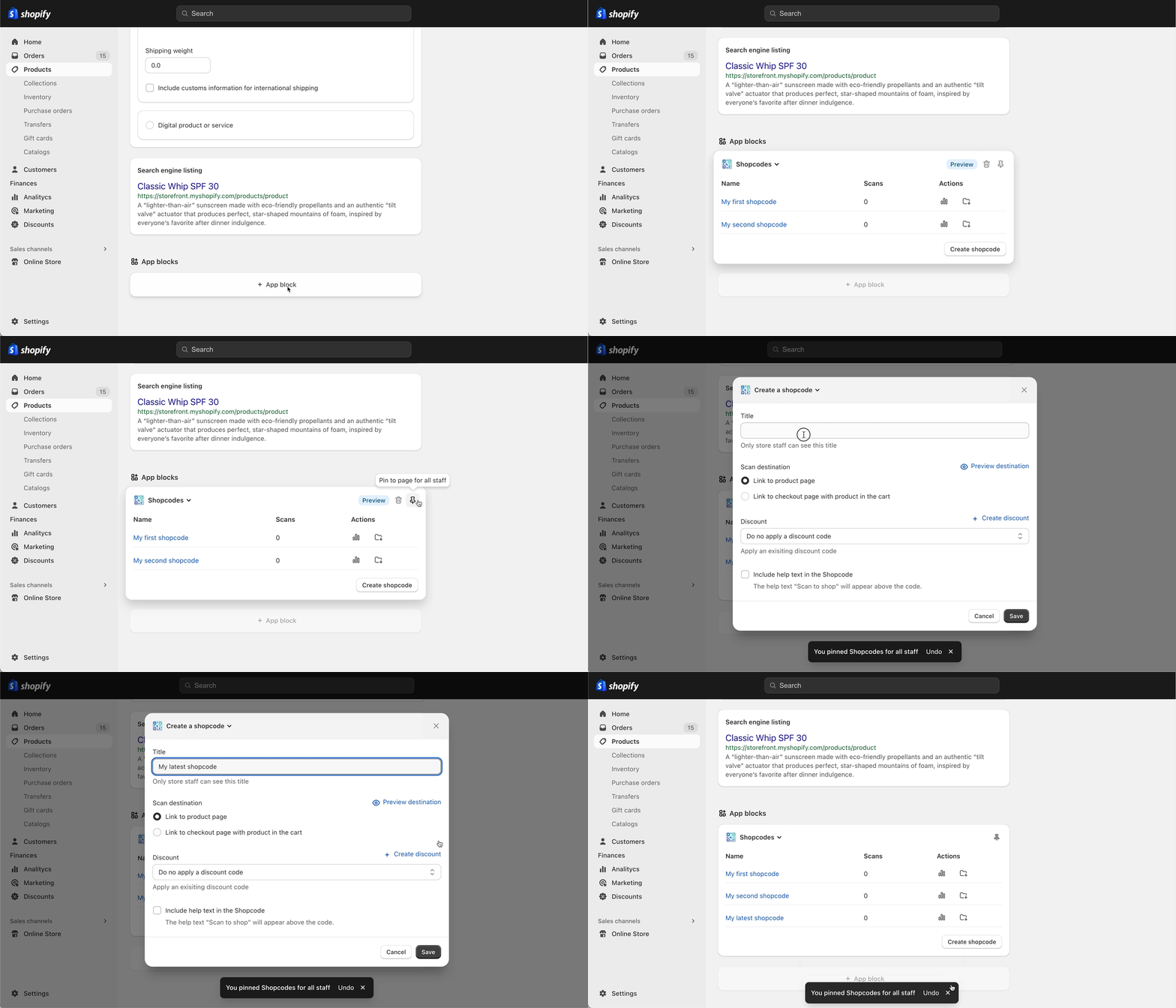
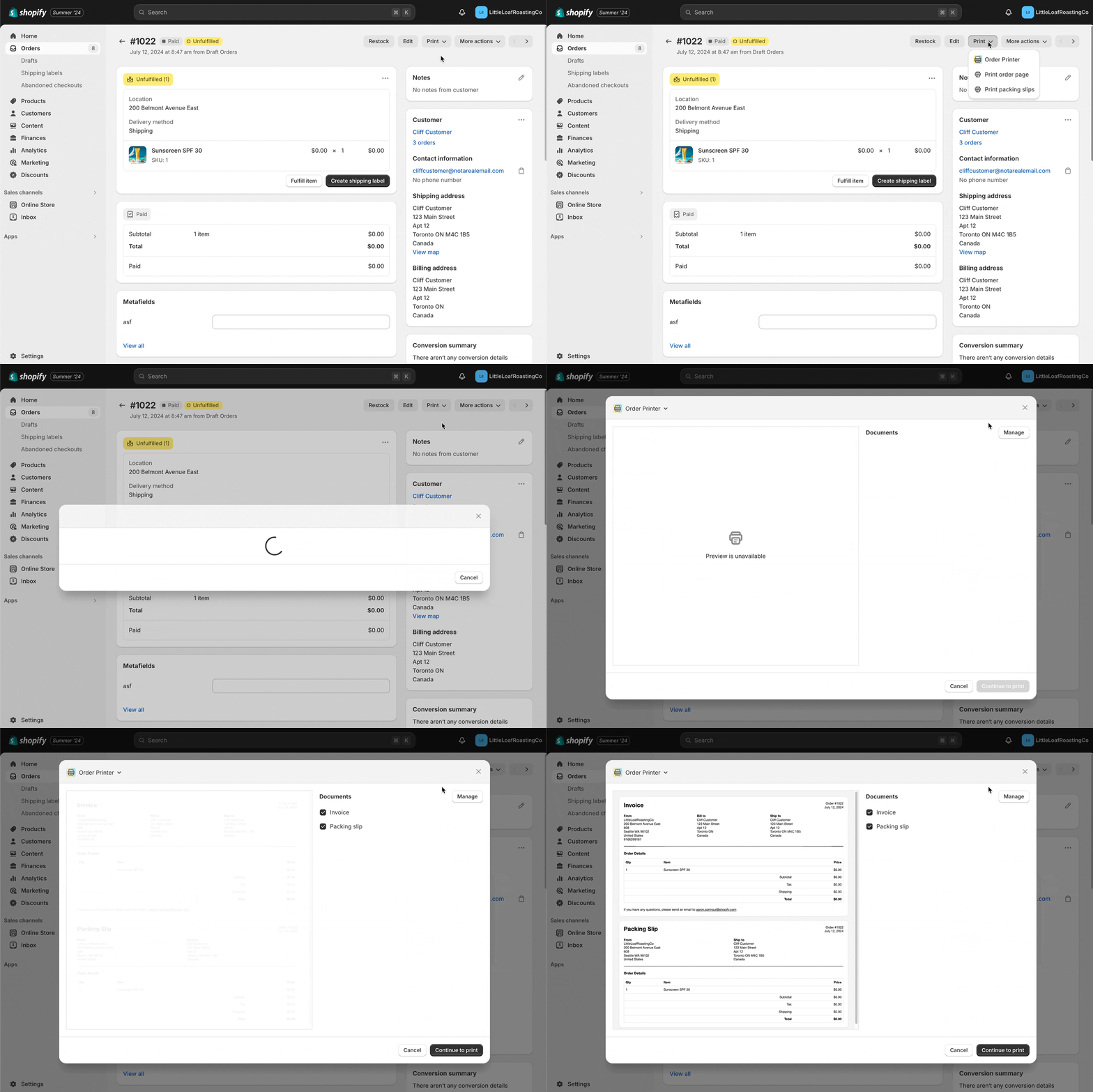
--- title: Apps in admin description: >- Learn how to extend Shopify admin pages with UI extensions, admin intents, and admin links. source_url: html: 'https://shopify.dev/docs/apps/build/admin' md: 'https://shopify.dev/docs/apps/build/admin.md' --- # Apps in admin Your app can extend the Shopify admin beyond [App Home](https://shopify.dev/docs/apps/build/app-home) by adding functionality directly to resource pages like **Products**, **Customers**, and **Orders**. You can embed transactional workflows, display contextual information, launch native Shopify editors, and link to your app's pages. There are two primary ways to extend the admin: * **[Admin UI extensions](#admin-ui-extensions)** add custom actions, blocks, and print functionality to resource pages. * **[Admin intents](#admin-intents)** launch Shopify's native resource editors directly from your app. **Note:** [Admin link extensions](https://shopify.dev/docs/apps/build/admin/admin-links) are also available but are recommended only when you need to navigate merchants to a page in your app. In most cases, admin UI extensions are a better choice. *** ## Admin UI extensions Admin UI extensions let you embed your app's functionality on core admin pages. They automatically match the Shopify admin's look and feel, so merchants can interact with your app without navigating away from their current task. Each UI extension is made up of three parts: * **[Targets](https://shopify.dev/docs/api/admin-extensions/latest/targets)** define where your extension appears in the admin, such as a product details page or an order index table. * **[Target APIs](https://shopify.dev/docs/api/admin-extensions/latest/target-apis)** provide data and methods specific to each target, like the current resource or the ability to close a modal. * **[Web components](https://shopify.dev/docs/api/admin-extensions/latest/web-components)** are the UI building blocks you use to render your extension's interface. ### Admin actions Admin actions display as modals that merchants launch from the **More actions** menu on resource pages, or from an index table's bulk action menu when one or more resources are selected. Use them for transactional workflows like creating, editing, or resolving records. ![An example admin action UI extension.](https://shopify.dev/assets/assets/images/admin/admin-actions-and-block/action-extension-example-D8t2Eqpr.gif) ### Admin blocks Admin blocks display as cards inline with existing resource information on admin pages. Merchants add and pin blocks to their pages. Use them to persistently display contextual information or let merchants edit data. You can also launch admin actions directly from blocks. ![An example admin block UI extension on the product page showing created issues.](https://shopify.dev/assets/assets/images/admin/admin-actions-and-block/block-extension-example-BvFjr72B.gif) ### Admin print actions Admin print actions appear under the **Print** menu on orders and product pages. They include special APIs for previewing and printing documents like invoices and packing slips. ![An example admin print action UI extension.](https://shopify.dev/assets/assets/images/admin/admin-actions-and-block/build-an-admin-print-action/print-action-extension-Db_30ybn.gif) *** ## Admin intents [Admin intents](https://shopify.dev/docs/apps/build/admin/admin-intents) let you launch Shopify's native resource editors directly from your app. With a single API call, you can open the same editors merchants already use to create and edit products, collections, and other resources. When merchants complete their action, they return directly to your app. ```js shopify.intents.invoke('create:shopify/Collection'); ``` Admin intents work in both [App Home](https://shopify.dev/docs/api/app-home/apis/user-interface-and-interactions/intents-api) and [admin UI extensions](https://shopify.dev/docs/api/admin-extensions/2026-01/target-apis/utility-apis/intents-api). *** ## Build for admin The following guides walk through common use cases for admin UI extensions. For the full reference, see [admin UI extensions](https://shopify.dev/docs/api/admin-extensions). ### Extension types [Build an admin action\ \ ](https://shopify.dev/docs/apps/build/admin/actions-blocks/build-admin-action) [Create a modal workflow that merchants launch from a resource page's **More actions** menu.](https://shopify.dev/docs/apps/build/admin/actions-blocks/build-admin-action) [Build an admin block\ \ ](https://shopify.dev/docs/apps/build/admin/actions-blocks/build-admin-block) [Display persistent contextual information or editable data inline on resource pages.](https://shopify.dev/docs/apps/build/admin/actions-blocks/build-admin-block) [Build an admin print action\ \ ](https://shopify.dev/docs/apps/build/admin/actions-blocks/build-admin-print-action) [Add printable documents like invoices or packing slips to the **Print** menu on orders and product pages.](https://shopify.dev/docs/apps/build/admin/actions-blocks/build-admin-print-action) ### Discounts Add configuration UIs that let merchants set up custom discount types. See all [discounts guides](https://shopify.dev/docs/apps/build/discounts). [Build a UI extension for discounts\ \ ](https://shopify.dev/docs/apps/build/discounts/build-ui-extension) [Add configuration to your discounts experience with metafields and a UI extension.](https://shopify.dev/docs/apps/build/discounts/build-ui-extension) [Build a discounts UI with React Router\ \ ](https://shopify.dev/docs/apps/build/discounts/build-ui-with-react-router) [Build a configuration experience for your discount type using a React Router app UI.](https://shopify.dev/docs/apps/build/discounts/build-ui-with-react-router) ### Bundles Let merchants configure product bundles from within the admin. See all [product bundles guides](https://shopify.dev/docs/apps/build/product-merchandising/bundles). [Add a merchant configuration UI\ \ ](https://shopify.dev/docs/apps/build/product-merchandising/bundles/product-configuration-extension/add-merchant-config-ui) [Build a product configuration extension that surfaces bundle settings on the product details page.](https://shopify.dev/docs/apps/build/product-merchandising/bundles/product-configuration-extension/add-merchant-config-ui) ### Purchase options Let merchants create and manage selling plans for subscriptions and deferred purchases. See all [purchase options guides](https://shopify.dev/docs/apps/build/purchase-options). [Build a purchase options extension\ \ ](https://shopify.dev/docs/apps/build/purchase-options/purchase-options-extensions/start-building) [Surface your app's purchase options in the Shopify admin with a purchase options extension.](https://shopify.dev/docs/apps/build/purchase-options/purchase-options-extensions/start-building) [Build a product subscription extension\ \ ](https://shopify.dev/docs/apps/build/purchase-options/product-subscription-app-extensions/start-building) [Let merchants create and manage subscription selling plans on the product details page.](https://shopify.dev/docs/apps/build/purchase-options/product-subscription-app-extensions/start-building) ### Orders and fulfillment Automate inventory, order routing, fulfillment, and returns workflows. See all [orders and fulfillment guides](https://shopify.dev/docs/apps/build/orders-fulfillment). [Inventory management apps\ \ ](https://shopify.dev/docs/apps/build/orders-fulfillment/inventory-management-apps) [Query and adjust inventory quantities on behalf of merchants.](https://shopify.dev/docs/apps/build/orders-fulfillment/inventory-management-apps) [Order management apps\ \ ](https://shopify.dev/docs/apps/build/orders-fulfillment/order-management-apps) [Fulfill orders on behalf of merchants or let merchants fulfill orders through your app.](https://shopify.dev/docs/apps/build/orders-fulfillment/order-management-apps) [Order routing apps\ \ ](https://shopify.dev/docs/apps/build/orders-fulfillment/order-routing-apps) [Customize fulfillment and delivery strategies with Shopify Functions.](https://shopify.dev/docs/apps/build/orders-fulfillment/order-routing-apps) [Returns apps\ \ ](https://shopify.dev/docs/apps/build/orders-fulfillment/returns-apps) [Capture the financial, logistical, and business intent of a return.](https://shopify.dev/docs/apps/build/orders-fulfillment/returns-apps) ### Marketing and analytics Help merchants segment customers and run marketing automations from the admin. See all [marketing and analytics guides](https://shopify.dev/docs/apps/build/marketing-analytics). [Build a customer segment action extension\ \ ](https://shopify.dev/docs/apps/build/marketing-analytics/customer-segments/build-an-action-extension) [Let merchants trigger marketing actions on a customer segment from the admin.](https://shopify.dev/docs/apps/build/marketing-analytics/customer-segments/build-an-action-extension) *** ## Next steps * [Build an admin action](https://shopify.dev/docs/apps/build/admin/actions-blocks/build-admin-action) to extend a resource page. * Explore the [admin UI extensions reference](https://shopify.dev/docs/api/admin-extensions) for available targets, target APIs, and web components. ***