Order actions
Order pages allow customers to view and manage their purchases, including browsing order history, checking fulfillment status, and reviewing order details. Extensions on these pages help customers take action on their orders directly from customer accounts.
Anchor to Use casesUse cases
- Return and exchange requests: Let customers select items to return or exchange, submit a reason, and receive a shipping label directly from the order page.
- Reorder: Add all items from a previous order back to the cart with a single click.
- Subscription management: Show active subscriptions tied to past orders, with options to skip, pause, or cancel.
- Shipment tracking: Surface real-time tracking updates when a shipment is in transit.
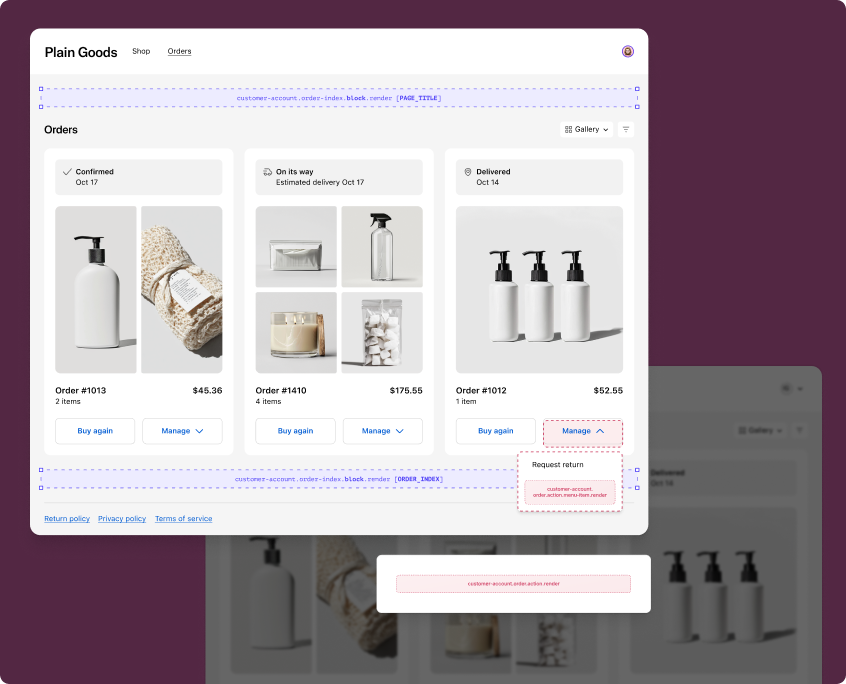
Use static targets to extend the order index and order status pages with custom workflows in the order action menu.
Menu item targets render as buttons in the order action menu, while action targets open as modal overlays. The examples demonstrate fetching data from your app's backend or using the Order API.
customer-account.order.action.menu-item.render
Renders a button in the order action menu on the order index and order status pages. Use this target to add custom actions that navigate to a URL or open a modal for workflows like returns, exchanges, or reorders.
Extensions at this target can access order data through the Order API. The root element must be a single button component. Use the href prop to navigate directly, or omit it to open a modal rendered by customer-account.order.action.render.
Supported components
- Abbreviation
- Announcement
- Avatar
- Badge
- Banner
- Box
- Button
- Button group
- Checkbox
- Chip
- Choice list
- Clickable
- Clickable chip
- Clipboard item
- Customer account action
- Date field
- Date picker
- Details
- Divider
- Drop zone
- Email field
- Form
- Grid
- Heading
- Icon
- Image
- Image group
- Link
- Map
- Menu
- Modal
- Money field
- Number field
- Ordered list
- Page
- Paragraph
- Password field
- Payment icon
- Phone field
- Popover
- Press button
- Product thumbnail
- Progress
- Qr code
- Query container
- Scroll box
- Section
- Select
- Sheet
- Skeleton paragraph
- Spinner
- Stack
- Switch
- Text
- Text area
- Text field
- Time
- Tooltip
- Unordered list
- Url field
Supported components
- Abbreviation
- Announcement
- Avatar
- Badge
- Banner
- Box
- Button
- Button group
- Checkbox
- Chip
- Choice list
- Clickable
- Clickable chip
- Clipboard item
- Customer account action
- Date field
- Date picker
- Details
- Divider
- Drop zone
- Email field
- Form
- Grid
- Heading
- Icon
- Image
- Image group
- Link
- Map
- Menu
- Modal
- Money field
- Number field
- Ordered list
- Page
- Paragraph
- Password field
- Payment icon
- Phone field
- Popover
- Press button
- Product thumbnail
- Progress
- Qr code
- Query container
- Scroll box
- Section
- Select
- Sheet
- Skeleton paragraph
- Spinner
- Stack
- Switch
- Text
- Text area
- Text field
- Time
- Tooltip
- Unordered list
- Url field
jsx
Examples
Add a localized order action button
Description
Add a localized button to the order action menu that opens a modal when clicked. This example omits `href` so the paired `customer-account.order.action.render` target renders the modal, and uses `shopify.i18n.translate` for the button label.
jsx
import '@shopify/ui-extensions/preact';
import {render} from 'preact';

export default async () => {
  render(
    <MenuActionItemExtension />,
    document.body,
  );
};

function MenuActionItemExtension() {
  return (
    <s-button>
      {shopify.i18n.translate('menuItem.button')}
    </s-button>
  );
}
Navigate to a URL from the action menu
Description
Customize the button label and destination with data from your app's backend. This example uses a session token for authentication and sets the `href` prop to navigate directly instead of opening a modal.
jsx
import '@shopify/ui-extensions/preact';
import {render} from 'preact';

export default async () => {
  const data = await fetchMenuItems();
  render(
    <MenuActionItemExtension data={data} />,
    document.body,
  );
};

function MenuActionItemExtension({data}) {
  return (
    <s-button href={data.url}>
      {data.itemName}
    </s-button>
  );
}

async function fetchMenuItems() {
  // Fetch menu item configuration from your backend
  const token = await shopify.sessionToken.get();
  const res = await fetch('https://your-app.com/api/menu-items', {
    headers: {Authorization: `Bearer ${token}`},
  });
  return res.json();
}
Anchor to Order action ,[object Object]Order action target
customer-account.order.action.render
Renders a modal when a customer clicks an order action button that doesn't have an href prop set. Use this target to build multi-step workflows like return requests, order modifications, or confirmations.
Extensions at this target can access order data through the Order API and control the modal with shopify.close(). The root element must be a customer account action component.
Supported components
- Abbreviation
- Announcement
- Avatar
- Badge
- Banner
- Box
- Button
- Button group
- Checkbox
- Chip
- Choice list
- Clickable
- Clickable chip
- Clipboard item
- Customer account action
- Date field
- Date picker
- Details
- Divider
- Drop zone
- Email field
- Form
- Grid
- Heading
- Icon
- Image
- Image group
- Link
- Map
- Menu
- Modal
- Money field
- Number field
- Ordered list
- Page
- Paragraph
- Password field
- Payment icon
- Phone field
- Popover
- Press button
- Product thumbnail
- Progress
- Qr code
- Query container
- Scroll box
- Section
- Select
- Sheet
- Skeleton paragraph
- Spinner
- Stack
- Switch
- Text
- Text area
- Text field
- Time
- Tooltip
- Unordered list
- Url field
Supported components
- Abbreviation
- Announcement
- Avatar
- Badge
- Banner
- Box
- Button
- Button group
- Checkbox
- Chip
- Choice list
- Clickable
- Clickable chip
- Clipboard item
- Customer account action
- Date field
- Date picker
- Details
- Divider
- Drop zone
- Email field
- Form
- Grid
- Heading
- Icon
- Image
- Image group
- Link
- Map
- Menu
- Modal
- Money field
- Number field
- Ordered list
- Page
- Paragraph
- Password field
- Payment icon
- Phone field
- Popover
- Press button
- Product thumbnail
- Progress
- Qr code
- Query container
- Scroll box
- Section
- Select
- Sheet
- Skeleton paragraph
- Spinner
- Stack
- Switch
- Text
- Text area
- Text field
- Time
- Tooltip
- Unordered list
- Url field
jsx
Examples
Build a basic order action modal
Description
Display a confirmation modal with a heading, message, and primary action button. This example uses `s-customer-account-action` as the required root element and `shopify.close()` to dismiss the modal.
jsx
import '@shopify/ui-extensions/preact';
import {render} from 'preact';

export default async () => {
  render(<OrderActionExtension />, document.body);
};

function OrderActionExtension() {
  return (
    <s-customer-account-action heading="Request a return">
      <s-button
        slot="primary-action"
        onClick={() => {
          // Submit return request, then close
          shopify.close();
        }}
      >
        Submit request
      </s-button>
      <s-button
        slot="secondary-action"
        onClick={() => shopify.close()}
      >
        Cancel
      </s-button>
      <s-stack direction="block" gap="base">
        <s-text>
          Select the items you'd like to return and we'll email you a shipping label.
        </s-text>
      </s-stack>
    </s-customer-account-action>
  );
}
Reorder items from a previous order
Description
Show order-specific information in the action modal with a one-click reorder flow. This example reads from `shopify.order`, guards against missing data with a loading state, and displays the order name in the modal heading.
jsx
import '@shopify/ui-extensions/preact';
import {render} from 'preact';

export default async () => {
  render(<ReorderExtension />, document.body);
};

function ReorderExtension() {
  const order = shopify.order.value;

  if (!order) {
    return (
      <s-customer-account-action heading="Reorder">
        <s-spinner size="base" />
      </s-customer-account-action>
    );
  }

  return (
    <s-customer-account-action heading={`Reorder from ${order.name}`}>
      <s-button
        slot="primary-action"
        onClick={() => {
          // Add items to cart, then close
          shopify.close();
        }}
      >
        Add all to cart
      </s-button>
      <s-button
        slot="secondary-action"
        onClick={() => shopify.close()}
      >
        Cancel
      </s-button>
      <s-text>
        Add all items from this order back to your cart.
      </s-text>
    </s-customer-account-action>
  );
}
Anchor to Order index targetsOrder index targets
Use static and block targets to extend the order index page with contextual content and information.
Announcement targets render as dismissable banners at the top of the page, while block targets display as inline cards that merchants can position using the checkout and accounts editor. The examples demonstrate using the Localization API or fetching data from your app's backend.
Anchor to Order index announcement ,[object Object]Order index announcement target
customer-account.order-index.announcement.render
Renders a dismissable announcement at the top of the order index page. Use this target to surface time-sensitive information like shipping updates, promotions, or account status changes.
Extensions at this target can access locale and currency context through the Localization API. The root element should be an announcement component.
Supported components
- Abbreviation
- Announcement
- Avatar
- Badge
- Banner
- Box
- Button
- Button group
- Checkbox
- Chip
- Choice list
- Clickable
- Clickable chip
- Clipboard item
- Customer account action
- Date field
- Date picker
- Details
- Divider
- Drop zone
- Email field
- Form
- Grid
- Heading
- Icon
- Image
- Image group
- Link
- Map
- Menu
- Modal
- Money field
- Number field
- Ordered list
- Page
- Paragraph
- Password field
- Payment icon
- Phone field
- Popover
- Press button
- Product thumbnail
- Progress
- Qr code
- Query container
- Scroll box
- Section
- Select
- Sheet
- Skeleton paragraph
- Spinner
- Stack
- Switch
- Text
- Text area
- Text field
- Time
- Tooltip
- Unordered list
- Url field
Supported components
- Abbreviation
- Announcement
- Avatar
- Badge
- Banner
- Box
- Button
- Button group
- Checkbox
- Chip
- Choice list
- Clickable
- Clickable chip
- Clipboard item
- Customer account action
- Date field
- Date picker
- Details
- Divider
- Drop zone
- Email field
- Form
- Grid
- Heading
- Icon
- Image
- Image group
- Link
- Map
- Menu
- Modal
- Money field
- Number field
- Ordered list
- Page
- Paragraph
- Password field
- Payment icon
- Phone field
- Popover
- Press button
- Product thumbnail
- Progress
- Qr code
- Query container
- Scroll box
- Section
- Select
- Sheet
- Skeleton paragraph
- Spinner
- Stack
- Switch
- Text
- Text area
- Text field
- Time
- Tooltip
- Unordered list
- Url field
jsx
Examples
Show an account status announcement
Description
Display a dismissable announcement with a message and a link to the profile page. This example uses `s-announcement` as the root element and the `shopify:customer-account` protocol for internal navigation.
jsx
import '@shopify/ui-extensions/preact';
import {render} from 'preact';

export default async () => {
  render(<Extension />, document.body);
};

function Extension() {
  return (
    <s-announcement>
      <s-stack direction="inline" gap="base">
        <s-text>Your loyalty status has been upgraded!</s-text>
        <s-link href="shopify:customer-account/profile">
          View your profile
        </s-link>
      </s-stack>
    </s-announcement>
  );
}
Announce a shipping update with localized content
Description
Surface a shipping update announcement in the customer's language. This example combines `shopify.i18n.translate` with `shopify.localization.country` to localize the announcement content.
jsx
import '@shopify/ui-extensions/preact';
import {render} from 'preact';

export default async () => {
  render(<Extension />, document.body);
};

function Extension() {
  const translate = shopify.i18n.translate;
  const country = shopify.localization.country.value;

  return (
    <s-announcement>
      <s-stack direction="inline" gap="base">
        <s-text>
          {translate('announcement.shippingUpdate', {
            country: country?.isoCode,
          })}
        </s-text>
        <s-link href="shopify:customer-account/orders">
          {translate('announcement.viewOrders')}
        </s-link>
      </s-stack>
    </s-announcement>
  );
}
Anchor to Order index block ,[object Object]Order index block target
customer-account.order-index.block.render
Renders inline content on the order index page. Use this target to display persistent information like loyalty points, subscription summaries, or account-level insights.
Extensions at this target appear as blocks that merchants can position using the checkout and accounts editor. To preview your extension in each supported location, use the placement reference for that location as a URL parameter.
Supported components
- Abbreviation
- Announcement
- Avatar
- Badge
- Banner
- Box
- Button
- Button group
- Checkbox
- Chip
- Choice list
- Clickable
- Clickable chip
- Clipboard item
- Customer account action
- Date field
- Date picker
- Details
- Divider
- Drop zone
- Email field
- Form
- Grid
- Heading
- Icon
- Image
- Image group
- Link
- Map
- Menu
- Modal
- Money field
- Number field
- Ordered list
- Page
- Paragraph
- Password field
- Payment icon
- Phone field
- Popover
- Press button
- Product thumbnail
- Progress
- Qr code
- Query container
- Scroll box
- Section
- Select
- Sheet
- Skeleton paragraph
- Spinner
- Stack
- Switch
- Text
- Text area
- Text field
- Time
- Tooltip
- Unordered list
- Url field
Supported components
- Abbreviation
- Announcement
- Avatar
- Badge
- Banner
- Box
- Button
- Button group
- Checkbox
- Chip
- Choice list
- Clickable
- Clickable chip
- Clipboard item
- Customer account action
- Date field
- Date picker
- Details
- Divider
- Drop zone
- Email field
- Form
- Grid
- Heading
- Icon
- Image
- Image group
- Link
- Map
- Menu
- Modal
- Money field
- Number field
- Ordered list
- Page
- Paragraph
- Password field
- Payment icon
- Phone field
- Popover
- Press button
- Product thumbnail
- Progress
- Qr code
- Query container
- Scroll box
- Section
- Select
- Sheet
- Skeleton paragraph
- Spinner
- Stack
- Switch
- Text
- Text area
- Text field
- Time
- Tooltip
- Unordered list
- Url field
jsx
Examples
Display a loyalty points summary
Description
Show a customer's loyalty points on the order index page. This example fetches loyalty data from your app's backend using a session token for authentication.
jsx
import '@shopify/ui-extensions/preact';
import {render} from 'preact';
import {useState, useEffect} from 'preact/hooks';

export default async () => {
  render(<Extension />, document.body);
};

function Extension() {
  const [points, setPoints] = useState(null);

  useEffect(() => {
    async function fetchPoints() {
      const token = await shopify.sessionToken.get();
      const res = await fetch('https://your-app.com/api/loyalty', {
        headers: {Authorization: `Bearer ${token}`},
      });
      const data = await res.json();
      setPoints(data.points);
    }
    fetchPoints();
  }, []);

  return (
    <s-section heading="Loyalty program">
      <s-stack direction="block" gap="base">
        <s-text>
          {points !== null
            ? `You have ${points} loyalty points.`
            : 'Loading your points...'}
        </s-text>
        <s-link href="shopify:customer-account/profile">
          View rewards
        </s-link>
      </s-stack>
    </s-section>
  );
}
Show active subscriptions tied to orders
Description
Display a block that lists a customer's active subscriptions. This example fetches subscription data from your app's backend and renders each subscription with its status and next billing date.
jsx
import '@shopify/ui-extensions/preact';
import {render} from 'preact';
import {useState, useEffect} from 'preact/hooks';

export default async () => {
  render(<Extension />, document.body);
};

function Extension() {
  const [subscriptions, setSubscriptions] = useState(null);

  useEffect(() => {
    async function fetchSubscriptions() {
      const token = await shopify.sessionToken.get();
      const res = await fetch('https://your-app.com/api/subscriptions', {
        headers: {Authorization: `Bearer ${token}`},
      });
      const data = await res.json();
      setSubscriptions(data.subscriptions);
    }
    fetchSubscriptions();
  }, []);

  if (!subscriptions) {
    return (
      <s-section heading="Subscriptions">
        <s-spinner size="base" />
      </s-section>
    );
  }

  if (subscriptions.length === 0) {
    return null;
  }

  return (
    <s-section heading="Subscriptions">
      <s-stack direction="block" gap="base">
        {subscriptions.map((sub) => (
          <s-stack key={sub.id} direction="inline" gap="base">
            <s-text type="strong">{sub.productName}</s-text>
            <s-badge>{sub.status}</s-badge>
            <s-text color="subdued">
              Next billing: {sub.nextBillingDate}
            </s-text>
          </s-stack>
        ))}
      </s-stack>
    </s-section>
  );
}
Anchor to Best practicesBest practices
- Guard against missing data: Always check that
shopify.order.valueis defined before rendering order-specific content in action targets. The order data loads asynchronously and might beundefinedon the initial render. - Keep announcements concise: The announcement component is dismissable by the customer, so long messages risk being closed before they're read. Use short, actionable text and link to modals or pages for additional detail.
- Pair menu items with modals: When building order actions, implement both
customer-account.order.action.menu-item.render(the button) andcustomer-account.order.action.render(the modal) in the same extension. Omithrefon the button to trigger the modal automatically.