Footer
The footer appears at the bottom of every customer account page, below the links to store policies. Use the footer to display persistent content that's visible across all pages, including Order index, Order status, Profile, Settings, and any full-page extensions.
This is a static extension target that renders on every customer account page and can't be conditionally shown or hidden per page. Returning null from this target collapses the extension rather than removing it from the page, so the extension slot still exists in the DOM.
Anchor to Use casesUse cases
- Cookie consent: Display a cookie consent banner that appears across all customer account pages, allowing customers to manage their tracking preferences.
- Global announcements: Show store-wide notices, such as holiday shipping deadlines or service updates, that apply to the entire customer account experience.
- Accessibility aids: Provide persistent accessibility tools or links that customers can access from any page.
- Legal compliance: Display required legal notices, privacy policy links, or regulatory disclosures that must be visible site-wide.
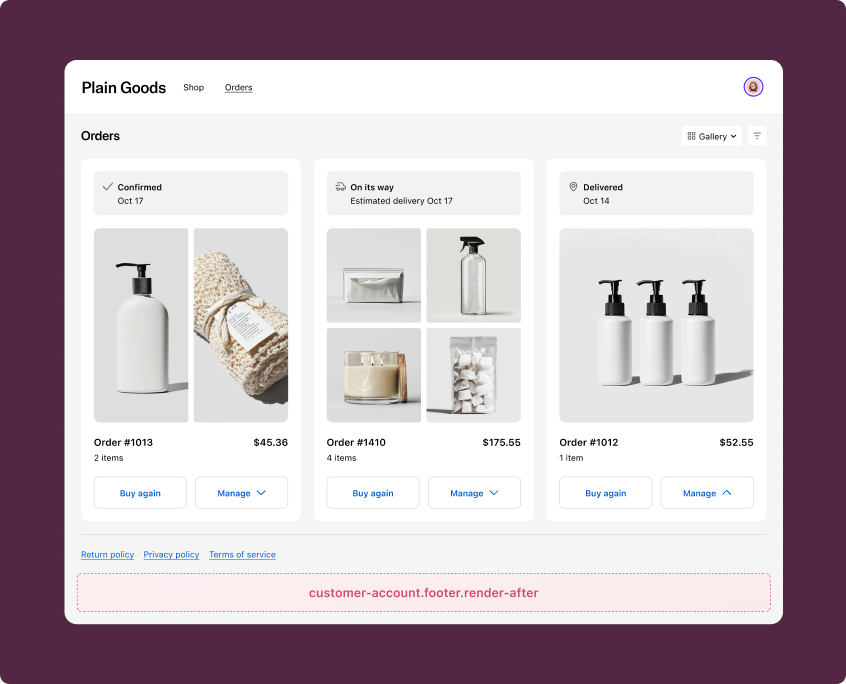
Use the static extension target below to extend the footer on all customer account pages with persistent, globally visible content.
Since this target renders on every page, it's well-suited for cross-cutting concerns like consent management. The examples demonstrate using the Customer Privacy API to manage cookie consent, as well as rendering static content in the footer.
To use the Customer Privacy API, you must enable the collect_buyer_consent capability in your TOML configuration file.
To use the Customer Privacy API, you must enable the collect_buyer_consent capability in your TOML configuration file.
customer-account.footer.render-after
Renders a static extension target below the footer on all customer account pages.
To prevent layout shifting, avoid dynamic data fetching and rendering in this target. If you need to render dynamic content, consider reserving space for your content while it is loading using spinner, skeleton paragraph, or stack.
Supported components
- Abbreviation
- Announcement
- Avatar
- Badge
- Banner
- Box
- Button
- Button group
- Checkbox
- Chip
- Choice list
- Clickable
- Clickable chip
- Clipboard item
- Customer account action
- Date field
- Date picker
- Details
- Divider
- Drop zone
- Email field
- Form
- Grid
- Heading
- Icon
- Image
- Image group
- Link
- Map
- Menu
- Modal
- Money field
- Number field
- Ordered list
- Page
- Paragraph
- Password field
- Payment icon
- Phone field
- Popover
- Press button
- Product thumbnail
- Progress
- Qr code
- Query container
- Scroll box
- Section
- Select
- Sheet
- Skeleton paragraph
- Spinner
- Stack
- Switch
- Text
- Text area
- Text field
- Time
- Tooltip
- Unordered list
- Url field
Supported components
- Abbreviation
- Announcement
- Avatar
- Badge
- Banner
- Box
- Button
- Button group
- Checkbox
- Chip
- Choice list
- Clickable
- Clickable chip
- Clipboard item
- Customer account action
- Date field
- Date picker
- Details
- Divider
- Drop zone
- Email field
- Form
- Grid
- Heading
- Icon
- Image
- Image group
- Link
- Map
- Menu
- Modal
- Money field
- Number field
- Ordered list
- Page
- Paragraph
- Password field
- Payment icon
- Phone field
- Popover
- Press button
- Product thumbnail
- Progress
- Qr code
- Query container
- Scroll box
- Section
- Select
- Sheet
- Skeleton paragraph
- Spinner
- Stack
- Switch
- Text
- Text area
- Text field
- Time
- Tooltip
- Unordered list
- Url field
jsx
Examples
Create a cookie consent banner
Description
Add a consent banner to the footer that lets customers manage their tracking preferences. This example uses a [sheet](/docs/api/customer-account-ui-extensions/2026-04/polaris-web-components/overlays/sheet) to display the banner and a [modal](/docs/api/customer-account-ui-extensions/2026-04/polaris-web-components/overlays/modal) for granular consent settings. It reads the current consent state from `shopify.customerPrivacy` and applies changes with `shopify.applyTrackingConsentChange`.
jsx
import '@shopify/ui-extensions/preact';
import {render} from 'preact';
import {useState, useRef} from 'preact/hooks';

export default async () => {
  render(<Extension />, document.body);
};

function Extension() {
  const {
    shouldShowBanner,
    visitorConsent: {
      analytics,
      marketing,
      preferences,
      saleOfData,
    },
  } = shopify.customerPrivacy.value;

  const [consentFormValues, setConsentFormValues] = useState({
    analytics,
    marketing,
    preferences,
    saleOfData,
  });

  const sheetId = 'sheet-consent';
  const modalId = 'modal-consent';
  const sheetRef = useRef();
  const modalRef = useRef();

  const getCheckboxOnChangeHandler = (key) => {
    return function (event) {
      setConsentFormValues({
        ...consentFormValues,
        [key]: event.currentTarget.checked,
      });
    };
  };

  const handleConsentChange = async (visitorConsent) => {
    try {
      const result = await shopify.applyTrackingConsentChange({
        ...(visitorConsent ? visitorConsent : consentFormValues),
        type: 'changeVisitorConsent',
      });

      if (result.type === 'success') {
        modalRef.current?.hideOverlay();
        sheetRef.current?.hideOverlay();
      }
    } catch (error) {
      console.error('Failed to apply consent change:', error);
    }
  };

  if (!shouldShowBanner) {
    return null;
  }

  return (
    <s-sheet
      id={sheetId}
      ref={sheetRef}
      accessibilityLabel="Cookie consent preferences"
      defaultOpen
    >
      <s-button
        slot="primary-action"
        variant="secondary"
        onClick={() =>
          handleConsentChange({
            analytics: false,
            marketing: false,
            preferences: false,
            saleOfData: false,
          })
        }
      >
        Decline
      </s-button>
      <s-button
        slot="primary-action"
        variant="secondary"
        onClick={() =>
          handleConsentChange({
            analytics: true,
            marketing: true,
            preferences: true,
            saleOfData: true,
          })
        }
      >
        Accept all
      </s-button>

      <s-button slot="secondary-action" commandFor={modalId}>
        Manage preferences
      </s-button>
      <s-modal id={modalId} ref={modalRef}>
        <s-form onSubmit={() => handleConsentChange()}>
          <s-stack direction="block">
            <s-grid gap="base">
              <s-checkbox
                id="marketing"
                label="Marketing"
                value={consentFormValues.marketing}
                onChange={getCheckboxOnChangeHandler('marketing')}
              />
              <s-checkbox
                id="analytics"
                label="Analytics"
                value={consentFormValues.analytics}
                onChange={getCheckboxOnChangeHandler('analytics')}
              />
              <s-checkbox
                id="preferences"
                label="Preferences"
                value={consentFormValues.preferences}
                onChange={getCheckboxOnChangeHandler('preferences')}
              />
              <s-checkbox
                id="saleOfData"
                label="Sale of data"
                value={consentFormValues.saleOfData}
                onChange={getCheckboxOnChangeHandler('saleOfData')}
              />
            </s-grid>
            <s-button type="submit">Save preferences</s-button>
          </s-stack>
        </s-form>
      </s-modal>

      <s-paragraph>
        This website uses cookies to ensure you get the best experience.{' '}
        <s-link>Privacy Policy</s-link>
      </s-paragraph>
    </s-sheet>
  );
}
Display a persistent footer message
Description
Add a simple, static message to the footer that appears on every customer account page. This example shows how to render lightweight content without dynamic data fetching, which is the recommended approach for this target to prevent layout shifting.
jsx
import '@shopify/ui-extensions/preact';
import {render} from 'preact';

export default async () => {
  render(<Extension />, document.body);
};

function Extension() {
  return (
    <s-stack direction="block" gap="base">
      <s-divider />
      <s-stack direction="inline" gap="base" alignItems="center" justifyContent="center">
        <s-link href="https://your-app.com/help">
          Help Center
        </s-link>
        <s-text color="subdued">|</s-text>
        <s-link href="https://your-app.com/terms">
          Terms of Service
        </s-link>
        <s-text color="subdued">|</s-text>
        <s-link href="https://your-app.com/contact">
          Contact Us
        </s-link>
      </s-stack>
    </s-stack>
  );
}
Anchor to Best practicesBest practices
- Keep content lightweight: Since the footer renders on every customer account page, avoid heavy data fetching or complex rendering that could cause layout shifts. Use static content or reserve space with placeholder components while loading.
- Use the consent APIs for privacy banners: Use
shopify.customerPrivacyandshopify.applyTrackingConsentChangerather than building custom consent tracking. These APIs integrate directly with Shopify's consent management system. - Respect the
shouldShowBannerflag: When building consent banners, checkshopify.customerPrivacy.value.shouldShowBannerto determine whether a banner should be shown. This flag accounts for whether consent has already been collected. - Provide accessible overlays: When using sheet or modal components for consent forms, include
accessibilityLabelattributes and ensure the form can be navigated with keyboard controls.