Carts and checkout for agents
Carts and checkout in Universal Commerce Protocol (UCP) let your agent move buyers from product selection to purchase. Build a cart to iterate on line items and totals while the buyer is still shopping. When they're ready to buy, follow the cart's continue_url to hand off to the merchant's checkout, or create a checkout session when finalized values are critical to the buyer's experience.
The merchant always remains the merchant of record. When eligible, your agent can complete the checkout directly. When a purchase requires escalation or review, redirect the buyer to the merchant's prefilled checkout for completion.
Tool use is subject to access and rate limiting that scale with how your agent identifies itself. See Auth and rate limiting for traffic tiers and what each can do.
Tool use is subject to access and rate limiting that scale with how your agent identifies itself. See Auth and rate limiting for traffic tiers and what each can do.
Anchor to How it worksHow it works
After product discovery, your agent moves the buyer to purchase through the cart and checkout stages. Each stage has two options, but you choose between them for different reasons: at the cart stage, how much control your agent needs, and at the checkout stage, where your agent runs.
Anchor to Cart stageCart stage
- Cart MCP: Your agent owns the cart, adjusting line items and context and reading back estimated totals before the buyer commits to purchase. Cart tools accept unauthenticated requests, which lets your agent estimate totals and share a cart with the buyer before collecting credentials.
- Cart permalinks: URLs that take buyers directly to a merchant's checkout with pre-selected items. The Catalog returns a
checkout_urlfor each variant that your agent can hand to the buyer without managing a cart. Cart permalinks offer less control, but are simpler to implement.
Anchor to Checkout stageCheckout stage
- Checkout MCP: Create and manage a checkout session from your own server, optionally converting a cart into a checkout. Checkout tools require authentication or a signed request.
- Checkout WebMCP: Read and update the buyer's current checkout, and place the order, from the buyer's browser. Checkout tools are registered on the checkout page through WebMCP.
Anchor to End-to-end flowEnd-to-end flow
The following flow uses Cart MCP and Checkout MCP. Shopify recommends Checkout MCP, so build this flow unless your agent has to run in the buyer's browser:
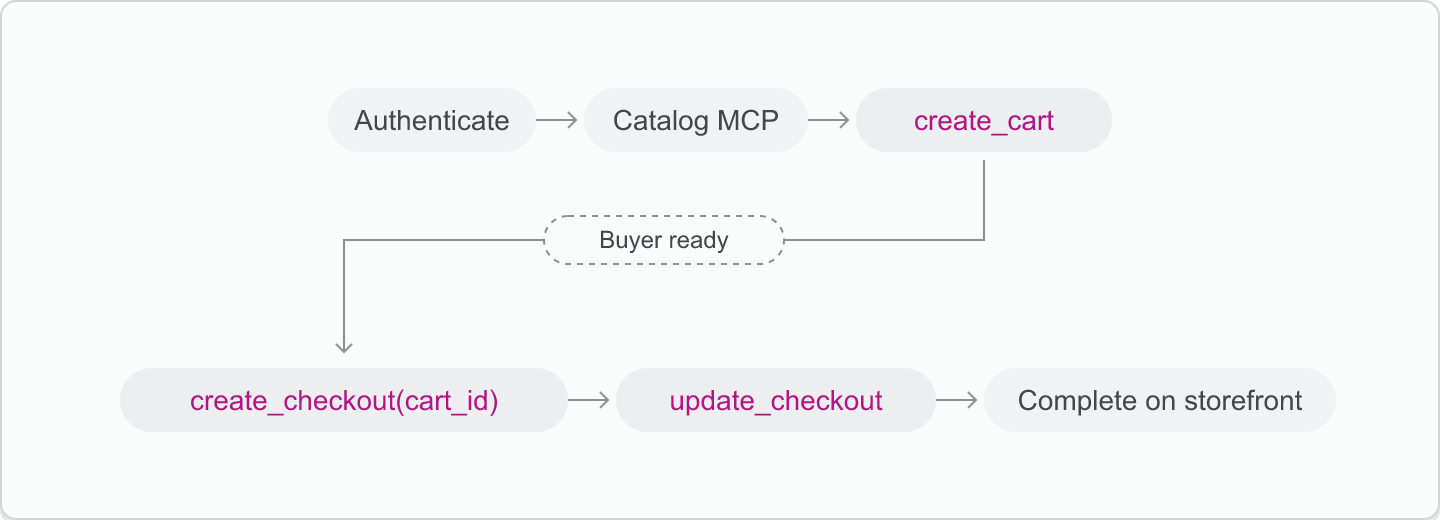
- Your agent authenticates itself and gets an access token.
- A buyer discovers products using the Catalog MCP, with results optionally scoped to a custom catalog.
- (Optional) Build a cart with the Cart MCP
create_carttool, iterating on line items and context until the buyer is ready to purchase. - Call the Checkout MCP
create_checkouttool with the selected line items, or passcart_idto convert an existing cart into a checkout. - Call the Checkout MCP
update_checkouttool as needed to resolve missing data or add more line items. - Direct the buyer to the
continue_urlin the response to finish checkout on the merchant's storefront.
If your agent runs in the buyer's browser, then it uses Checkout WebMCP at the checkout stage instead. See Checkout.
Anchor to CartCart
You have two options at this stage. Use Cart MCP when your agent manages line items, context, and estimated totals itself, or use a cart permalink to send the buyer to a prefilled checkout without managing a cart.
Anchor to Cart MCPCart MCP
Cart MCP implements UCP's cart capability. A cart holds line items, localization context, and buyer information. Use carts to iterate on line items across multiple conversations, show estimated totals before the buyer commits, or hand off a cart to the buyer via continue_url without starting a checkout session. Carts are designed for long-running, exploratory sessions.
Cart tools accept unauthenticated requests, so your agent can call them while the buyer is still browsing:
| Tool | Description |
|---|---|
create_cart | Start a new cart with line items and optional context. |
get_cart | Fetch the current cart state and totals. |
update_cart | Replace the cart's contents. |
cancel_cart | Delete the cart. No further action can be taken. |
update_cart uses PUT semantics. This differs from Storefront API and AJAX cart mutations, which patch individual fields. Each update_cart request replaces the cart's full state with the payload you send. Omit a field and it's removed from the cart.
update_cart uses PUT semantics. This differs from Storefront API and AJAX cart mutations, which patch individual fields. Each update_cart request replaces the cart's full state with the payload you send. Omit a field and it's removed from the cart.
Anchor to Cart permalinksCart permalinks
Cart permalinks are URLs that take buyers directly to a merchant's checkout with pre-selected items. Use permalinks for simpler flows where you redirect buyers without managing a cart or checkout session programmatically.
Get permalink
The Global Catalog returns a checkout_url for each variant when you call get_product:
Customize permalink
You can append query parameters to prefill buyer information, apply discounts, add custom tracking data, or attribute marketing campaigns. See supported checkout parameters for the full list:
Handle multiple merchants
The Global Catalog can return products from multiple merchants in a single search. Cart permalinks are scoped to a single merchant, so when buyers select variants from different merchants, group them by shop domain and create a separate checkout URL for each:
The Global Catalog returns a checkout_url for each variant when you call get_product:
Anchor to CheckoutCheckout
Checkout MCP and Checkout WebMCP both implement the UCP checkout capability and use the same checkout object.
Shopify recommends Checkout MCP. Your agent owns the checkout session from its own server and doesn't depend on the buyer's browser, so it can create, update, and complete checkouts wherever it runs. Use Checkout WebMCP only when your agent is already operating in the buyer's browser.
| Checkout MCP (recommended) | Checkout WebMCP | |
|---|---|---|
| Where your agent runs | Your server | The buyer's browser, on the checkout page |
| How you call tools | JSON-RPC POST requests to https://{shop-domain}/api/ucp/mcp | document.modelContext.executeTool() in the checkout page |
| Authentication | Bearer token or signed request | Web Bot Auth on the browser's requests |
| Which checkout | A session you create with create_checkout and address by id | The checkout open in that tab. Tools take no checkout id or meta. |
| What updates accept | The full checkout object | A subset of it. update_checkout ignores line_items and attribution. |
| Validation | Runs against the checkout session your agent created | Runs in the buyer's session, using checkout's own validation. Changes appear on the page the buyer sees. |
| Buyer handoff | Send the buyer to continue_url | The buyer acts on the checkout page in the same tab, such as for Shop Pay login, a payment challenge, or a review step. Afterward, refresh the tool list and call get_checkout. |
Anchor to Checkout MCP toolsCheckout MCP tools
A checkout session represents an active purchase. Use checkout tools once the buyer is ready to buy to resolve fulfillment or buyer details and then refer them to the merchant's storefront.
Checkout tools require authentication or a signed request:
| Tool | Description |
|---|---|
create_checkout | Start a new checkout session, optionally from an existing cart. |
get_checkout | Fetch the current checkout state. |
update_checkout | Update items, fulfillment options, or buyer information. |
complete_checkout | Finalize the checkout after the buyer completes payment on the storefront. |
cancel_checkout | Cancel an in-progress checkout session. |
Every checkout response includes a status and a messages array. Non-terminal states (incomplete, requires_escalation, ready_for_complete) also include a continue_url that hands the buyer off to the merchant's storefront. See Checkout status for the full lifecycle and response shape.
When the buyer is ready to purchase, convert a cart from Cart MCP into a checkout by passing the cart's id as cart_id in the checkout object of create_checkout, along with an empty line_items array. The merchant uses the cart's line items, context, and buyer when creating the checkout, and ignores any overlapping fields in the checkout payload. See Convert a cart into a checkout for more details.
Conversion is idempotent: calling create_checkout with the same cart_id twice returns the same incomplete checkout.
Anchor to Checkout WebMCP toolsCheckout Web
Checkout WebMCP brings UCP checkout into the buyer's browser. Shopify checkout registers WebMCP tools on the checkout page, so a browser agent can read and update the buyer's current checkout, and place the order after the buyer confirms. The storefront's WebMCP tools take the buyer to checkout with proceed_to_checkout.
Checkout tools act on the checkout open in that tab and use its existing validation:
| Tool | Description |
|---|---|
get_checkout | Fetch the current checkout state, or the order receipt on the Thank you page. |
update_checkout | Replace buyer contact, fulfillment, discount codes, declared fields, and payment. |
complete_checkout | Place the order after the buyer confirms it. |
navigate_to_storefront | Leave checkout and return the tab to the storefront. |
There's no equivalent of Checkout MCP's cancel_checkout, so your agent can't cancel the checkout and the status is never canceled.
Checkout doesn't register tools for the following checkouts. Ask the buyer to complete them on the checkout page:
- Standard three-page checkout, unless the buyer checks out with Shop Pay.
- B2B checkout.
- Embedded checkout, and checkouts in mobile checkout SDKs.
- Checkouts with merchandise from another shop.
- Draft orders, order edits, and payment collection.
The tools also don't cover app-defined checkout extension interactions, which the buyer handles on the checkout page.


