About Catalogs
Shopify provides two catalog interfaces for AI agents to discover and retrieve products. Global Catalog searches across all Shopify merchants, while Storefront Catalog is scoped to a single merchant's store. Both implement the UCP Catalog capability, but they differ in scope, authentication, and available features.
Anchor to Catalog interfacesCatalog interfaces
Choose the catalog interface based on whether your agent needs to search across Shopify or within a single storefront.
| Catalog type | Global Catalog | Storefront Catalog |
| Scope | All Shopify merchants | Single merchant store |
| Endpoint | https://catalog.shopify.com/api/ucp/mcp | https://{storeDomain}/api/ucp/mcp |
| Auth | Agent profile (no API key needed) | Agent profile (no API key needed) |
| Extensions | Global Catalog extension | Storefront Catalog extension |
| Best for | Cross-merchant discovery, comparison shopping | Single-store agents |
Anchor to ToolsTools
Both catalog interfaces expose the same three tools. Which one you call depends on what your agent knows at the time of the request.
Anchor to [object Object]search_catalog
search_catalogFind products by keyword. Use this when a buyer describes what they want in natural language. Global Catalog returns products from across all Shopify merchants, clustered by Universal Product ID (UPID); Storefront Catalog returns products scoped to a single store.
- Global Catalog MCP:
search_catalog - Storefront Catalog MCP:
search_catalog
search_catalog request
Global Catalog MCP
{
  "catalog": {
    "query": "organic cotton sweater",
    "filters": {
      "ships_to": {"country": "US"},
      "available": true
    }
  }
}
Storefront Catalog MCP
{
  "catalog": {
    "query": "organic cotton sweater"
  }
}
Anchor to [object Object]lookup_catalog
lookup_catalogRetrieve products or variants by identifier. This is most useful at query time when your agent already has a product ID (for example, from a prior search result, a shared link, or a stored reference) and needs fresh data without running a new search. A single Global Catalog request resolves up to 50 identifiers, while Storefront Catalog supports up to 10. Unresolved IDs are reported in messages.
- Global Catalog MCP:
lookup_catalog - Storefront Catalog MCP:
lookup_catalog
lookup_catalog request
Global Catalog MCP
{
  "catalog": {
    "ids": [
      "gid://shopify/p/7f3a2b8c1d9e",
      "gid://shopify/ProductVariant/12345678"
    ],
    "context": {"address_country": "US"}
  }
}
Storefront Catalog MCP
{
  "catalog": {
    "ids": ["gid://shopify/Product/1001"]
  }
}
Anchor to [object Object]get_product
get_productRetrieve full details for a single product, including all option combinations with availability signals and checkout links. Call this after a buyer selects a product from search or lookup results.
Pass selected to anchor a specific variant and preferences to control how the server relaxes selections when an exact match isn't available.
- Global Catalog MCP:
get_product - Storefront Catalog MCP:
get_product
get_product request
Global Catalog MCP
{
  "catalog": {
    "id": "gid://shopify/p/7f3a2b8c1d9e",
    "selected": [{"name": "Color", "label": "Black"}],
    "preferences": ["Color", "Size"]
  }
}
Storefront Catalog MCP
{
  "catalog": {
    "id": "gid://shopify/Product/1001",
    "selected": [{"name": "Color", "label": "Blue"}]
  }
}
Anchor to Usage guidelinesUsage guidelines
These guidelines apply to both catalog interfaces (Global Catalog and Storefront Catalog):
- Don't cache or re-use images: Images may only be used in connection with the related merchant's product listing and must be rendered in real-time (not downloaded to servers).
- Don't cache search results: Catalog results reflect merchant preferences on pricing, availability, and presentation. Caching results isn't allowed.
- Rate limits: Catalog queries are subject to rate limits. Keyless catalog access doesn't support rate limit increases. To request a rate limit increase, go to the Shopify Help Center, select Chat with us, log in, and choose your Partner organization to contact us.
- Inferred fields: Some fields might be inferred by Shopify's AI and might not always be present or have varying accuracy depending on available product data.
Inferred fields are marked throughout the Catalog MCP and API reference docs with the
Inferredlabel. - Endpoint URLs might change: API URLs are subject to change.
Anchor to Saved CatalogsSaved Catalogs
Saved Catalogs are a Global Catalog feature.
By default, Global Catalog queries return products from any eligible merchant on the Shopify platform. You can narrow these results at runtime using parameters like price range, shipping origin, shops, or product taxonomies.
If your agent consistently uses the same parameters, then you can save a Catalog configuration in the Dev Dashboard to avoid repeating them on every request.
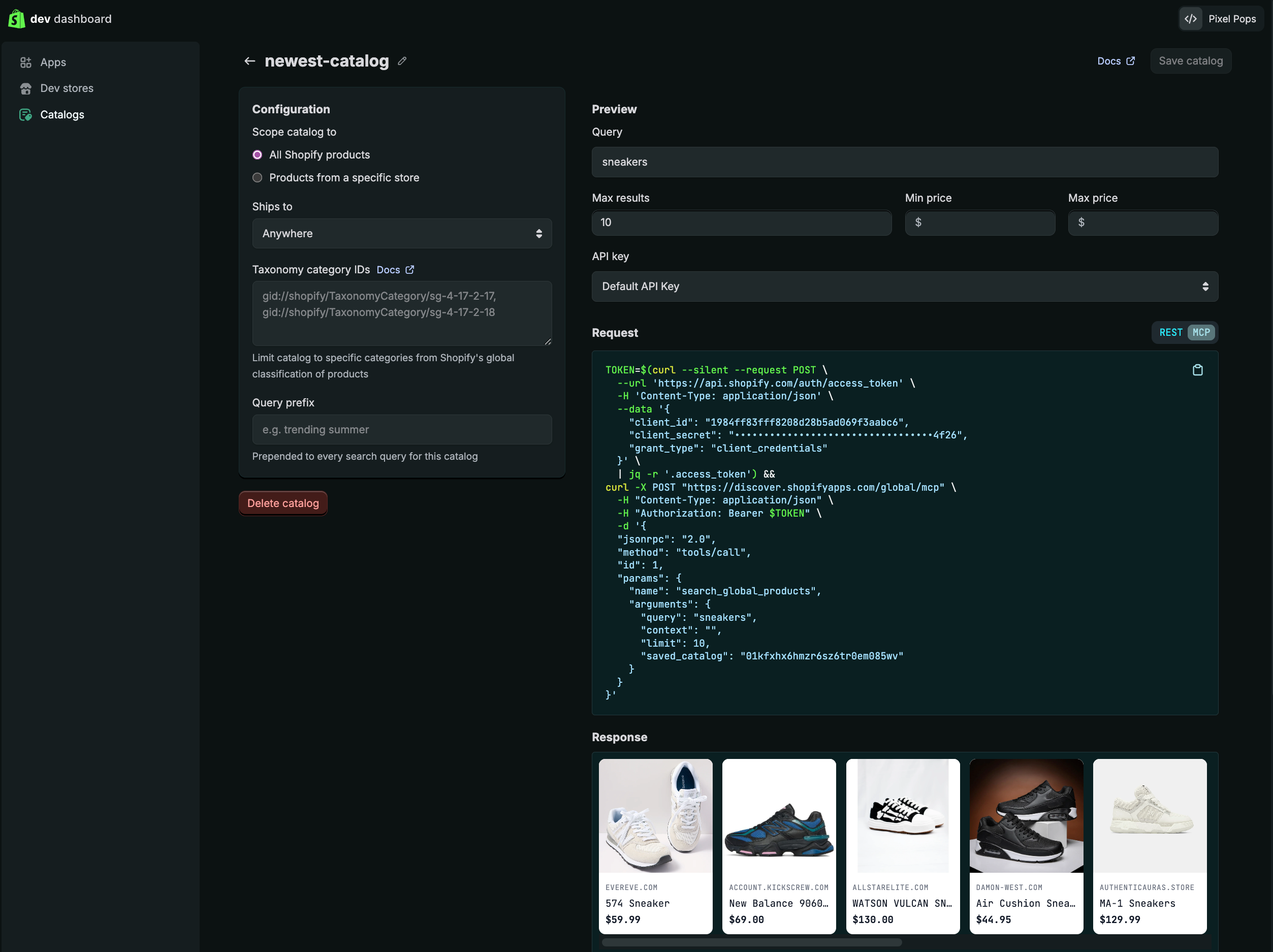
Catalog filter options include:
- Inputs: Whether the Catalog queries all of Shopify or products from a specific store.
- Overrides: Custom filters applied to queries that limit results by attributes like only those belonging to certain Taxonomy category IDs.
- Access: Where the custom URL for your saved Catalog can be retrieved, as well as requesting access to additional features related to agentic commerce.
You can test your catalog configuration in the Preview panel. After you're happy with the results, click Save.
If a slug for a saved catalog is provided in Catalog Search operations, then its parameters and filters always take precedence.
Anchor to Promoted placementsPromoted placements
Promoted placements let approved developers request paid placements in Global Catalog responses and earn commission on eligible attributed purchases. Use promoted placements when you want to blend promoted variants into Global Catalog search results.


