Authenticate checkouts
Authenticate checkouts with Checkout Kit and the Customer Account API. When a buyer signs in, Shopify prefills checkout with their email, shipping address, and payment method.
Use the Platform dropdown under Project to switch between Swift, Kotlin, and React Native. The steps and code update for each platform.
Anchor to What you'll learnWhat you'll learn
In this tutorial, you'll:
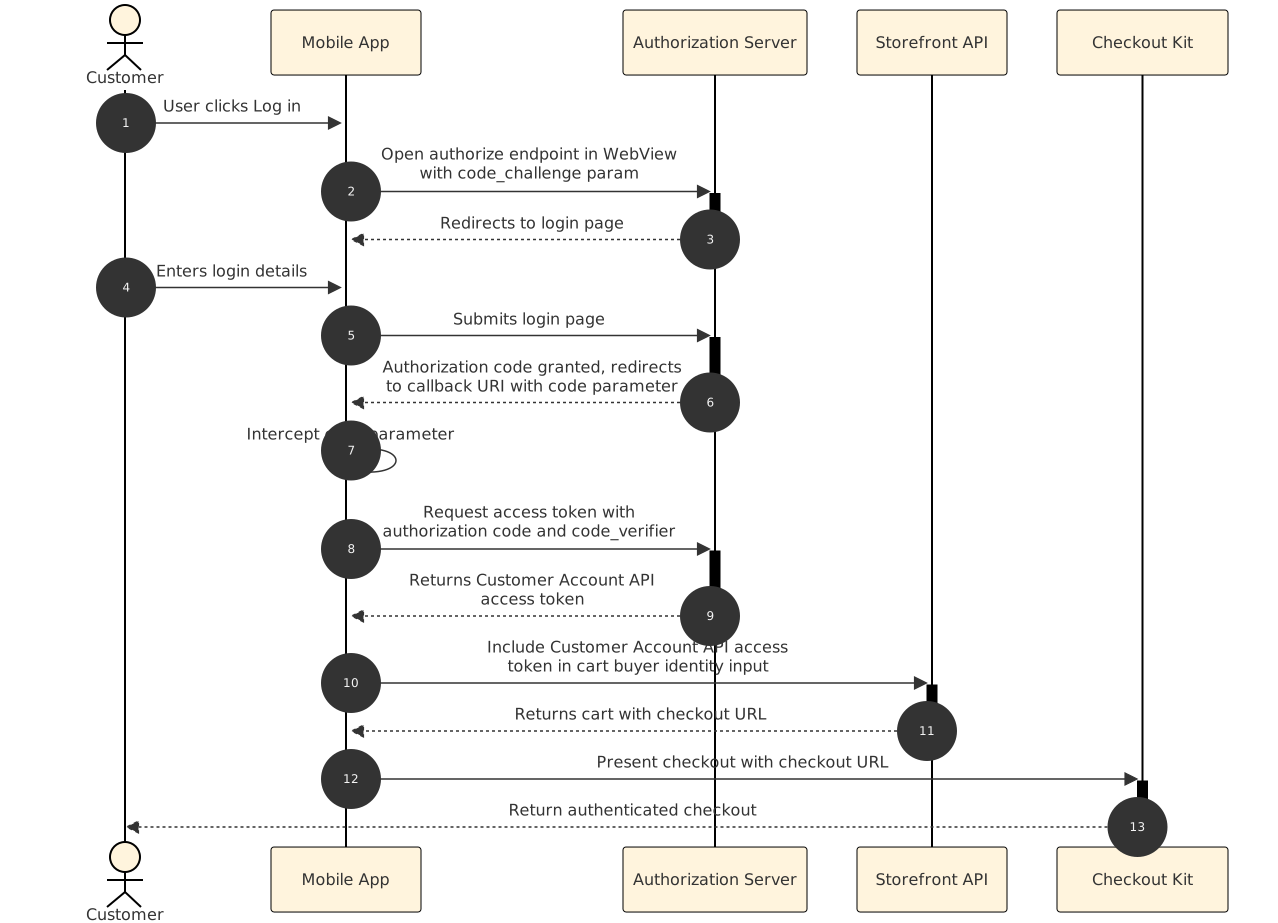
- Obtain a Customer Account API access token using OAuth and Proof Key for Code Exchange (PKCE).
- Use the access token to create an authenticated cart.
- Present checkout to a signed-in buyer using Checkout Kit.
Requirements
New customer accounts enabled on your store.
Checkout Kit installed in your app.
Storefront API access for your app.
Project
Anchor to Configure Customer Account API accessConfigure Customer Account API access
Configure Customer Account API access as a public mobile client. Save the callback URL and client ID because you'll need them in the next step.
Anchor to Set up the mobile clientSet up the mobile client
In the Dev Dashboard, configure a Customer Account API client for your app. Set the client type to Public and save these values:
- Client ID: Required for the authorization URL and token exchange.
- Callback URL: The redirect URI for the OAuth flow. By default, the format is
shop.{your_shop_id}.app://callback.
Anchor to Authenticate the buyerAuthenticate the buyer
Implement an OAuth 2.0 authorization flow with PKCE to sign the buyer in through the Customer Account API.
Anchor to Generate a code challenge and verifierGenerate a code challenge and verifier
Generate a PKCE code verifier and challenge. These prove that the client exchanging the authorization code is the same client that started the request, as defined in RFC 7636. Save the code verifier because you'll need it when you exchange the authorization code for a token.
Anchor to Discover authentication endpointsDiscover authentication endpoints
Fetch the authorization and token endpoints from your shop's OpenID configuration.
Combine the authorization endpoint, client ID, redirect URI, code challenge, and a random state parameter into an authorization URL. Open the URL in a web view so the buyer can sign in.
After the buyer signs in, the web view redirects to your redirect_uri with a code query parameter. Extract the authorization code and close the web view.
Listen for navigation events in the web view. When the URL matches your redirect URI, extract the code and state parameters. Verify that the state matches the value you sent in the authorization URL to prevent CSRF attacks.
Anchor to Exchange the code for an access tokenExchange the code for an access token
Submit the authorization code and the code verifier to the token endpoint to obtain a Customer Account API access token.
Anchor to Send the token requestSend the token request
Send a POST request with the authorization code and code verifier to the token endpoint. The response includes access_token, refresh_token, and expires_in.
Access tokens expire after the expires_in duration. Refresh an expired token by making a POST request to the token endpoint with grant_type set to refresh_token.
Store tokens securely using your platform's built-in security features (or equivalent secure storage):
Use Keychain Services to store tokens on iOS.
Never store tokens in plain text. Compromised tokens could allow unauthorized access to buyer accounts.
Never store tokens in plain text. Compromised tokens could allow unauthorized access to buyer accounts.
Anchor to Create an authenticated cartCreate an authenticated cart
Include the access token in the buyer identity input of your cartCreate mutation. Shopify uses the token to prefill checkout with the buyer's account information.
Anchor to Pass buyer identity in the cart mutationPass buyer identity in the cart mutation
Pass the access_token from the token response as the customerAccessToken in the cart's buyerIdentity. The response includes a checkoutUrl that you pass to Checkout Kit.
Present the checkoutUrl soon after receiving it. Authenticated checkout URLs expire, and an expired URL starts an unauthenticated checkout session.
Present the checkoutUrl soon after receiving it. Authenticated checkout URLs expire, and an expired URL starts an unauthenticated checkout session.
Anchor to Present the checkout URL in Checkout KitPresent the checkout URL in Checkout Kit
Pass the checkoutUrl to Checkout Kit's present() method. The buyer sees checkout prefilled with their account information.
Anchor to Open Checkout Kit with the prefilled URLOpen Checkout Kit with the prefilled URL
Call present() with the checkoutUrl from the cart response. Checkout Kit opens with the buyer's shipping address and payment methods prefilled.
After checkout, sign the buyer out by sending a request to the logout endpoint and clearing any locally stored tokens and authenticated carts.
After checkout, sign the buyer out by sending a request to the logout endpoint and clearing any locally stored tokens and authenticated carts.
Anchor to Tutorial complete!Tutorial complete!
You've built an authenticated checkout flow that signs buyers in through the Customer Account API and prefills checkout with their account information.


