Events and webhooks
Shopify offers two mechanisms for subscribing to changes to commerce resources: Events and webhooks.
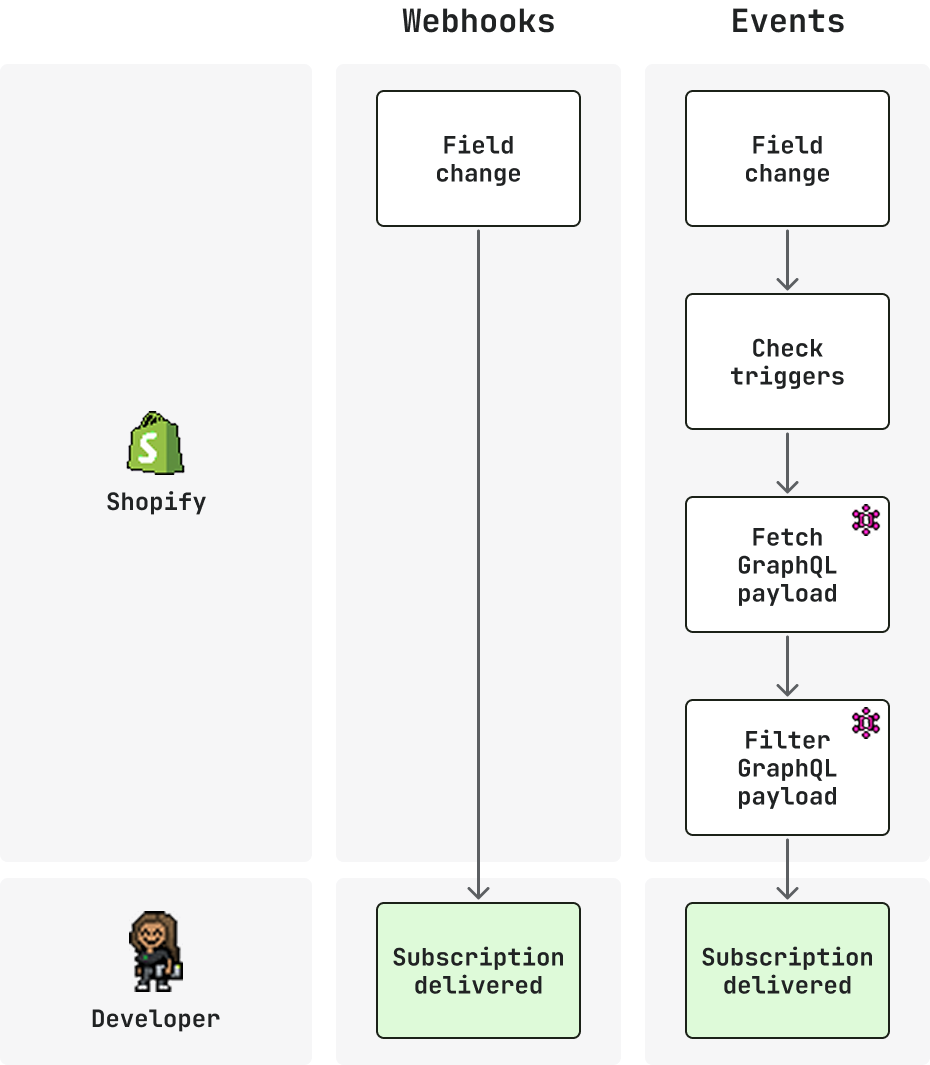
Events is Shopify's next-generation subscription mechanism, with field-level triggers, conditional filters, and custom GraphQL payloads for specific GraphQL Admin objects. You receive only the data you need, only when you need it.
Webhooks have broad coverage across all Shopify resources, with flexible delivery destinations and support for API-managed subscriptions.
Anchor to How it worksHow it works
The subscription workflow is the same for both Events and webhooks:
- Define a subscription: Declare a topic and where to send deliveries.
- Filter deliveries: Narrow which changes qualify.
- Receive a delivery: Shopify sends a payload when a qualifying change happens.
- Verify deliveries: Confirm the HMAC signature and deduplicate with unique IDs.
- Use the delivery: Act on the payload in your Shopify app handlers.
Where Events and webhooks diverge is in how much control you have over each stage.
Events adds field-level triggers and conditional suppression to the filter stage, and a custom GraphQL query to shape the received payload. Webhooks covers a broader set of topics, and supports shop-specific subscriptions managed through the GraphQL Admin API.
Events and webhooks can coexist in the same shopify.app.toml. Use Events for supported topics and webhooks for everything else. As topic coverage expands, migrate subscriptions one at a time.
Events and webhooks can coexist in the same shopify.app.toml. Use Events for supported topics and webhooks for everything else. As topic coverage expands, migrate subscriptions one at a time.
Anchor to EventsEvents
Subscribe to topics with field-level triggers, custom GraphQL Admin API queries, and query filters. The following capabilities set Events apart from webhooks:
- Configuration:
shopify.app.tomlonly. - Topic format:
topic = "Product"+actions = ["update"]. - Field filtering:
triggersnarrow updates to specific field changes. - Delivery filtering:
query_filterto suppress deliveries based on query results. - Payload shape: Defined by your custom GraphQL query.
- Supported topics: A subset of Shopify resources.
Define subscriptions in your app configuration file and receive deliveries only when the data you care about changes.

shopify.app.toml
Response
Anchor to WebhooksWebhooks
Subscribe to any Shopify resource using topic strings. The following capabilities set webhooks apart from Events:
- Configuration:
shopify.app.tomlor GraphQL Admin API. - Topic format:
products/updatestring. - Field filtering:
include_fieldstrim the payload to specific fields. - Delivery filtering:
filterto suppress deliveries using search syntax. - Payload shape: Fixed, REST-shaped payload.
- Supported topics: All Shopify resources.
Define subscriptions in your app configuration file or manage them dynamically through the GraphQL Admin API.


shopify.app.toml
Response
Anchor to Subscribe to data on ShopifySubscribe to data on Shopify
Dive deeper with these resources to accelerate development.


