Version 2025-07 is the last API version to support React-based UI components. Later versions use Polaris web components, native UI elements with built-in accessibility, better performance, and consistent styling with Shopify's design system. Check out the upgrade guide to upgrade your extension and avoid being blocked from updating your extension after October 1st 2026.
Overlay
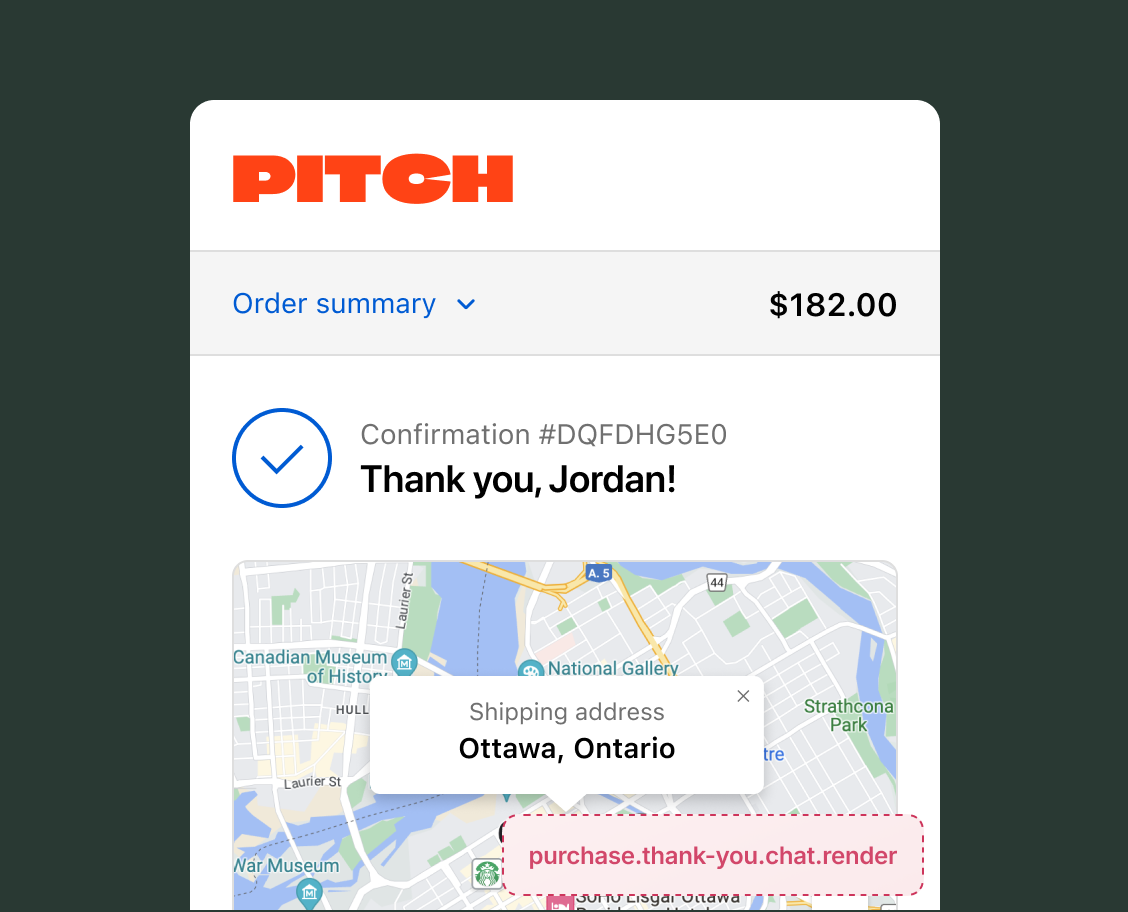
The overlay target adds a floating chat widget to the Thank you page. Buyers can start a conversation after placing their order. Use it to connect buyers with a live agent or chatbot.
The Order API provides the order ID and whether it's the buyer's first order. Pass this data to your chat platform so agents can see order details when a conversation starts.
Anchor to Use casesUse cases
- Post-purchase help: Connect buyers with an agent or chatbot who can answer questions about their order, shipping timelines, or return policies.
- Order-aware conversations: Pass order details from the Order API to your chat platform so agents can see the order when a conversation starts. See the Chat component reference for an example using
onReadyandpostMessage. - Feedback collection: Prompt buyers for a review or satisfaction rating while the purchase is fresh.
Anchor to Overlay targetOverlay target
Use this target to add a chat widget that floats over the Thank you page. This target accepts only the Chat component. Learn more about building chat applications for checkout.
Anchor to Render a chat overlay ,[object Object]Render a chat overlay target
purchase.thank-you.chat.render
Set extensions.targeting.preloads.chat in your shopify.extension.toml file to the URL of your chat page. The Chat component loads this URL in an iframe with access to the App Bridge script for checkout.
The overlay starts in a minimized state (max 224x72 pixels). After the buyer interacts with the widget and your app calls window.resizeTo(), the overlay expands to a maximized state (max 415x700 pixels on desktop, 100% width and 93% height of the viewport on mobile).
Supported components
Supported components
Examples
Add a chat widget to the Thank you page
Description
Render a floating chat widget on the Thank you page. This example mounts a Chat component with a defined width and height.
React
import {
  Chat,
  reactExtension,
} from '@shopify/ui-extensions-react/checkout';

export default reactExtension(
  'purchase.thank-you.chat.render',
  () => <Extension />,
);

function Extension() {
  return <Chat inlineSize={100} blockSize={50} />;
}
TS
import {extension, Chat} from '@shopify/ui-extensions/checkout';

export default extension(
  'purchase.thank-you.chat.render',
  (root) => {
    const chat = root.createComponent(Chat, {
      inlineSize: 100,
      blockSize: 50,
    });

    root.appendChild(chat);
  },
);
Anchor to Best practicesBest practices
- Test sizing across states: The overlay enforces different size limits for minimized and maximized states. The values you set for
inlineSizeandblockSizeare clamped to these limits, so the rendered size might not match your input. Test both states on the Thank you page to verify dimensions. - Design for the minimized state: Buyers see the minimized overlay first. Use it to show a clear call to action, like a chat icon or short label, that invites interaction. Reserve detailed content for the maximized state after the buyer focuses the widget.
Anchor to LimitationsLimitations
- Anchored position: The overlay is anchored to the bottom-right corner. There's no API to change the position.
- HTTPS required: The
preloads.chatURL must use HTTPS. Relative URLs are resolved against your app URL. - Single extension: Only one extension can be active at the chat target at any time.
- Public apps only: Chat extensions are available to public apps for real-time customer support. Custom apps can't use chat extensions.