Shipping
The shipping step is where buyers enter a delivery address and select a shipping method. Use shipping targets to add address validation, delivery date pickers, shipping insurance offers, and messages with delivery information.
Shipping data at these targets is read-only. Extensions can read shipping options and delivery groups but can't modify the shipping option list, reorder methods, or change shipping rates.
Anchor to Use casesUse cases
- Delivery date selection: Display a date picker under a specific shipping option so buyers can choose their preferred delivery date.
- Shipping insurance: Offer shipping protection for high-value orders.
- Delivery-region restrictions: Display a notice if the buyer's address is outside the allowed delivery region.
- Carbon-neutral shipping: Highlight eco-friendly shipping options or offer a carbon offset add-on after the buyer selects a method.
- Split shipping guidance: When an order splits into multiple shipments, display messaging that explains why items are shipping separately.
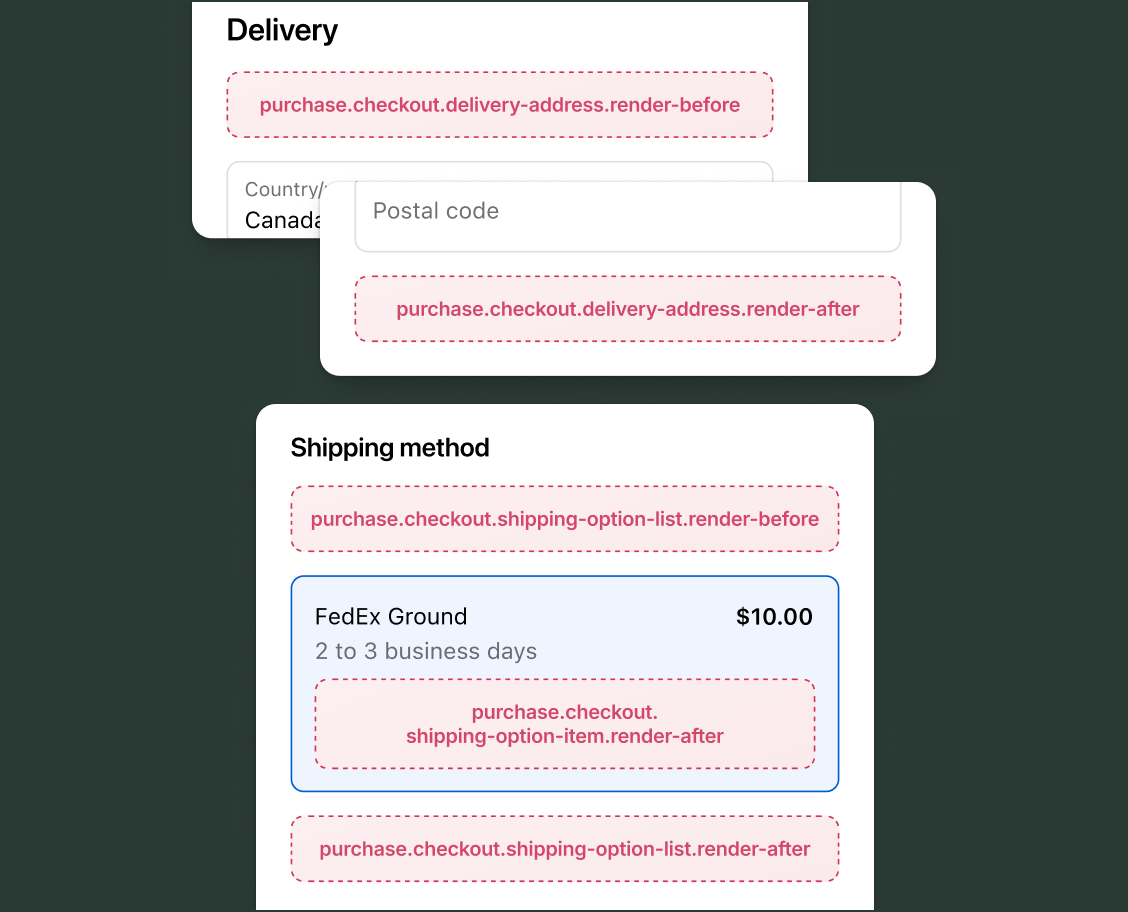
Anchor to Delivery address targetsDelivery address targets
The render-before and render-after delivery address targets position content around the shipping address form. These targets have read access through API properties and write access through API methods.
Anchor to Render before delivery address ,[object Object]Render before delivery address target
purchase.checkout.delivery-address.render-before
This target renders between the shipping address header and the address form fields. Use this target to display address-related guidance or validation messaging before the buyer enters their address.
Read access to cart contents, buyer identity, and delivery details is available through API properties. The buyer's current shipping address is available through shopify.shippingAddress.
Supported components
- Abbreviation
- Badge
- Banner
- Box
- Button
- Chat
- Checkbox
- Chip
- Choice list
- Clickable
- Clickable chip
- Clipboard item
- Consent checkbox
- Consent phone field
- Date field
- Date picker
- Details
- Divider
- Drop zone
- Email field
- Form
- Grid
- Heading
- Icon
- Image
- Link
- Map
- Modal
- Money field
- Number field
- Ordered list
- Paragraph
- Password field
- Payment icon
- Phone field
- Popover
- Press button
- Product thumbnail
- Progress
- Qr code
- Query container
- Scroll box
- Section
- Select
- Sheet
- Skeleton paragraph
- Spinner
- Stack
- Switch
- Text
- Text area
- Text field
- Time
- Tooltip
- Unordered list
- Url field
Available APIs
- Addresses API
- Analytics API
- Attributes API
- Buyer Identity API
- Buyer Journey API
- Cart Instructions API
- Cart Lines API
- Checkout Token API
- Cost API
- Customer Privacy API
- Delivery API
- Discounts API
- Extension API
- Gift Cards API
- Localization API
- Localized Fields API
- Metafields API
- Note API
- Payments API
- Session Token API
- Settings API
- Shop API
- Storage API
- Storefront API
Supported components
- Abbreviation
- Badge
- Banner
- Box
- Button
- Chat
- Checkbox
- Chip
- Choice list
- Clickable
- Clickable chip
- Clipboard item
- Consent checkbox
- Consent phone field
- Date field
- Date picker
- Details
- Divider
- Drop zone
- Email field
- Form
- Grid
- Heading
- Icon
- Image
- Link
- Map
- Modal
- Money field
- Number field
- Ordered list
- Paragraph
- Password field
- Payment icon
- Phone field
- Popover
- Press button
- Product thumbnail
- Progress
- Qr code
- Query container
- Scroll box
- Section
- Select
- Sheet
- Skeleton paragraph
- Spinner
- Stack
- Switch
- Text
- Text area
- Text field
- Time
- Tooltip
- Unordered list
- Url field
Available APIs
- Addresses API
- Analytics API
- Attributes API
- Buyer Identity API
- Buyer Journey API
- Cart Instructions API
- Cart Lines API
- Checkout Token API
- Cost API
- Customer Privacy API
- Delivery API
- Discounts API
- Extension API
- Gift Cards API
- Localization API
- Localized Fields API
- Metafields API
- Note API
- Payments API
- Session Token API
- Settings API
- Shop API
- Storage API
- Storefront API
Preact
Examples
Display an address guidance banner
Description
Show a reminder before the address form asking buyers to enter their full address, including apartment or unit number, for accurate delivery.
Preact
import '@shopify/ui-extensions/preact';
import {render} from 'preact';

export default function extension() {
  render(<Extension />, document.body);
}

function Extension() {
  return (
    <s-banner>
      Include your apartment or unit number for accurate delivery.
    </s-banner>
  );
}
Prompt returning buyers to use a saved address
Description
Show a different banner for signed-in buyers versus guests. This example checks `shopify.buyerIdentity?.customer.value` and surfaces a saved-address prompt for returning customers. The optional chain handles cases where the extension doesn't have access to protected customer data.
Preact
import '@shopify/ui-extensions/preact';
import {render} from 'preact';

export default function extension() {
  render(<Extension />, document.body);
}

function Extension() {
  const customer = shopify.buyerIdentity?.customer.value;

  if (!customer) {
    return (
      <s-banner tone="info">
        Sign in to speed up checkout with saved addresses.
      </s-banner>
    );
  }

  return (
    <s-banner tone="info">
      Welcome back, {customer.firstName ?? 'friend'}. Your saved addresses are available below.
    </s-banner>
  );
}
Anchor to Render after delivery address ,[object Object]Render after delivery address target
purchase.checkout.delivery-address.render-after
This target renders after the shipping address form fields. Use this target to display post-address content such as delivery notes or address verification results.
Read access to cart contents, buyer identity, and delivery details is available through API properties. The buyer's current shipping address is available through shopify.shippingAddress.
Supported components
- Abbreviation
- Badge
- Banner
- Box
- Button
- Chat
- Checkbox
- Chip
- Choice list
- Clickable
- Clickable chip
- Clipboard item
- Consent checkbox
- Consent phone field
- Date field
- Date picker
- Details
- Divider
- Drop zone
- Email field
- Form
- Grid
- Heading
- Icon
- Image
- Link
- Map
- Modal
- Money field
- Number field
- Ordered list
- Paragraph
- Password field
- Payment icon
- Phone field
- Popover
- Press button
- Product thumbnail
- Progress
- Qr code
- Query container
- Scroll box
- Section
- Select
- Sheet
- Skeleton paragraph
- Spinner
- Stack
- Switch
- Text
- Text area
- Text field
- Time
- Tooltip
- Unordered list
- Url field
Available APIs
- Addresses API
- Analytics API
- Attributes API
- Buyer Identity API
- Buyer Journey API
- Cart Instructions API
- Cart Lines API
- Checkout Token API
- Cost API
- Customer Privacy API
- Delivery API
- Discounts API
- Extension API
- Gift Cards API
- Localization API
- Localized Fields API
- Metafields API
- Note API
- Payments API
- Session Token API
- Settings API
- Shop API
- Storage API
- Storefront API
Supported components
- Abbreviation
- Badge
- Banner
- Box
- Button
- Chat
- Checkbox
- Chip
- Choice list
- Clickable
- Clickable chip
- Clipboard item
- Consent checkbox
- Consent phone field
- Date field
- Date picker
- Details
- Divider
- Drop zone
- Email field
- Form
- Grid
- Heading
- Icon
- Image
- Link
- Map
- Modal
- Money field
- Number field
- Ordered list
- Paragraph
- Password field
- Payment icon
- Phone field
- Popover
- Press button
- Product thumbnail
- Progress
- Qr code
- Query container
- Scroll box
- Section
- Select
- Sheet
- Skeleton paragraph
- Spinner
- Stack
- Switch
- Text
- Text area
- Text field
- Time
- Tooltip
- Unordered list
- Url field
Available APIs
- Addresses API
- Analytics API
- Attributes API
- Buyer Identity API
- Buyer Journey API
- Cart Instructions API
- Cart Lines API
- Checkout Token API
- Cost API
- Customer Privacy API
- Delivery API
- Discounts API
- Extension API
- Gift Cards API
- Localization API
- Localized Fields API
- Metafields API
- Note API
- Payments API
- Session Token API
- Settings API
- Shop API
- Storage API
- Storefront API
Preact
Examples
Show a delivery note field after the address form
Description
Display a text field after the address form where buyers can add special delivery instructions. This example stores the instructions as a cart metafield.
Preact
import '@shopify/ui-extensions/preact';
import {render} from 'preact';

export default function extension() {
  render(<Extension />, document.body);
}

function Extension() {
  async function onInput(event) {
    const value = event.currentTarget.value;
    if (!shopify.instructions.value.metafields.canSetCartMetafields) {
      return;
    }
    try {
      await shopify.applyMetafieldChange({
        type: 'updateCartMetafield',
        metafield: {
          namespace: '$app:delivery',
          key: 'instructions',
          value,
          type: 'single_line_text_field',
        },
      });
    } catch {
    }
  }

  return (
    <s-text-field
      label="Delivery instructions (optional)"
      onInput={onInput}
    />
  );
}
Preview tax based on the delivery country
Description
Display the tax that applies once the buyer enters a delivery country. This example reads `shopify.shippingAddress` for the country code and `shopify.cost.totalTaxAmount` for the amount, then renders both below the address form.
Preact
import '@shopify/ui-extensions/preact';
import {render} from 'preact';

export default function extension() {
  render(<Extension />, document.body);
}

function Extension() {
  const address = shopify.shippingAddress?.value;
  const tax = shopify.cost.totalTaxAmount.value;

  if (!address?.countryCode || !tax) return null;

  return (
    <s-text color="subdued">
      Estimated tax for {address.countryCode}: {tax.amount} {tax.currencyCode}
    </s-text>
  );
}
Anchor to Shipping option list targetsShipping option list targets
The render-before and render-after shipping option list targets position content around the list of available shipping methods. Both provide access to the ShippingOptionListApi, which includes shopify.target containing the delivery group and shopify.deliverySelectionGroups for split shipping scenarios where multiple delivery groups are present.
Anchor to Render before shipping options ,[object Object]Render before shipping options target
purchase.checkout.shipping-option-list.render-before
This target renders between the shipping method header and the list of shipping options. Use this target to display general shipping information or promotions that apply to all available methods.
Access the current delivery group through shopify.target and split shipping delivery selection groups through shopify.deliverySelectionGroups. Read access to cart contents, buyer identity, and delivery details is available through API properties.
Supported components
- Abbreviation
- Badge
- Banner
- Box
- Button
- Chat
- Checkbox
- Chip
- Choice list
- Clickable
- Clickable chip
- Clipboard item
- Consent checkbox
- Consent phone field
- Date field
- Date picker
- Details
- Divider
- Drop zone
- Email field
- Form
- Grid
- Heading
- Icon
- Image
- Link
- Map
- Modal
- Money field
- Number field
- Ordered list
- Paragraph
- Password field
- Payment icon
- Phone field
- Popover
- Press button
- Product thumbnail
- Progress
- Qr code
- Query container
- Scroll box
- Section
- Select
- Sheet
- Skeleton paragraph
- Spinner
- Stack
- Switch
- Text
- Text area
- Text field
- Time
- Tooltip
- Unordered list
- Url field
Available APIs
- Addresses API
- Analytics API
- Attributes API
- Buyer Identity API
- Buyer Journey API
- Cart Instructions API
- Cart Lines API
- Checkout Token API
- Cost API
- Customer Privacy API
- Delivery API
- Discounts API
- Extension API
- Gift Cards API
- Localization API
- Localized Fields API
- Metafields API
- Note API
- Payments API
- Session Token API
- Settings API
- Shop API
- Storage API
- Storefront API
Supported components
- Abbreviation
- Badge
- Banner
- Box
- Button
- Chat
- Checkbox
- Chip
- Choice list
- Clickable
- Clickable chip
- Clipboard item
- Consent checkbox
- Consent phone field
- Date field
- Date picker
- Details
- Divider
- Drop zone
- Email field
- Form
- Grid
- Heading
- Icon
- Image
- Link
- Map
- Modal
- Money field
- Number field
- Ordered list
- Paragraph
- Password field
- Payment icon
- Phone field
- Popover
- Press button
- Product thumbnail
- Progress
- Qr code
- Query container
- Scroll box
- Section
- Select
- Sheet
- Skeleton paragraph
- Spinner
- Stack
- Switch
- Text
- Text area
- Text field
- Time
- Tooltip
- Unordered list
- Url field
Available APIs
- Addresses API
- Analytics API
- Attributes API
- Buyer Identity API
- Buyer Journey API
- Cart Instructions API
- Cart Lines API
- Checkout Token API
- Cost API
- Customer Privacy API
- Delivery API
- Discounts API
- Extension API
- Gift Cards API
- Localization API
- Localized Fields API
- Metafields API
- Note API
- Payments API
- Session Token API
- Settings API
- Shop API
- Storage API
- Storefront API
Preact
Examples
Display a message about split shipping
Description
When the order requires multiple shipments, display a banner explaining the split. This example checks whether more than one delivery group exists and renders guidance for the buyer.
Preact
import '@shopify/ui-extensions/preact';
import {render} from 'preact';

export default function extension() {
  render(<Extension />, document.body);
}

function Extension() {
  const deliveryGroups = shopify.target.value?.deliveryGroups ?? [];

  if (deliveryGroups.length <= 1) return null;

  return (
    <s-banner>
      Your order contains items that ship separately. Select a shipping
      method for each shipment.
    </s-banner>
  );
}
Highlight free shipping eligibility above the options
Description
Encourage buyers to unlock free shipping by displaying the remaining amount needed. This example reads `shopify.cost.totalAmount.value` and renders the gap to a free-shipping threshold.
Preact
import '@shopify/ui-extensions/preact';
import {render} from 'preact';

export default function extension() {
  render(<Extension />, document.body);
}

function Extension() {
  const THRESHOLD = 75;
  const total = Number(shopify.cost.totalAmount.value?.amount ?? 0);
  const remaining = THRESHOLD - total;

  if (remaining <= 0) {
    return (
      <s-banner tone="success">You qualify for free shipping.</s-banner>
    );
  }

  return (
    <s-text color="subdued">
      Add ${remaining.toFixed(2)} more to unlock free shipping.
    </s-text>
  );
}
Anchor to Render after shipping options ,[object Object]Render after shipping options target
purchase.checkout.shipping-option-list.render-after
This target renders after the list of shipping options. Use this target to display supplementary information below the shipping methods, such as delivery disclaimers or estimated arrival date.
This target provides the same API access as render-before: the delivery group through shopify.target and split shipping groups through shopify.deliverySelectionGroups. Read access to cart contents, buyer identity, and delivery details is available through API properties.
Supported components
- Abbreviation
- Badge
- Banner
- Box
- Button
- Chat
- Checkbox
- Chip
- Choice list
- Clickable
- Clickable chip
- Clipboard item
- Consent checkbox
- Consent phone field
- Date field
- Date picker
- Details
- Divider
- Drop zone
- Email field
- Form
- Grid
- Heading
- Icon
- Image
- Link
- Map
- Modal
- Money field
- Number field
- Ordered list
- Paragraph
- Password field
- Payment icon
- Phone field
- Popover
- Press button
- Product thumbnail
- Progress
- Qr code
- Query container
- Scroll box
- Section
- Select
- Sheet
- Skeleton paragraph
- Spinner
- Stack
- Switch
- Text
- Text area
- Text field
- Time
- Tooltip
- Unordered list
- Url field
Available APIs
- Addresses API
- Analytics API
- Attributes API
- Buyer Identity API
- Buyer Journey API
- Cart Instructions API
- Cart Lines API
- Checkout Token API
- Cost API
- Customer Privacy API
- Delivery API
- Discounts API
- Extension API
- Gift Cards API
- Localization API
- Localized Fields API
- Metafields API
- Note API
- Payments API
- Session Token API
- Settings API
- Shop API
- Storage API
- Storefront API
Supported components
- Abbreviation
- Badge
- Banner
- Box
- Button
- Chat
- Checkbox
- Chip
- Choice list
- Clickable
- Clickable chip
- Clipboard item
- Consent checkbox
- Consent phone field
- Date field
- Date picker
- Details
- Divider
- Drop zone
- Email field
- Form
- Grid
- Heading
- Icon
- Image
- Link
- Map
- Modal
- Money field
- Number field
- Ordered list
- Paragraph
- Password field
- Payment icon
- Phone field
- Popover
- Press button
- Product thumbnail
- Progress
- Qr code
- Query container
- Scroll box
- Section
- Select
- Sheet
- Skeleton paragraph
- Spinner
- Stack
- Switch
- Text
- Text area
- Text field
- Time
- Tooltip
- Unordered list
- Url field
Available APIs
- Addresses API
- Analytics API
- Attributes API
- Buyer Identity API
- Buyer Journey API
- Cart Instructions API
- Cart Lines API
- Checkout Token API
- Cost API
- Customer Privacy API
- Delivery API
- Discounts API
- Extension API
- Gift Cards API
- Localization API
- Localized Fields API
- Metafields API
- Note API
- Payments API
- Session Token API
- Settings API
- Shop API
- Storage API
- Storefront API
Preact
Examples
Show a shipping disclaimer below the options
Description
Display a disclaimer about delivery estimates below the shipping options list. This example renders a text notice that applies to all available methods.
Preact
import '@shopify/ui-extensions/preact';
import {render} from 'preact';

export default function extension() {
  render(<Extension />, document.body);
}

function Extension() {
  return (
    <s-text>
      Delivery estimates are calculated from the shipping date and don't
      include processing time.
    </s-text>
  );
}
Show a sustainability message below shipping options
Description
Promote a carbon-neutral shipping initiative below the available options. This example renders a static message that reinforces the brand's sustainability commitments.
Preact
import '@shopify/ui-extensions/preact';
import {render} from 'preact';

export default function extension() {
  render(<Extension />, document.body);
}

function Extension() {
  return (
    <s-text color="subdued">
      All shipments are carbon-neutral. We offset emissions through verified partners.
    </s-text>
  );
}
Anchor to Shipping option item targetsShipping option item targets
The details.render and render-after shipping option item targets render for each individual shipping option in the list. Both provide access to the ShippingOptionItemApi. This API includes shopify.target containing the shipping option details, shopify.isTargetSelected indicating whether the buyer has selected that option, and shopify.renderMode with layout information.
Anchor to Render shipping option details ,[object Object]Render shipping option details target
purchase.checkout.shipping-option-item.details.render
For each option in the shipping option list, this target renders under the shipping method name. Use this target to display expanded details for a shipping method, such as a delivery date picker or additional cost breakdowns.
Access the shipping option through shopify.target, selection state through shopify.isTargetSelected, and layout context through shopify.renderMode. Read access to cart contents, buyer identity, and delivery details is available through API properties.
Supported components
- Abbreviation
- Badge
- Banner
- Box
- Button
- Chat
- Checkbox
- Chip
- Choice list
- Clickable
- Clickable chip
- Clipboard item
- Consent checkbox
- Consent phone field
- Date field
- Date picker
- Details
- Divider
- Drop zone
- Email field
- Form
- Grid
- Heading
- Icon
- Image
- Link
- Map
- Modal
- Money field
- Number field
- Ordered list
- Paragraph
- Password field
- Payment icon
- Phone field
- Popover
- Press button
- Product thumbnail
- Progress
- Qr code
- Query container
- Scroll box
- Section
- Select
- Sheet
- Skeleton paragraph
- Spinner
- Stack
- Switch
- Text
- Text area
- Text field
- Time
- Tooltip
- Unordered list
- Url field
Available APIs
- Addresses API
- Analytics API
- Attributes API
- Buyer Identity API
- Buyer Journey API
- Cart Instructions API
- Cart Lines API
- Checkout Token API
- Cost API
- Customer Privacy API
- Delivery API
- Discounts API
- Extension API
- Gift Cards API
- Localization API
- Localized Fields API
- Metafields API
- Note API
- Payments API
- Session Token API
- Settings API
- Shop API
- Storage API
- Storefront API
Supported components
- Abbreviation
- Badge
- Banner
- Box
- Button
- Chat
- Checkbox
- Chip
- Choice list
- Clickable
- Clickable chip
- Clipboard item
- Consent checkbox
- Consent phone field
- Date field
- Date picker
- Details
- Divider
- Drop zone
- Email field
- Form
- Grid
- Heading
- Icon
- Image
- Link
- Map
- Modal
- Money field
- Number field
- Ordered list
- Paragraph
- Password field
- Payment icon
- Phone field
- Popover
- Press button
- Product thumbnail
- Progress
- Qr code
- Query container
- Scroll box
- Section
- Select
- Sheet
- Skeleton paragraph
- Spinner
- Stack
- Switch
- Text
- Text area
- Text field
- Time
- Tooltip
- Unordered list
- Url field
Available APIs
- Addresses API
- Analytics API
- Attributes API
- Buyer Identity API
- Buyer Journey API
- Cart Instructions API
- Cart Lines API
- Checkout Token API
- Cost API
- Customer Privacy API
- Delivery API
- Discounts API
- Extension API
- Gift Cards API
- Localization API
- Localized Fields API
- Metafields API
- Note API
- Payments API
- Session Token API
- Settings API
- Shop API
- Storage API
- Storefront API
Preact
Examples
Show a delivery estimate for the selected shipping option
Description
Display a delivery date estimate when the buyer selects a shipping option. This example reads the target's delivery estimate and renders it only for the selected method.
Preact
import '@shopify/ui-extensions/preact';
import {render} from 'preact';

export default function extension() {
  render(<Extension />, document.body);
}

function Extension() {
  const isSelected = shopify.isTargetSelected.value;
  const option = shopify.target.value;

  if (!isSelected) return null;

  const estimate = option.deliveryEstimate?.timeInTransit;
  if (!estimate?.lower || !estimate?.upper) return null;

  const lowerDays = Math.round(estimate.lower / 86400);
  const upperDays = Math.round(estimate.upper / 86400);

  return (
    <s-text>
      Estimated delivery: {lowerDays}–{upperDays} days
    </s-text>
  );
}
Show delivery restrictions for express shipping
Description
Display a per-option restriction message for express shipping methods. This example reads `shopify.target` for the selected option and renders a subdued message beside the option's details when its title matches an express method.
Preact
import '@shopify/ui-extensions/preact';
import {render} from 'preact';

export default function extension() {
  render(<Extension />, document.body);
}

function Extension() {
  const option = shopify.target.value;

  if (!option.title?.toLowerCase().includes('express')) return null;

  return (
    <s-text color="subdued">
      Express delivery excludes PO boxes and remote locations.
    </s-text>
  );
}
Anchor to Render after shipping option ,[object Object]Render after shipping option target
purchase.checkout.shipping-option-item.render-after
For each delivery option in the list, this target renders after the shipping method details. Use this target to display supplementary information about a shipping method, such as insurance offers or carrier information.
This target provides the same API access as details.render: the shipping option through shopify.target, selection state through shopify.isTargetSelected, and layout context through shopify.renderMode. Read access to cart contents, buyer identity, and delivery details is available through API properties.
Supported components
- Abbreviation
- Badge
- Banner
- Box
- Button
- Chat
- Checkbox
- Chip
- Choice list
- Clickable
- Clickable chip
- Clipboard item
- Consent checkbox
- Consent phone field
- Date field
- Date picker
- Details
- Divider
- Drop zone
- Email field
- Form
- Grid
- Heading
- Icon
- Image
- Link
- Map
- Modal
- Money field
- Number field
- Ordered list
- Paragraph
- Password field
- Payment icon
- Phone field
- Popover
- Press button
- Product thumbnail
- Progress
- Qr code
- Query container
- Scroll box
- Section
- Select
- Sheet
- Skeleton paragraph
- Spinner
- Stack
- Switch
- Text
- Text area
- Text field
- Time
- Tooltip
- Unordered list
- Url field
Available APIs
- Addresses API
- Analytics API
- Attributes API
- Buyer Identity API
- Buyer Journey API
- Cart Instructions API
- Cart Lines API
- Checkout Token API
- Cost API
- Customer Privacy API
- Delivery API
- Discounts API
- Extension API
- Gift Cards API
- Localization API
- Localized Fields API
- Metafields API
- Note API
- Payments API
- Session Token API
- Settings API
- Shop API
- Storage API
- Storefront API
Supported components
- Abbreviation
- Badge
- Banner
- Box
- Button
- Chat
- Checkbox
- Chip
- Choice list
- Clickable
- Clickable chip
- Clipboard item
- Consent checkbox
- Consent phone field
- Date field
- Date picker
- Details
- Divider
- Drop zone
- Email field
- Form
- Grid
- Heading
- Icon
- Image
- Link
- Map
- Modal
- Money field
- Number field
- Ordered list
- Paragraph
- Password field
- Payment icon
- Phone field
- Popover
- Press button
- Product thumbnail
- Progress
- Qr code
- Query container
- Scroll box
- Section
- Select
- Sheet
- Skeleton paragraph
- Spinner
- Stack
- Switch
- Text
- Text area
- Text field
- Time
- Tooltip
- Unordered list
- Url field
Available APIs
- Addresses API
- Analytics API
- Attributes API
- Buyer Identity API
- Buyer Journey API
- Cart Instructions API
- Cart Lines API
- Checkout Token API
- Cost API
- Customer Privacy API
- Delivery API
- Discounts API
- Extension API
- Gift Cards API
- Localization API
- Localized Fields API
- Metafields API
- Note API
- Payments API
- Session Token API
- Settings API
- Shop API
- Storage API
- Storefront API
Preact
Examples
Offer shipping insurance for the selected method
Description
Display a shipping insurance opt-in checkbox after the selected shipping option. This example checks isTargetSelected and renders the offer only for the method the buyer has chosen.
Preact
import '@shopify/ui-extensions/preact';
import {render} from 'preact';

export default function extension() {
  render(<Extension />, document.body);
}

function Extension() {
  const isSelected = shopify.isTargetSelected.value;

  if (!isSelected) return null;

  async function onCheckboxChange(event) {
    const isChecked = event.currentTarget.checked;
    if (!shopify.instructions.value.metafields.canSetCartMetafields) {
      return;
    }
    try {
      if (isChecked) {
        await shopify.applyMetafieldChange({
          type: 'updateCartMetafield',
          metafield: {
            namespace: '$app:shipping',
            key: 'insurance',
            value: 'true',
            type: 'single_line_text_field',
          },
        });
      } else {
        await shopify.applyMetafieldChange({
          type: 'removeCartMetafield',
          namespace: '$app:shipping',
          key: 'insurance',
        });
      }
    } catch {
      event.currentTarget.checked = !isChecked;
    }
  }

  return (
    <s-checkbox
      onChange={onCheckboxChange}
      label="Add shipping protection ($2.99)"
    />
  );
}
Offer a carbon-offset add-on for the selected option
Description
Invite buyers to add a carbon-offset contribution when they've selected a specific shipping option. This example uses `shopify.isTargetSelected` to only render the offer on the chosen option.
Preact
import '@shopify/ui-extensions/preact';
import {render} from 'preact';

export default function extension() {
  render(<Extension />, document.body);
}

function Extension() {
  if (!shopify.isTargetSelected.value) return null;

  return (
    <s-checkbox label="Add a $2 carbon offset to this shipment" />
  );
}
Anchor to Best practicesBest practices
- Use
isTargetSelectedto limit per-option content: The item-level targets render for every shipping option. Show detailed content only for the selected option to keep the list easy to scan. - Account for split shipping: When the order has multiple delivery groups, the shipping option list targets render once per group. Use
shopify.targetto read the current delivery group and display group-relevant content. - Test both render modes: When
shopify.renderMode.overlayistrue, the item-level target renders in an overlay context rather than inline. Test your extension with both layout modes to confirm it displays correctly.