Local pickup
When buyers choose local pickup as their delivery method, checkout displays a list of available store locations where they can collect their order. Use local pickup targets to add store-specific messaging, pickup instructions, and readiness information to buyers as they browse and select a pickup location.
The write operations available at this target — notes, metafields, discount codes — don't include changing the pickup point selection or the buyer's search address.
For access to individual pickup location data, use deliveryGroups. Carrier names, location addresses, and costs are available there. Collection hours, service area details, and the buyer's search address aren't exposed.
Anchor to Use casesUse cases
- Store hours and availability: Display operating hours or holiday closures for each pickup location so buyers know when they can collect their order.
- Pickup instructions: Show location-specific directions, such as where to park or which entrance to use.
- Readiness estimate: Display an estimated preparation time for the order based on the selected location's current workload.
- Location-specific promotions: Offer in-store discounts or exclusive deals tied to specific pickup locations to encourage buyers to choose local pickup.
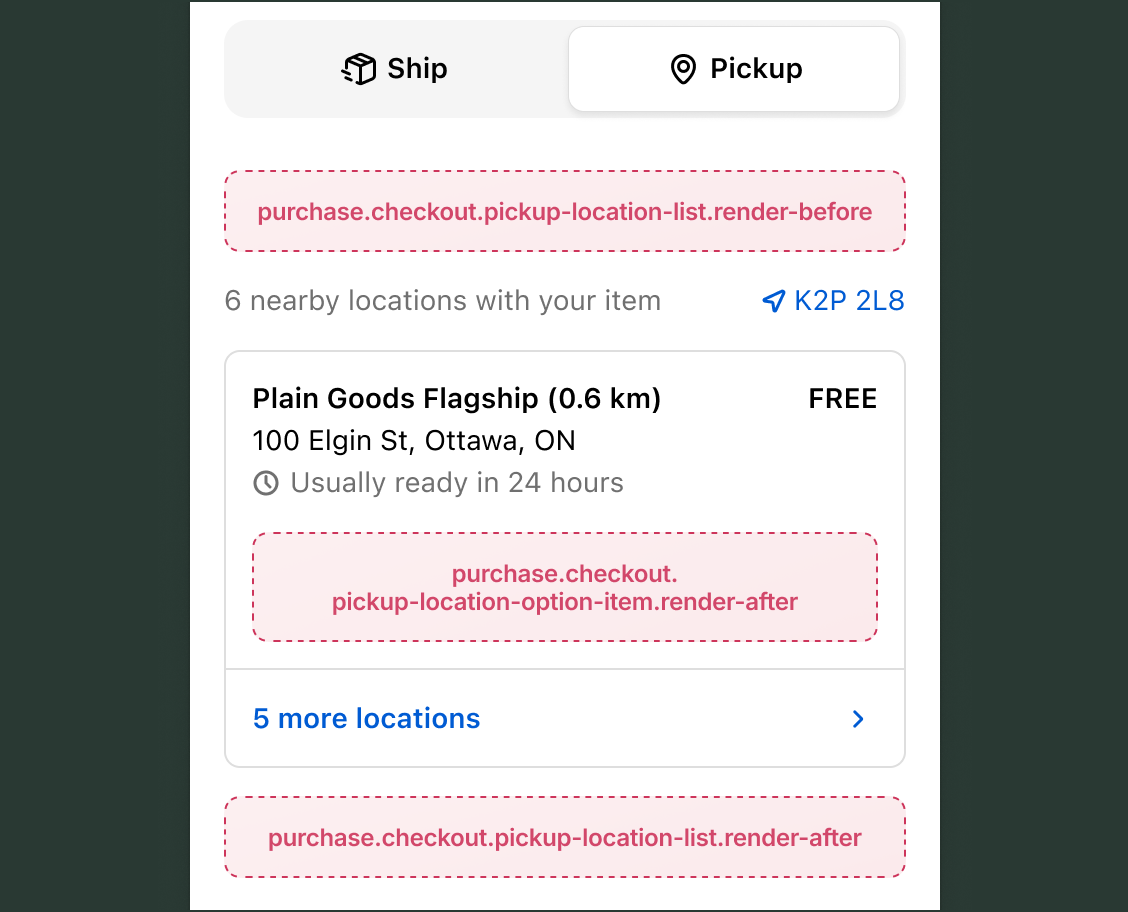
Anchor to Location list targetsLocation list targets
These static targets render before and after the pickup location list. They're tied to the list as a whole, not to individual locations. Both targets provide access to shopify.isLocationFormVisible, which indicates whether the buyer is viewing the location search form or the results list. Read access to cart contents, buyer identity, and delivery details is available through API properties.
Anchor to Render before pickup locations ,[object Object]Render before pickup locations target
purchase.checkout.pickup-location-list.render-before
Renders before the list of pickup location options. Use this target to display introductory messaging or general pickup instructions before the buyer interacts with the location list.
Use shopify.isLocationFormVisible to determine whether the buyer is entering their location or viewing the results list and show appropriate content.
Supported components
- Abbreviation
- Badge
- Banner
- Box
- Button
- Chat
- Checkbox
- Chip
- Choice list
- Clickable
- Clickable chip
- Clipboard item
- Consent checkbox
- Consent phone field
- Date field
- Date picker
- Details
- Divider
- Drop zone
- Email field
- Form
- Grid
- Heading
- Icon
- Image
- Link
- Map
- Modal
- Money field
- Number field
- Ordered list
- Paragraph
- Password field
- Payment icon
- Phone field
- Popover
- Press button
- Product thumbnail
- Progress
- Qr code
- Query container
- Scroll box
- Section
- Select
- Sheet
- Skeleton paragraph
- Spinner
- Stack
- Switch
- Text
- Text area
- Text field
- Time
- Tooltip
- Unordered list
- Url field
Available APIs
- Addresses API
- Analytics API
- Attributes API
- Buyer Identity API
- Buyer Journey API
- Cart Instructions API
- Cart Lines API
- Checkout Token API
- Cost API
- Customer Privacy API
- Delivery API
- Discounts API
- Extension API
- Gift Cards API
- Localization API
- Localized Fields API
- Metafields API
- Note API
- Payments API
- Session Token API
- Settings API
- Shop API
- Storage API
- Storefront API
Supported components
- Abbreviation
- Badge
- Banner
- Box
- Button
- Chat
- Checkbox
- Chip
- Choice list
- Clickable
- Clickable chip
- Clipboard item
- Consent checkbox
- Consent phone field
- Date field
- Date picker
- Details
- Divider
- Drop zone
- Email field
- Form
- Grid
- Heading
- Icon
- Image
- Link
- Map
- Modal
- Money field
- Number field
- Ordered list
- Paragraph
- Password field
- Payment icon
- Phone field
- Popover
- Press button
- Product thumbnail
- Progress
- Qr code
- Query container
- Scroll box
- Section
- Select
- Sheet
- Skeleton paragraph
- Spinner
- Stack
- Switch
- Text
- Text area
- Text field
- Time
- Tooltip
- Unordered list
- Url field
Available APIs
- Addresses API
- Analytics API
- Attributes API
- Buyer Identity API
- Buyer Journey API
- Cart Instructions API
- Cart Lines API
- Checkout Token API
- Cost API
- Customer Privacy API
- Delivery API
- Discounts API
- Extension API
- Gift Cards API
- Localization API
- Localized Fields API
- Metafields API
- Note API
- Payments API
- Session Token API
- Settings API
- Shop API
- Storage API
- Storefront API
Preact
Examples
Show pickup guidance before the location list
Description
Display different content depending on whether the buyer is searching for a location or viewing the available pickup locations. This example checks isLocationFormVisible to adapt the message.
Preact
import '@shopify/ui-extensions/preact';
import {render} from 'preact';

export default function extension() {
  render(<Extension />, document.body);
}

function Extension() {
  if (shopify.isLocationFormVisible.value) {
    return (
      <s-banner>
        Enter your address to find pickup locations near you.
      </s-banner>
    );
  }

  return (
    <s-banner>
      Select a store to see estimated pickup times.
    </s-banner>
  );
}
Promote a local pickup discount
Description
Surface a location-specific promotion before buyers browse pickup locations. This example renders an `s-banner` advertising an in-store discount to encourage local pickup selection.
Preact
import '@shopify/ui-extensions/preact';
import {render} from 'preact';

export default function extension() {
  render(<Extension />, document.body);
}

function Extension() {
  if (shopify.isLocationFormVisible.value) return null;

  return (
    <s-banner tone="info">
      Save 10% on orders picked up in store. Use code PICKUP10 at checkout.
    </s-banner>
  );
}
Anchor to Render after pickup locations ,[object Object]Render after pickup locations target
purchase.checkout.pickup-location-list.render-after
Renders after the list of pickup location options. Use this target to display general pickup policies or post-selection guidance below the location list.
Use shopify.isLocationFormVisible to determine whether the buyer is entering their location or viewing the results list.
Supported components
- Abbreviation
- Badge
- Banner
- Box
- Button
- Chat
- Checkbox
- Chip
- Choice list
- Clickable
- Clickable chip
- Clipboard item
- Consent checkbox
- Consent phone field
- Date field
- Date picker
- Details
- Divider
- Drop zone
- Email field
- Form
- Grid
- Heading
- Icon
- Image
- Link
- Map
- Modal
- Money field
- Number field
- Ordered list
- Paragraph
- Password field
- Payment icon
- Phone field
- Popover
- Press button
- Product thumbnail
- Progress
- Qr code
- Query container
- Scroll box
- Section
- Select
- Sheet
- Skeleton paragraph
- Spinner
- Stack
- Switch
- Text
- Text area
- Text field
- Time
- Tooltip
- Unordered list
- Url field
Available APIs
- Addresses API
- Analytics API
- Attributes API
- Buyer Identity API
- Buyer Journey API
- Cart Instructions API
- Cart Lines API
- Checkout Token API
- Cost API
- Customer Privacy API
- Delivery API
- Discounts API
- Extension API
- Gift Cards API
- Localization API
- Localized Fields API
- Metafields API
- Note API
- Payments API
- Session Token API
- Settings API
- Shop API
- Storage API
- Storefront API
Supported components
- Abbreviation
- Badge
- Banner
- Box
- Button
- Chat
- Checkbox
- Chip
- Choice list
- Clickable
- Clickable chip
- Clipboard item
- Consent checkbox
- Consent phone field
- Date field
- Date picker
- Details
- Divider
- Drop zone
- Email field
- Form
- Grid
- Heading
- Icon
- Image
- Link
- Map
- Modal
- Money field
- Number field
- Ordered list
- Paragraph
- Password field
- Payment icon
- Phone field
- Popover
- Press button
- Product thumbnail
- Progress
- Qr code
- Query container
- Scroll box
- Section
- Select
- Sheet
- Skeleton paragraph
- Spinner
- Stack
- Switch
- Text
- Text area
- Text field
- Time
- Tooltip
- Unordered list
- Url field
Available APIs
- Addresses API
- Analytics API
- Attributes API
- Buyer Identity API
- Buyer Journey API
- Cart Instructions API
- Cart Lines API
- Checkout Token API
- Cost API
- Customer Privacy API
- Delivery API
- Discounts API
- Extension API
- Gift Cards API
- Localization API
- Localized Fields API
- Metafields API
- Note API
- Payments API
- Session Token API
- Settings API
- Shop API
- Storage API
- Storefront API
Preact
Examples
Display pickup policy after the location list
Description
Show general pickup information below the location list once results are visible. This example renders a notice about order hold times and identification requirements.
Preact
import '@shopify/ui-extensions/preact';
import {render} from 'preact';

export default function extension() {
  render(<Extension />, document.body);
}

function Extension() {
  if (shopify.isLocationFormVisible.value) return null;

  return (
    <s-text>
      Orders are held for 7 days. Bring a valid photo ID when collecting your order.
    </s-text>
  );
}
Show a pickup policy for perishable items
Description
Display a cart-specific policy below the location list when perishable items are in the cart. This example reads `shopify.lines` to check product type and renders a caution banner only when it applies.
Preact
import '@shopify/ui-extensions/preact';
import {render} from 'preact';

export default function extension() {
  render(<Extension />, document.body);
}

function Extension() {
  if (shopify.isLocationFormVisible.value) return null;

  const hasPerishables = shopify.lines.value.some(
    (line) => line.merchandise.product.productType === 'Food',
  );

  if (!hasPerishables) return null;

  return (
    <s-banner tone="warning">
      Perishable items must be picked up within 24 hours of order readiness.
    </s-banner>
  );
}
Anchor to Location option item targetLocation option item target
This static target renders after the details of each individual pickup location in the list. Unlike the list targets above, it provides access to location-specific data through shopify.target and whether the buyer has selected that location through shopify.isTargetSelected. Read access to cart contents, buyer identity, and delivery details is also available through API properties.
Anchor to Render after pickup location option ,[object Object]Render after pickup location option target
purchase.checkout.pickup-location-option-item.render-after
Use this target to display location-specific information such as store hours, pickup instructions, or readiness estimates for each option. The location object includes the store name, address, and any associated metafields.
Supported components
- Abbreviation
- Badge
- Banner
- Box
- Button
- Chat
- Checkbox
- Chip
- Choice list
- Clickable
- Clickable chip
- Clipboard item
- Consent checkbox
- Consent phone field
- Date field
- Date picker
- Details
- Divider
- Drop zone
- Email field
- Form
- Grid
- Heading
- Icon
- Image
- Link
- Map
- Modal
- Money field
- Number field
- Ordered list
- Paragraph
- Password field
- Payment icon
- Phone field
- Popover
- Press button
- Product thumbnail
- Progress
- Qr code
- Query container
- Scroll box
- Section
- Select
- Sheet
- Skeleton paragraph
- Spinner
- Stack
- Switch
- Text
- Text area
- Text field
- Time
- Tooltip
- Unordered list
- Url field
Available APIs
- Addresses API
- Analytics API
- Attributes API
- Buyer Identity API
- Buyer Journey API
- Cart Instructions API
- Cart Lines API
- Checkout Token API
- Cost API
- Customer Privacy API
- Delivery API
- Discounts API
- Extension API
- Gift Cards API
- Localization API
- Localized Fields API
- Metafields API
- Note API
- Payments API
- Session Token API
- Settings API
- Shop API
- Storage API
- Storefront API
Supported components
- Abbreviation
- Badge
- Banner
- Box
- Button
- Chat
- Checkbox
- Chip
- Choice list
- Clickable
- Clickable chip
- Clipboard item
- Consent checkbox
- Consent phone field
- Date field
- Date picker
- Details
- Divider
- Drop zone
- Email field
- Form
- Grid
- Heading
- Icon
- Image
- Link
- Map
- Modal
- Money field
- Number field
- Ordered list
- Paragraph
- Password field
- Payment icon
- Phone field
- Popover
- Press button
- Product thumbnail
- Progress
- Qr code
- Query container
- Scroll box
- Section
- Select
- Sheet
- Skeleton paragraph
- Spinner
- Stack
- Switch
- Text
- Text area
- Text field
- Time
- Tooltip
- Unordered list
- Url field
Available APIs
- Addresses API
- Analytics API
- Attributes API
- Buyer Identity API
- Buyer Journey API
- Cart Instructions API
- Cart Lines API
- Checkout Token API
- Cost API
- Customer Privacy API
- Delivery API
- Discounts API
- Extension API
- Gift Cards API
- Localization API
- Localized Fields API
- Metafields API
- Note API
- Payments API
- Session Token API
- Settings API
- Shop API
- Storage API
- Storefront API
Preact
Examples
Show store hours for the selected pickup location
Description
Display location-specific store hours when a buyer selects a pickup location. This example reads a `store-hours` metafield from the pickup location option and renders it only for the currently selected store.
Preact
import '@shopify/ui-extensions/preact';
import {render} from 'preact';

export default function extension() {
  render(<Extension />, document.body);
}

function Extension() {
  const isSelected = shopify.isTargetSelected.value;
  const option = shopify.target.value;

  if (!isSelected) return null;

  const hours = option.metafields.find(
    (m) => m.namespace === 'custom' && m.key === 'store_hours',
  )?.value;

  return (
    <s-text>
      {option.location.name ?? 'This location'}: {hours ?? 'Hours not available'}
    </s-text>
  );
}
Display a pickup readiness estimate
Description
Show an estimated preparation time for each pickup location using a `pickup_ready_in` metafield. This example renders the estimate for every location so buyers can compare options at a glance.
Preact
import '@shopify/ui-extensions/preact';
import {render} from 'preact';

export default function extension() {
  render(<Extension />, document.body);
}

function Extension() {
  const option = shopify.target.value;

  const readyIn = option.metafields.find(
    (m) => m.namespace === 'custom' && m.key === 'pickup_ready_in',
  )?.value;

  if (!readyIn) return null;

  return <s-text color="subdued">Ready in {readyIn}</s-text>;
}
Anchor to Best practicesBest practices
- Adapt content based on the location form visibility: Buyers see two distinct views when selecting a local pickup location: the location search form and the results list. Use
shopify.isLocationFormVisibleto show content relevant to each view rather than displaying the same message in both. - Keep location-specific content concise: The
option-itemtarget renders for every location in the list. Lengthy content for each option increases visual clutter and makes it harder for buyers to compare locations. - Use
isTargetSelectedto reduce noise: In theoption-itemtarget, consider rendering detailed information only for the selected location to keep the list scannable.